Top Features of Browser-Based Calling
Top Features of Browser-Based Calling
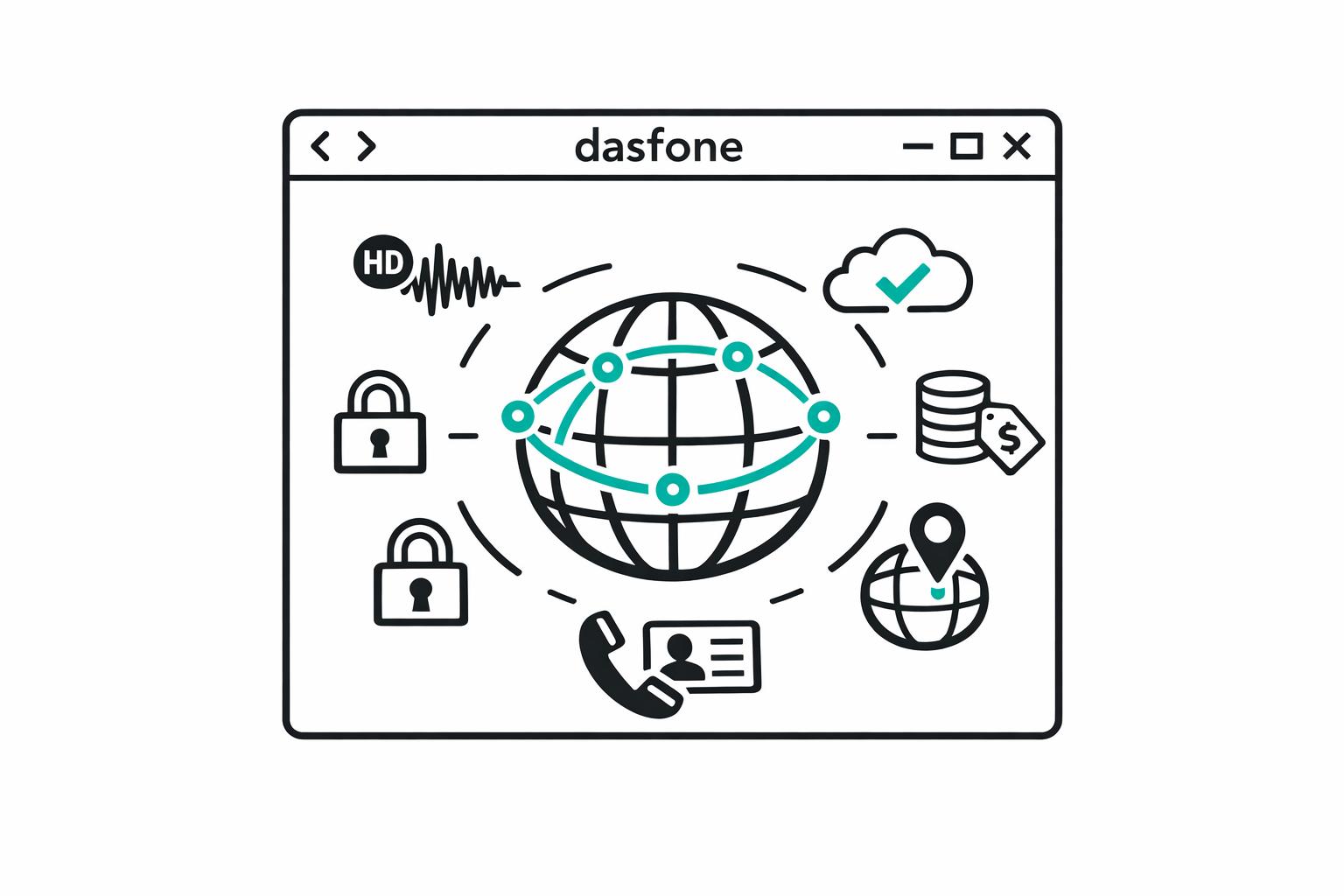
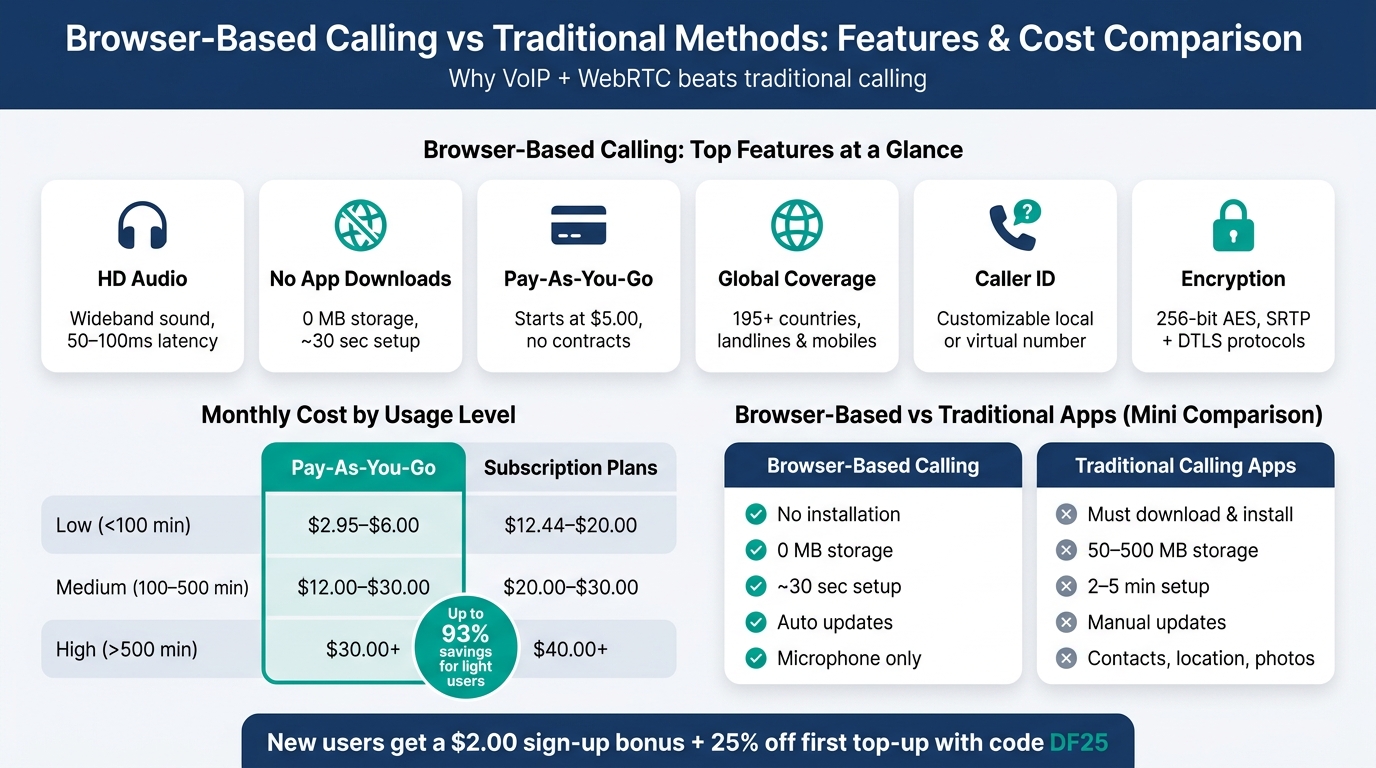
Browser-based calling lets you make phone calls directly from a web browser without apps, SIM cards, or special devices. This technology uses VoIP and WebRTC to deliver clear, secure, and cost-effective communication. Here are the top features to look for:
- HD Audio: Provides clear, natural-sounding calls using wideband technology and the Opus codec.
- No App Downloads: Works instantly in your browser with no installations or updates required.
- Pay-As-You-Go Pricing: Only pay for the minutes you use, avoiding contracts or hidden fees.
- Global Coverage with Caller ID: Call any number worldwide and display a local or custom ID for better response rates.
- Strong Security: Encryption protocols like SRTP and DTLS ensure your calls are private and secure.
Quick Comparison
| Feature | Benefit | Example: Dasfone |
|---|---|---|
| HD Audio | Clear, high-quality sound | Uses premium carriers and Opus codec |
| No App Downloads | Instant setup, no storage needed | Fully browser-based with WebRTC |
| Pay-As-You-Go Pricing | Transparent, flexible costs | Starts at $5.00, $2.00 sign-up bonus |
| Global Coverage | Call any phone worldwide | Covers 195+ countries |
| Caller ID | Better response rates | Customizable, local options |
| Encryption | Secure communication | 256-bit AES encryption |
Browser-based calling is ideal for expats, digital nomads, businesses, and travelers needing reliable, low-cost international communication. Platforms like Dasfone simplify the process with easy setup, affordable rates, and excellent call quality.
What is a Web Phone? (How to Use, Features, Benefits)
Feature 1: HD Audio for Clear Calls
When you're speaking with a bank overseas or finalizing a deal with an international client, clear audio can make or break the conversation. That’s where HD audio steps in - it’s a key feature to prioritize when choosing a browser-based calling platform.
What HD Audio Means in VoIP
Regular phone calls capture a limited range of sound frequencies, around 300–3,400 Hz. HD audio, on the other hand, uses wideband technology to cover a much broader spectrum, making voices sound richer and more natural. This expanded range improves how well you can understand the person on the other end. In browser-based calling, the Opus codec powers this experience. It’s a flexible audio format that adjusts its bitrate dynamically, ranging from 6 kbps to 510 kbps, based on your internet speed. This adaptability ensures consistent call quality, even if your connection fluctuates. These technical upgrades translate directly into noticeably better audio during every call.
How HD Audio Improves Call Quality
In practical terms, HD audio makes conversations smoother and more efficient. Words that sound similar become easier to distinguish, reducing the need to ask for clarification. Browser-based calls also benefit from reduced latency - typically between 50–100ms, compared to the 150–300ms delays common in standard calls. This lower latency eliminates the frustrating pauses and interruptions that often plague long-distance conversations.
Additional features like built-in noise cancellation, echo suppression, and automatic gain control ensure clear audio, even in noisy environments. Plus, browser-based calls rely on UDP (User Datagram Protocol), which prioritizes continuous audio flow. Even if small chunks of data are lost during transmission, the system compensates seamlessly, so you won’t notice any disruptions.
For the best experience, pair your setup with a wired or noise-canceling headset and a stable connection - like Ethernet or 5 GHz Wi-Fi - with speeds of at least 1 Mbps.
Dasfone's Approach to HD Audio
Dasfone takes HD audio to the next level by routing calls through premium carriers and geographically distributed servers. This setup minimizes the physical distance your audio data needs to travel, keeping latency low - an essential factor for crystal-clear international calls.
Feature 2: Calling Without Apps or Downloads
Making international calls often feels like a hassle - installing apps, plugins, or special software. But browser-based calling changes the game. All you need is a browser tab, and you're ready to connect. This simplicity pairs perfectly with the crisp sound quality of HD audio.
How App-Free Calling Works
Just like HD audio enhances clarity, skipping app downloads makes global calling even easier. The magic behind this is WebRTC (Web Real-Time Communication), a built-in protocol in modern browsers. Since WebRTC is already integrated, there's no need for installations. The browser takes care of everything - audio capture, encryption, and transmission - right out of the box.
When prompted, simply click "Allow" for microphone access. Behind the scenes, STUN/TURN servers handle bypassing firewalls and establishing fast, secure connections - all without requiring any extra effort from you. This technology is well-established and widely trusted.
Why App-Free Calling Is Useful
Unlike traditional apps that can take up 50–500 MB of storage and require manual updates, browser-based calling uses 0 MB of your local storage and updates automatically on the provider's end. It’s also less invasive. While many apps demand access to contacts, photos, and even your location, browser-based calling only needs microphone access. This makes it perfect for work laptops, shared devices, or systems with limited storage. Plus, the setup is quick and hassle-free, especially with Dasfone.
| Feature | Browser-Based Calling | Traditional Calling Apps |
|---|---|---|
| Installation | None required | Must download and install |
| Setup Time | ~30 seconds | 2–5 minutes |
| Storage Needed | 0 MB | 50–500 MB |
| Updates | Automatic | Manual via App Store |
| Permissions | Microphone only | Contacts, location, photos, etc. |
Dasfone's App-Free Setup
Dasfone fully embraces this app-free approach. There’s no need for downloads or subscriptions - just open the site in your browser, add credit (starting at $5.00), and start calling. The whole process takes about 30 seconds, from opening the website to making your first call.
Here’s a handy tip: right-click the Dasfone tab and select "Pin" to keep it fixed in your browser. This way, you won’t accidentally close it mid-call, and you’ll stay ready for any incoming notifications.
Feature 3: Pay-As-You-Go Pricing
When it comes to browser-based calling, the pricing model is just as crucial as the technology. Nobody wants to pay for minutes they’ll never use, which is why pay-as-you-go pricing is such a game-changer.
How Pay-As-You-Go Pricing Works
The idea is straightforward: you only pay for what you actually use. Forget about monthly fees, lengthy contracts, or surprise charges. All you need to do is add credit to your account, and as you make calls, your balance decreases. When it runs low, you simply top it up. This approach eliminates the stress of being locked into services you might not need while keeping billing simple and transparent.
Benefits of Clear Pricing
The financial benefits of this model are immediate. With call costs clearly defined upfront, you don’t have to worry about unexpected charges. This is especially helpful for occasional international callers, like expats staying in touch with family or small businesses handling overseas suppliers.
The savings can be substantial. For example, switching from a traditional carrier to a browser-based VoIP solution can slash monthly communication costs from around $90 to just $6 - a whopping 93% savings [2]. Take a look at the breakdown below to see how costs compare:
| Usage Level | Pay-As-You-Go | Monthly Subscription Plans |
|---|---|---|
| Low (<100 min/month) | $2.95 – $6.00/month | $12.44 – $20.00/month |
| Medium (100–500 min/month) | $12.00 – $30.00/month | $20.00 – $30.00/month |
| High (>500 min/month) | $30.00+/month | $40.00+/month (Unlimited) |
For light users, pay-as-you-go can cost less than half of what subscription plans charge.
Dasfone's Pricing Model
Dasfone has taken this approach even further by making it incredibly accessible. With a minimum top-up of just $5.00, there’s no need to commit a large amount of money upfront. New users also receive a $2.00 sign-up bonus, which can translate to around 100 free calling minutes depending on the destination. Plus, first-time users who apply the code DF25 get 25% off their initial top-up, allowing their credit to go even further.
There are no hidden fees, no charges for idle accounts, and no pressure to upgrade to a plan you don’t need. Your balance stays intact until you decide to use it, giving you complete control over your spending.
Feature 4: Global Coverage and Caller ID
Expanding on the foundation of excellent call quality and ease of use, global coverage and caller ID take browser-based calling to the next level.
What Global Coverage Means
Global coverage allows you to call any landline or mobile number anywhere in the world, without needing SIM cards or local phone plans. This feature is more critical than it might seem. Many essential contacts - such as government agencies, banks, suppliers, or even elderly family members - don’t rely on messaging apps. They simply have a phone number. With true global coverage, you can reach them no matter what device they’re using or whether they’re online.
Why Caller ID Matters
Caller ID plays a key role in whether your call gets answered. When people see an unfamiliar or "Unknown" number, they’re far less likely to pick up - especially for international calls. This is particularly true for businesses or financial institutions, where trust is crucial.
Displaying a recognizable caller ID, ideally with a local area code, can make all the difference. It reassures the recipient that the call is legitimate, not spam. For professionals making cold calls or expats managing accounts with overseas banks, this feature can determine whether the call connects or gets ignored. The table below highlights how caller ID flexibility compares across different calling methods:
| Feature | Browser-Based Calling | Traditional Mobile Carriers | Messaging Apps |
|---|---|---|---|
| Recipient Requirement | Any phone (landline or mobile) | Any phone | Must have the same app |
| Caller ID | Customizable / Virtual | Fixed to SIM | Fixed to account |
| Response Rates | High (local ID option) | Low (often "Unknown") | N/A (app-to-app only) |
| Cost | From $0.02/min | Up to $5.00/min | Free (app-to-app only) |
These advantages in global reach and customizable caller ID make browser-based calling a powerful option for both personal and professional use.
Dasfone's Coverage and Caller ID Options
Delivering on the promise of global connectivity, Dasfone enables calls to over 195 countries, covering both landlines and mobile numbers. Whether you’re a business owner contacting a supplier in Southeast Asia or a student calling a university in Europe, Dasfone ensures you can reach your destination.
What makes Dasfone stand out is its caller ID flexibility. You can display your existing phone number as your outgoing ID or purchase a virtual number tied to a specific country or region. This allows you to present a local number to your recipient, building instant trust - all without needing a physical SIM card or a local carrier contract.
Feature 5: Encryption and Call Security
Encryption plays a crucial role in keeping your international calls private, ensuring that your voice data remains protected as it travels over the Internet.
How Call Encryption Works
WebRTC employs two key protocols to secure calls: SRTP for encrypting voice data and DTLS for key exchange. Additionally, HTTPS secures the connection between your browser and the server, while the sandbox feature isolates browser processes to safeguard your system. However, it’s worth noting that once a call is connected to the Public Switched Telephone Network (PSTN) - the traditional infrastructure used by landlines and many mobile carriers - it loses the same level of encryption provided during the browser-to-server phase [3]. This layered encryption ensures a secure environment for international communications.
Why Security Matters for International Calls
When making international calls, security isn't just a bonus - it’s essential. These calls often involve sensitive topics like financial discussions, negotiations, or personal conversations. Encryption ensures these details stay private, even when using public Wi-Fi. On top of that, the only permission typically required is microphone access, adding another layer of privacy protection [1].
Dasfone's Security Standards
Dasfone takes security seriously by implementing 256-bit AES encryption for every call. Before connecting, an ICE handshake verifies both endpoints, while STUN and TURN servers help navigate firewalls, ensuring secure communication without requiring local software. Account access is further protected with six-digit verification codes sent via text or voice - these codes are your first line of defense, so never share them.
For the best security, always use the latest version of your browser (Chrome, Edge, Safari, or Firefox) and check for the padlock icon in the address bar before making a call. These measures collectively make browser-based international calling a secure and reliable option.
| Security Component | Function | Protection Provided |
|---|---|---|
| SRTP | Encrypts voice/media packets | Ensures confidentiality and blocks replay attacks |
| DTLS | Manages key negotiation/handshake | Secures the exchange of encryption keys |
| HTTPS | Protects browser-to-server communication | Safeguards account credentials and metadata |
| Sandbox | Isolates browser processes | Blocks access to OS core files and local data |
Conclusion: Choosing the Right Browser-Based Calling Platform
Key Features to Look For
When evaluating browser-based calling platforms, prioritize six essential features: HD audio, app-free setup, pay-as-you-go pricing, global coverage, dedicated caller ID, and strong encryption. These features ensure a platform can cater to a wide range of user requirements, from personal to professional.
Why Dasfone Is Worth Considering
Taking these features into account, Dasfone stands out as a reliable option. Designed for expats, digital nomads, students, and businesses, it simplifies international communication with its no-fuss, app-free design. There’s no need for downloads, subscriptions, or complicated setups.
Dasfone operates on a pay-as-you-go model, starting with a $5.00 minimum top-up, and new users enjoy a $2.00 sign-up bonus. Plus, you can save with a 25% discount on your first top-up using the code DF25.
With transparent pricing, easy accessibility, and consistent call quality, Dasfone offers a seamless solution for staying connected globally.
FAQs
What internet speed do I need for reliable browser calls?
For high-quality international calls through a browser, you'll need a stable internet connection. Ideally, aim for at least 1 Mbps upload and download speeds to enjoy HD-quality audio. While Dasfone can operate with as little as 64–100 kbps, having faster speeds significantly improves sound clarity and reduces the chances of lag or dropped calls.
Will my caller ID show as a local number?
Yes, with Dasfone, you have the option to display your verified phone number as your caller ID or purchase a dedicated local number in more than 40 countries. Showing a local caller ID makes your call appear domestic, which can improve answer rates and help establish trust. You can verify your existing number at no cost or choose a dedicated number to maintain a consistent local presence.
Are browser-based calls encrypted end-to-end?
Yes, browser-based calls rely on the WebRTC protocol, which provides encryption via DTLS-SRTP. This setup uses DTLS for secure key exchange and SRTP to encrypt audio, ensuring your call is well-protected while it travels over the internet. However, when the call transitions to the Public Switched Telephone Network (PSTN) to connect with standard phones, it adheres to the security measures of that network.
Related Articles
Ready to Make International Calls?
Try dasfone today and make your first international call in seconds. No app download, no subscription—just instant, affordable calling from your browser.
Start Calling Now