For most of the internet's history, real-time audio and video communication was a headache. It required external plugins (remember Flash?), bulky desktop applications, or proprietary protocols that didn't play nice with each other.
Enter WebRTC (Web Real-Time Communication). Open-sourced by Google in 2011 and now a standard supported by every major browser, it fundamentally changed how we connect. It turned the web browser from a simple document viewer into a powerful communication terminal.
But how does it actually work? And why is it secure enough for everything from healthcare consultations to international banking calls? Let's pop the hood.
The Three Pillars of WebRTC
At its core, WebRTC is built on three main JavaScript APIs that work in concert:
MediaStream
Accessing the hardware. This API asks the user for permission to use the microphone and camera.
RTCPeerConnection
The heavy lifter. Handles the audio/video processing, codec encoding, and P2P connection.
RTCDataChannel
Enables bidirectional transfer of arbitrary data (like text chat or files) with low latency.
The Connection Dance: Signaling
Here's the tricky part: WebRTC allows browsers to connect directly to each other (Peer-to-Peer). But how does Browser A find Browser B on the vast internet, especially when both are likely hidden behind firewalls and NATs (Network Address Translators)?
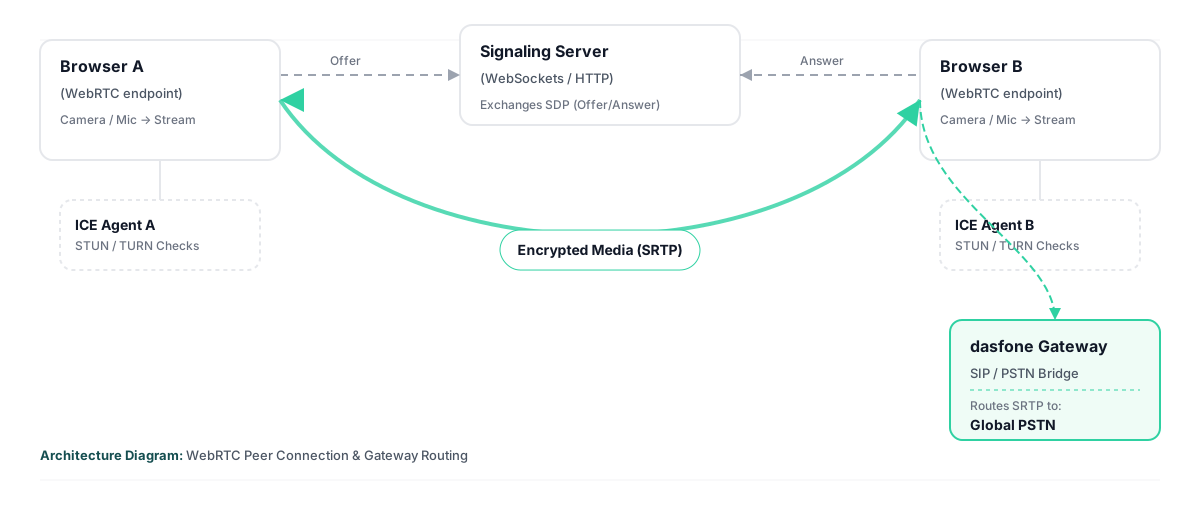
They need a mutual introduction. This process is called Signaling, and interestingly, WebRTC doesn't define how this happens. It's up to the developer (that's us at dasfone) to build a signaling server using WebSockets or HTTP.
// Simplified Signaling Flow
Alice -> Offer (SDP) -> Server
Server -> Offer (SDP) -> Bob
Bob -> Answer (SDP) -> Server
Server -> Answer (SDP) -> Alice
// Connection Established! Direct P2P Audio flows.
The "Offer" and "Answer" contain SDP (Session Description Protocol) data—basically a resume that says "I support these audio codecs, I have this much bandwidth, and here is my encryption key."
Breaking Through Firewalls: STUN and TURN
Most of us use routers at home, which means our devices don't have public IP addresses. To connect, WebRTC uses ICE (Interactive Connectivity Establishment).
- STUN (Session Traversal Utilities for NAT)A lightweight server that answers the question: "What is my public IP address?" It helps the browser discover how the outside world sees it.
- TURN (Traversal Using Relays around NAT)The backup plan. If a strict corporate firewall blocks direct P2P connections, the TURN server acts as a middleman, relaying the encrypted data packets between peers. This ensures 100% connectivity rates but costs money to operate.
Security by Design
One of the biggest misconceptions about browser calling is that it's less secure than a traditional phone line. In reality, it's often more secure.
Mandatory Encryption
WebRTC requires encryption. You literally cannot send unencrypted data. It uses DTLS (Datagram Transport Layer Security) for key exchange and SRTP (Secure Real-time Transport Protocol) for the audio/video stream. This means not even the signaling server (us) can eavesdrop on the content of the call if it's P2P.
Why Latency Matters
In a conversation, delay (latency) is the enemy. Anything above 150ms starts to feel like you're talking over a satellite link from the 90s.
WebRTC uses UDP (User Datagram Protocol) instead of TCP. TCP is reliable—if a packet is lost, it stops and asks for it again. Great for downloading files, terrible for voice. If you lose a millisecond of audio, you don't want the call to pause; you just want to move on. UDP fires packets and forgets them, prioritizing speed over perfection.
The dasfone Implementation
At dasfone, we utilize this technology to bridge the gap between the internet and the Public Switched Telephone Network (PSTN).
Your browser acts as the WebRTC endpoint. It connects securely to our media gateways. These gateways then convert the digital SRTP stream into standard SIP/PSTN signals to ring a physical phone in Berlin, a mobile in Bangkok, or a landline in New York.
Why This Stack Wins
- Zero FootprintNo installation means no vulnerabilities from outdated desktop software.
- Codec AgilityWebRTC supports OPUS, a highly versatile audio codec that adapts bitrate in real-time to match your network conditions.
- Sandbox SecurityThe code runs inside the browser's sandbox, isolating it from your operating system's core files.
Conclusion
WebRTC is more than just a convenient way to make calls; it's a sophisticated stack of protocols that solves the hardest problems in networking: NAT traversal, packet loss concealment, and encryption.
By leveraging this standard, we can offer international calling that rivals traditional carriers in quality while offering the flexibility of the web. Learn why browser-based calling matters for travelers in 2026.
Experience WebRTC Calling Firsthand
Try dasfone now and make crystal-clear international calls directly from your browser. No downloads, no plugins—just instant, secure communication.
Start Calling NowRelated Articles
Why It Still Makes Sense to Use International Calling Apps in 2026
Discover why browser-based calling apps remain essential for travelers, expats, and businesses.
dasfone vs ZenCall: Which Browser-Based Calling App Is Right for You?
Compare two leading browser-based calling platforms to find the best fit for your needs.
dasfone vs Yadaphone: Which Browser-Based Calling App Is Right for You?
Compare dasfone and Yadaphone's features, pricing, and team management capabilities.
About the Author
Julian Vane is a technology writer passionate about the future of digital communication. He explores how modern tools and web standards are changing the way we connect across borders.
More Articles