10 Questions About Browser-Based Phone Calls
10 Questions About Browser-Based Phone Calls
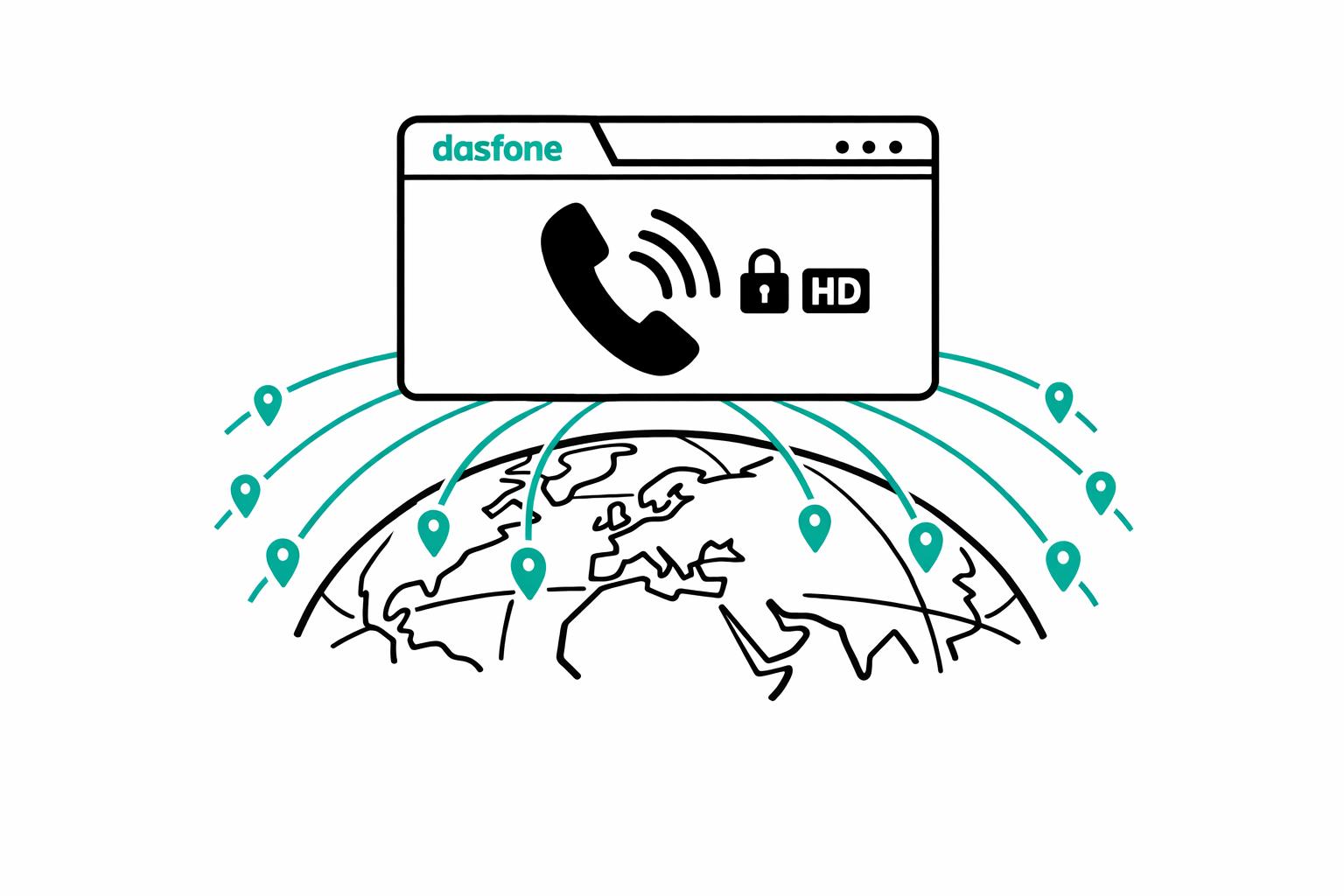
Browser-based phone calls let you make calls directly from your browser to any regular phone number - no apps, SIM cards, or downloads required. Powered by WebRTC technology, these calls offer clear audio, strong security, and global reach. Here's a quick summary of what you need to know:
- How it works: Your voice is converted into digital packets, encrypted, and sent over the internet to connect with landlines or mobile phones worldwide.
- Setup: All you need is a modern browser, internet access, and a microphone. Calls can be initiated in seconds.
- Cost: Pay-as-you-go pricing starts at $0.02 per minute, with no subscriptions or hidden fees. Credits never expire.
- Compatibility: Works on both desktop and mobile browsers, including Chrome, Safari, Firefox, and Edge.
- Audio quality: High-definition sound with low latency, even on slower networks.
- Security: Calls are encrypted with SRTP and handled in a secure browser environment.
- Limitations: Not for emergency calls, and recipients cannot call you back via the browser.
Browser-based calling is a simple and cost-effective way to stay connected globally, offering flexibility and ease of use for international communication.
WebRTC Calls Made Super Simple!
What Are Browser-Based Phone Calls?
Browser-based phone calls let you dial any regular phone number straight from your browser - no downloads, SIM cards, or special hardware needed. All it takes is opening a website, typing in the number, and hitting "call." On the other end, the person you're contacting receives the call just like they would on their landline or mobile phone.
This technology is powered by WebRTC (Web Real-Time Communication), an open-source protocol built into modern browsers like Chrome, Safari, Firefox, and Edge. WebRTC handles the heavy lifting: it captures audio from your microphone, encrypts it for security, and sends it over the internet. From there, it connects with the Public Switched Telephone Network (PSTN), allowing your call to reach any phone, anywhere in the world. The process is designed to feel smooth and straightforward.
One of the standout features? It works with any phone. The person you're calling doesn’t need internet access, a smartphone, or any special setup - just a regular phone.
As Sagar Malam, a Unified Communications Expert at Tragofone, puts it:
"The browser is no longer just a window to the web, it's now a portal for conversation."
Using WebRTC, browser-based calling eliminates the hassle of software downloads or updates. It doesn’t take up storage space on your device, and you don’t even need to create an account for basic use. Since the technology is built directly into your browser, it’s always up-to-date. In fact, making your first call through browser-based calling apps can be up to 20x faster compared to traditional apps that require installation [3].
How Do Browser-Based Phone Calls Work?
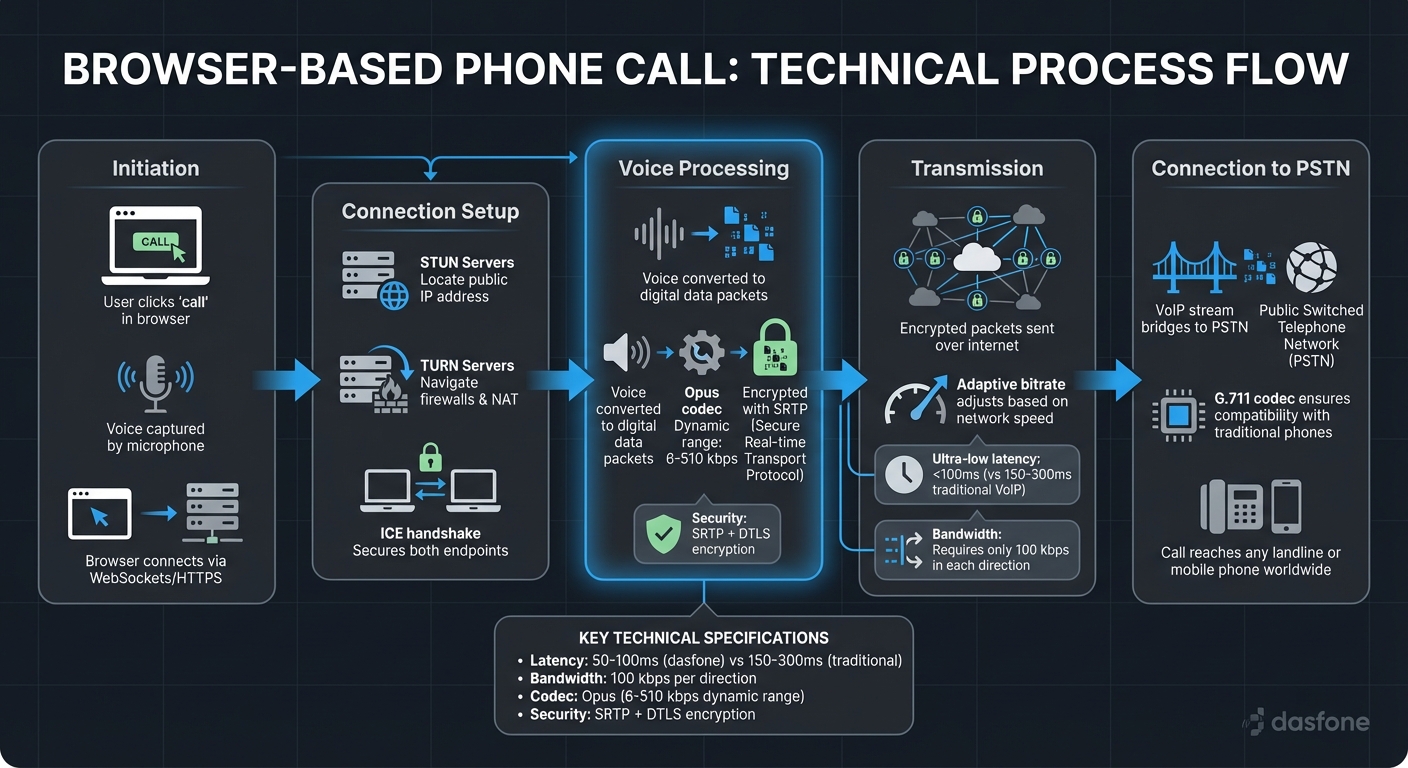
Browser-based phone calls might seem like magic, but there's a lot happening behind the scenes - at lightning speed. When you hit "call" in your browser, your voice is turned into digital data packets, encrypted for security, and sent over the internet to connect with any phone worldwide. This process hinges on three essential elements: internet connectivity, VoIP technology, and audio codecs.
Here’s how it all comes together: your browser first connects to a signaling server using WebSockets or HTTPS. This server handles the exchange of session details between you and the person you’re calling. Meanwhile, STUN (Session Traversal Utilities for NAT) and TURN (Traversal Using Relays around NAT) servers work in the background to locate your public IP address and navigate firewalls, ensuring the call connects even on private or complex networks [2][8].
Once the connection is live, your voice travels as encrypted audio packets using SRTP (Secure Real-time Transport Protocol). To keep the call smooth, the system uses adaptive bitrate technology, which adjusts audio quality based on your network speed. For example, if your connection slows, the system reduces the bitrate to prevent delays or dropped calls. Thanks to how WebRTC works, this process achieves ultra-low latency - less than 100ms - compared to the 150-300ms typical of traditional VoIP apps [3]. This quick response ensures a stable and clear call experience, even if network conditions fluctuate.
Another critical piece of the puzzle is audio codecs, which compress and decompress your voice. The go-to codec for browser-based calls is Opus, capable of dynamically adjusting between 6 kbps and 510 kbps depending on your internet speed [9][10]. For calls to regular phones, the system also supports G.711, an older codec that ensures compatibility with traditional landlines and mobile networks. When connecting to a standard phone number, the VoIP stream bridges to the PSTN (Public Switched Telephone Network), making it possible for your browser to call any phone, anywhere.
Interestingly, voice calls require only about 100 kbps in each direction [1], so you don’t need blazing-fast internet - just a stable connection. With the WebRTC market expected to grow from $7.03 billion in 2024 to $94.07 billion by 2032, it’s clear that this technology is both reliable and scalable [2].
What Do You Need to Get Started with dasfone?
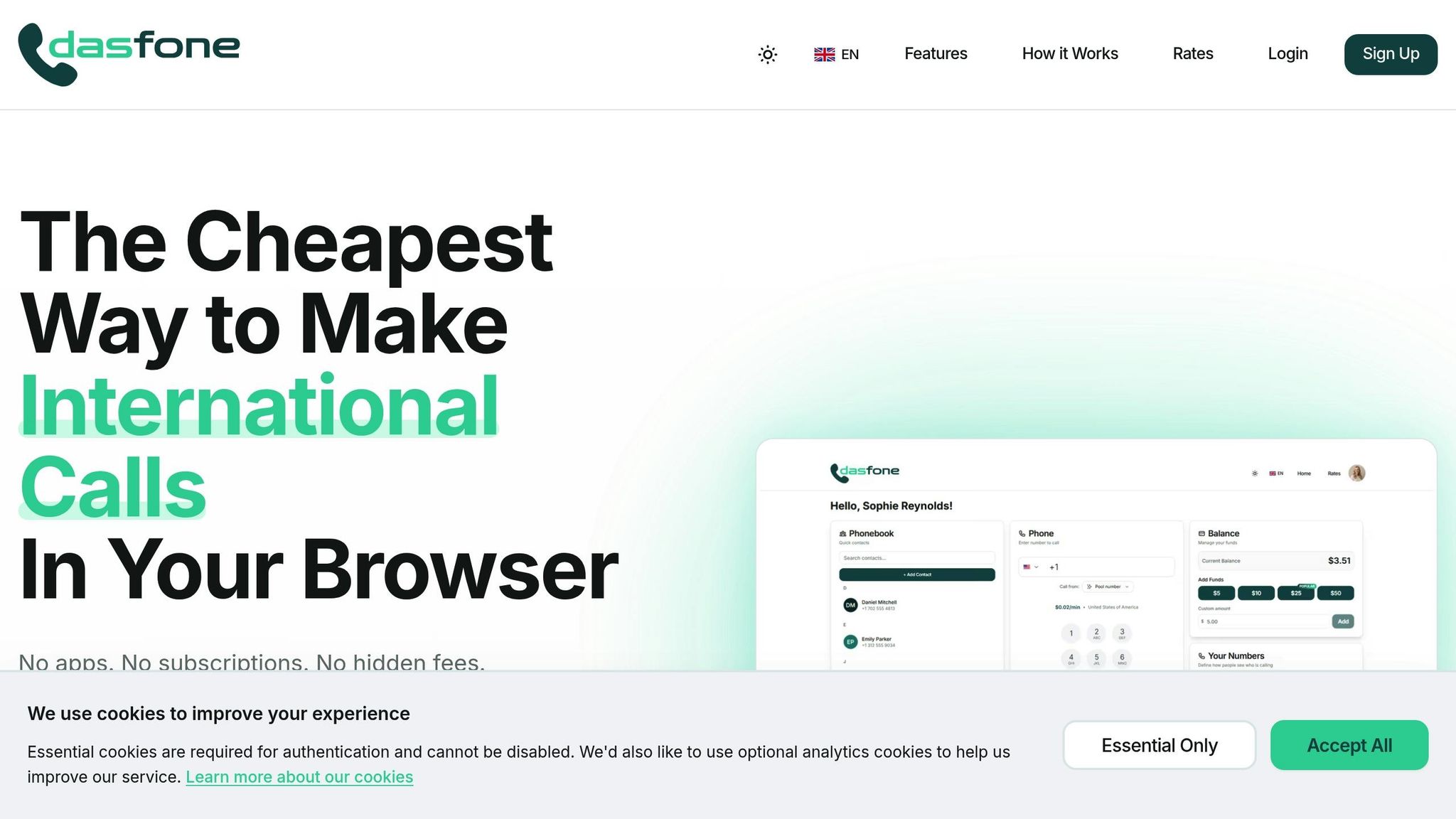
Getting started with dasfone is quick and hassle-free - no downloads or installations required. All you need is a modern web browser, a stable internet connection, and a working microphone. Here’s how to begin:
- Sign Up: Head to dasfone.com and register using your email or Google account. The process takes about 30 seconds.
- Add Credits: dasfone uses a pay-as-you-go model. Upon signing up, you’ll receive a $2 bonus, which covers up to 100 free calling minutes. Plus, use the code DF25 on your first top-up to get a 25% discount. The minimum top-up is $5, with no recurring fees or hidden charges.
Optimizing Your Setup
For the best experience, ensure your internet connection has at least 1 Mbps upload and download speeds. Although dasfone can operate on as little as 64–100 kbps, faster connections provide clearer, HD-quality audio. A wired Ethernet connection is ideal for business calls, but 4G or 5G networks also work well for mobile devices.
When dialing, enter the destination number in international format (e.g., +1 for U.S. numbers, followed by the area code and local number). Once you initiate a call, your browser will request microphone access - click "Allow" to enable two-way audio. For the clearest sound, use a USB headset with noise-canceling features and keep your browser updated to ensure optimal performance and security.
A Quick Note on Emergency Calls
It’s important to know that dasfone, like other browser-based services, does not support emergency calls (e.g., 911). Be sure to use a traditional phone service for emergency situations.
Does dasfone Work on Mobile and Desktop Browsers?
Dasfone is designed to provide a seamless calling experience across both mobile and desktop browsers, without the hassle of downloading additional apps.
The service relies on WebRTC (Web Real-Time Communication) technology, which is integrated into all modern browsers. This allows users to make calls directly from dasfone.com, as long as their device has a microphone and an internet connection.
On desktop platforms, dasfone supports Windows, macOS, Linux, and ChromeOS. It works with browsers such as Chrome, Firefox, Safari, Edge, Opera, and Brave, with Chrome and Edge being the recommended options. For mobile users, Android devices are compatible with Chrome or Firefox, while iOS users need Safari 14.3 or newer (since all iOS browsers use Safari's engine).
"WebRTC makes it possible for a calling app to work in any browser, between any browser. It doesn't matter if you have Firefox, Chrome, Safari or Edge." - Joe DeBari, Author, OnSIP [4]
The service's bandwidth needs are minimal. Voice calls require approximately 100 kbps in both directions, ensuring clear communication. To avoid delays, it's best to keep your connection's latency under 150 ms [1][12].
For optimal audio quality and to reduce issues like echo, it's recommended to use a dedicated headset instead of built-in speakers. Desktop users can further enhance their connection by using a 5GHz Wi-Fi network or a wired Ethernet connection to reduce jitter and packet loss [1].
Does dasfone Require App Downloads or Subscriptions?
Nope, dasfone keeps things simple - there’s no need to download apps, install software, or deal with any extra steps. Powered by WebRTC technology, dasfone works directly in modern browsers. All you have to do is head over to dasfone.com, log in, and you can start making international calls in just 30 to 60 seconds [5]. This browser-based setup means no storage worries, and you’ll always have the latest features and security updates automatically [5].
"A browser calling app eliminates these friction points entirely by letting you start web dialing instantly without any installation." - HelloAirDial [1]
When it comes to pricing, dasfone is refreshingly straightforward. There are no monthly subscriptions, contracts, or recurring fees. Instead, it operates on a pay-as-you-go system. You can add credit with a minimum top-up of $5 and only pay for the minutes you actually use. Rates for international calls start at just $0.02 per minute for many destinations, and the best part? Your credits never expire [5]. This setup keeps things flexible and budget-friendly.
With dasfone, you can make international calls from any device that has a browser and internet connection - whether it’s a Windows laptop, MacBook, Chromebook, Android phone, or iPhone. No installations, no commitments, just easy, hassle-free calling.
Up next, see how dasfone ensures crystal-clear audio for your calls.
What Is the Audio Quality Like with dasfone?
dasfone offers high-definition (HD) audio that surpasses the quality of traditional phone lines. By leveraging WebRTC technology and the Opus codec, it ensures crystal-clear voice transmission, even at bitrates as high as 48,000 bps [14]. This makes international calls sound incredibly natural and sharp.
To maintain this level of clarity, a stable internet connection is essential. dasfone requires at least 1 Mbps for both upload and download speeds [5]. Its Adaptive Call Quality feature further enhances reliability by automatically adjusting the audio bitrate based on your connection speed. This ensures smooth communication, even during network fluctuations [5]. Additional features like noise cancellation, echo suppression, and gain control work seamlessly in the background to eliminate distractions and deliver clear audio [6,4].
However, network stability plays a key role in audio performance. Issues like jitter (when data packets arrive inconsistently) and latency (delays in transmission) can disrupt calls. For example, jitter over 30 milliseconds can result in choppy or robotic audio, while latency beyond 300 milliseconds may cause noticeable lags and overlapping conversations [34,36]. dasfone, on the other hand, achieves latency between 50 and 100 milliseconds, which is far lower than the 150–300 milliseconds typical of traditional systems [5].
For the best experience, a wired Ethernet connection is recommended over Wi‑Fi. If Wi‑Fi is your only option, connecting to a 5 GHz band instead of 2.4 GHz helps reduce interference [1,34]. Using a quality wired headset instead of laptop speakers and closing bandwidth-heavy apps can further optimize call performance [1,37].
dasfone also ensures low latency and high reliability by routing calls through premium carriers and geographically distributed servers, minimizing the distance data travels [1,34]. All audio streams are encrypted with SRTP (Secure Real-time Transport Protocol), so your conversations remain private [1,13]. The result? HD audio quality that not only matches but exceeds traditional phone lines, all accessible directly through your browser.
Can You Use dasfone for International Calls Worldwide?
Yes, dasfone allows international calls to over 200 countries, covering both landlines and mobile networks [1]. This makes it a handy tool for staying connected with family, banks, government offices, or businesses that still rely on traditional phone lines instead of messaging apps.
It’s especially useful when reaching someone without a smartphone or those who prefer using landlines. For example, many banks, airlines, and customer service centers operate through landline numbers. With dasfone, you can call these numbers directly from your browser at rates that are 6 to 20 times cheaper than what traditional mobile carriers typically charge [6]. The combination of extensive reach and affordability makes it a practical option for international communication.
Rates for international calls start at just $0.02 per minute for popular destinations [5][7]. For instance, a $5 credit can provide approximately 250 minutes of talk time to countries like India, Mexico, and the United Kingdom, or about 33–45 minutes to higher-rate destinations such as Nigeria [11][7].
That said, there are a few limitations to keep in mind. dasfone cannot be used for emergency calls [1]. It’s designed solely for outbound calls, so recipients cannot call you back via the browser interface [1]. Additionally, while dasfone offers global coverage, some countries may have specific regulations that limit or block VoIP traffic [15].
How Does dasfone's Pay-As-You-Go Pricing Work?
dasfone keeps things simple with a pay-as-you-go model - no monthly fees, no subscriptions, and no activation charges. To get started, you only need to add a minimum top-up of $5. From there, you’re charged solely for the minutes you use.
One of the standout features is per-second billing. If your call lasts 47 seconds, you’re only charged for 47 seconds. This approach is perfect for those who make frequent short calls, offering real savings.
New users are welcomed with 25 free calling credits to try out the service[19]. Plus, you don’t even need a credit card to sign up[5]. When you’re ready to add more credit, you can do so easily through the "Add Credits" section in your web dashboard[5]. Payments are handled securely via Stripe, which is PCI DSS Level 1 compliant[20].
Another great perk? Your credits never expire[5]. For instance, you can add $10 today and use it whenever you like, whether that’s next week or next year. If you’re a high-volume caller, volume discounts kick in automatically at business-tier levels[13].
Rates depend on the country you’re calling and whether it’s a landline or mobile number[16][17][18]. For many popular destinations, rates start as low as $0.02 per minute[5]. This transparent pricing ensures you always know exactly what you’re paying, making dasfone a clear choice for affordable international communication.
Is dasfone Secure for Making Phone Calls?
Dasfone doesn't just deliver clear audio and efficient performance - it also takes security seriously. Each call is protected with enterprise-grade encryption that kicks in automatically, so there's no need for any manual setup. In addition to SRTP encryption for voice data, dasfone employs DTLS (Datagram Transport Layer Security) to secure key exchanges. This combination helps block eavesdropping and man-in-the-middle attacks, keeping your conversations private[3].
"All media streams are protected by SRTP encryption, meaning your voice data is encrypted before it ever leaves your browser." – HelloAirDial[1]
Using a browser for calls adds another layer of protection. Calls are handled in a sandboxed environment, which isolates the process from your operating system and local files. This means no call data is saved on your device. Plus, browsers require explicit permission to access your microphone, reducing the chance of unauthorized access. These features collectively ensure your call data stays secure at every step.
Dasfone calls are also conducted over HTTPS connections, indicated by the padlock icon in your browser's address bar. Before a call starts, an ICE (Interactive Connectivity Establishment) handshake secures both endpoints. This robust security setup works seamlessly with dasfone's easy-to-use, plug-and-play design. Regular browser updates further enhance protection by automatically applying the latest WebRTC security improvements.
For the best security, always use the latest version of Chrome, Edge, Safari, or Firefox. It's also a good idea to review your browser's site permissions occasionally to manage microphone access effectively.
Can You Choose Your Caller ID with dasfone?
Controlling your caller ID isn't just about convenience - it plays a key role in building trust with the people you call.
With dasfone, you can customize your caller ID so recipients see the number you want them to see. Through your account settings, you can set a default outbound caller ID to ensure a consistent professional appearance. For added flexibility, you can also adjust the caller ID for individual calls by selecting a specific number from a drop-down menu in the dialer [21][24].
Why does this matter? Because 88% of customers avoid answering calls from unknown numbers due to rising fraud concerns [26]. When your caller ID displays a recognizable name or a local number instead of "Unknown Caller", nearly half of recipients are more likely to pick up, especially if they already know your brand [25].
Dasfone also supports strategies like using local presence. By purchasing virtual numbers with specific area codes, you can appear as a local caller in different regions. This approach helps build trust, as people are more likely to answer calls from numbers in their own community [22][23]. Plus, using a dedicated business number keeps your personal number private and secure [12].
"Caller ID shapes how customers feel about a brand. When they see a name they recognize, they're more likely to engage confidently." – Retell AI [25]
Setting up your caller ID is quick and easy. Once you choose your preferred number, dasfone takes care of the rest, ensuring your calls always project a professional and trustworthy image - whether you're running a small business, working remotely, or managing calls across borders.
Conclusion
By tackling 10 key questions, we've explored how browser-based calling simplifies international communication. Dasfone makes this process incredibly easy - within about 30 seconds, you can start making calls without downloading any apps or committing to monthly fees. It works effortlessly on modern browsers like Chrome, Safari, Firefox, or Edge, across Windows, Mac, iOS, and Android devices [5].
With enterprise-level encryption, HD audio quality, and pay-as-you-go rates starting at just $0.02 per minute, Dasfone offers a practical solution for international calls [6, 24]. There are no subscription requirements, credits never expire, and you only pay for what you use. Whether you're an expat keeping in touch with loved ones, a digital nomad handling work calls, or a business managing outreach, the flexibility is a game-changer.
Every call is protected by encryption standards trusted by financial institutions [5], ensuring your privacy - even on public WiFi. Additionally, customizable caller ID options let you maintain a professional image and build trust with those you contact.
Dasfone connects you to recipients in over 195 countries, requiring only a stable 1 Mbps internet connection [5]. Recipients don’t need any special setup - they’ll get your call as a regular incoming call on their landline or mobile phone. This simplicity, combined with global reach, strong security, and transparent pricing, makes communication seamless.
Every feature of Dasfone is designed with ease and efficiency in mind. Sign up today and get a $2 bonus to experience the service firsthand.
FAQs
How is my privacy protected when making calls through a web browser?
Browser-based calling puts a strong focus on privacy and security by implementing end-to-end encryption. This ensures that your voice and video data are protected during transmission, making it extremely difficult for anyone to intercept or access your conversations.
On top of that, these platforms require you to grant explicit permission before accessing your microphone or camera. This gives you complete control over your device's privacy settings, adding another layer of security to your communication.
What kind of internet connection do I need for clear browser-based calls?
To make sure your browser-based calls go smoothly, you’ll need a reliable internet connection with at least 100 kbps of bandwidth per active call. Beyond bandwidth, factors like low latency, minimal jitter, and almost no packet loss play a big role in delivering a seamless calling experience.
Before jumping into a call, it’s a good idea to test your internet speed. Tools like online speed tests can quickly confirm if your upload and download rates are up to par. A steady and strong connection can help you avoid issues like dropped calls or choppy audio.
Can I use a browser-based phone service to receive calls?
Yes, you can take calls using a browser-based phone service. These platforms use VoIP (Voice over Internet Protocol) technology, letting you manage incoming calls straight from your web browser - no extra hardware or software needed.
As long as your device has internet access and meets the service's basic requirements, you can receive calls effortlessly, whether you're at home, at work, or traveling. This makes browser-based calling a flexible and practical choice for both personal and professional use.
Related Articles
Ready to Make International Calls?
Try dasfone today and make your first international call in seconds. No app download, no subscription—just instant, affordable calling from your browser.
Start Calling Now