CRM Integration vs Workflow Automation in Calling
CRM Integration vs Workflow Automation in Calling
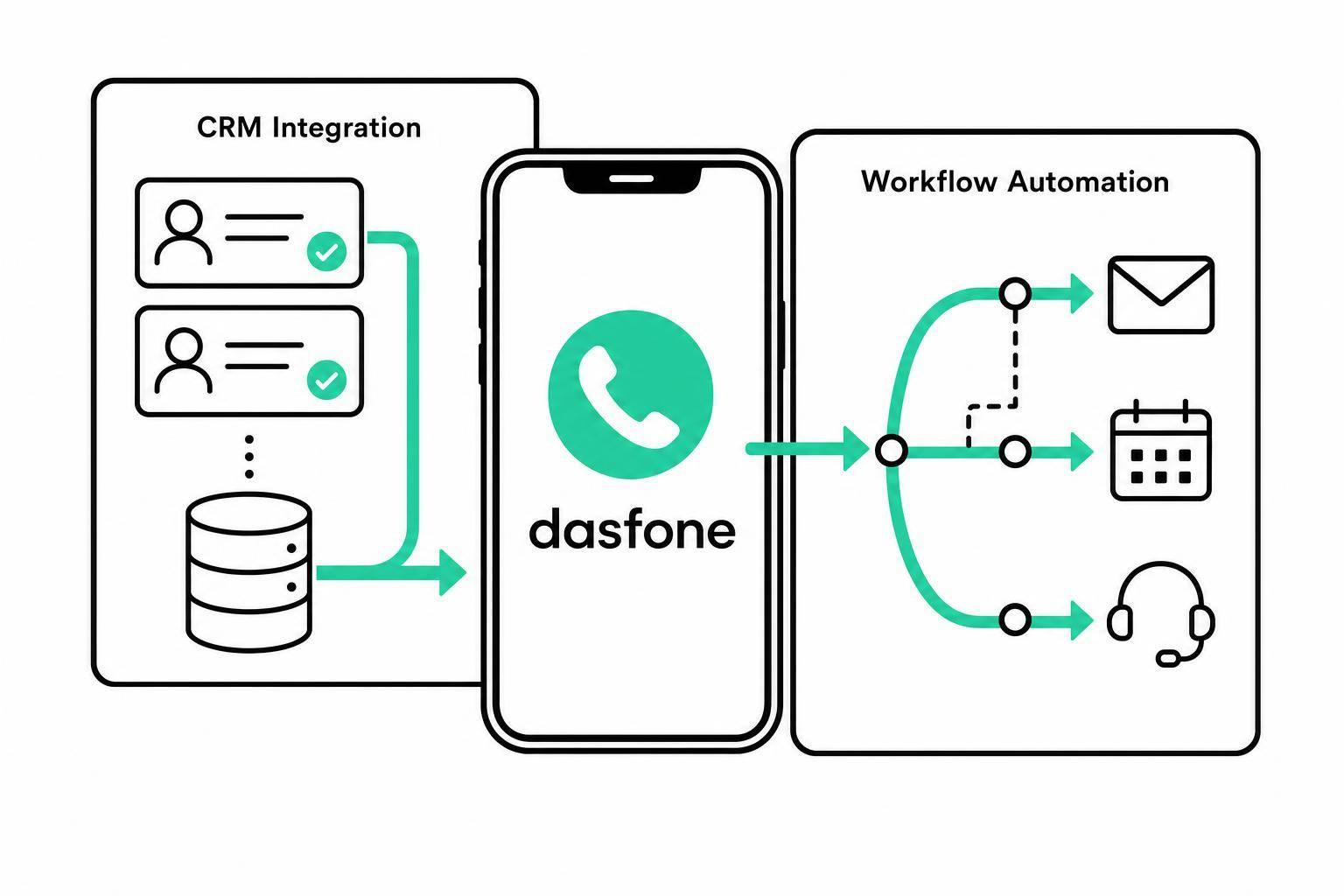
Most calling teams don’t have one problem. They have two: bad records and missed follow-up. CRM integration fixes the first. Workflow automation fixes the second.
If I had to sum it up in one line, it would be this:
- CRM integration keeps contact records, call logs, owners, notes, and history up to date.
- Workflow automation turns call outcomes into next steps like texts, emails, callbacks, routing, and alerts.
- Integration answers: Where should this data go?
- Automation answers: What should happen next?
That split matters because teams often lose time in the same five places:
- Contact handling: who owns the lead, and whether reps see the same record
- Call tracking: what gets logged after each call
- Follow-up: whether reps must send every next step by hand
- Team coordination: whether handoffs break between people or regions
- International calling: whether time zones, consent, and local calling hours are handled the right way
Here’s the short version: if your team keeps working from old records, start with CRM integration. If leads go cold because follow-up is missed, start with workflow automation. If you run calls across regions or high volume queues, you’ll often need both.
A few facts from the article stand out:
- Call logs should include date, local time zone, duration, outcome, notes, owner, and recordings/transcripts
- Automation depends on standardized dispositions like “No Answer” or “Voicemail”
- Bad input data can lead to duplicate tasks, wrong routing, or failed follow-up
- CRM sync is often lower effort to set up than automation rules, which need testing and cleaner inputs
Cogover Platform: Unifying CRM, Call Center, Omnichannel, Workflow Automation, and AI
Quick Comparison
| Area | CRM Integration | Workflow Automation |
|---|---|---|
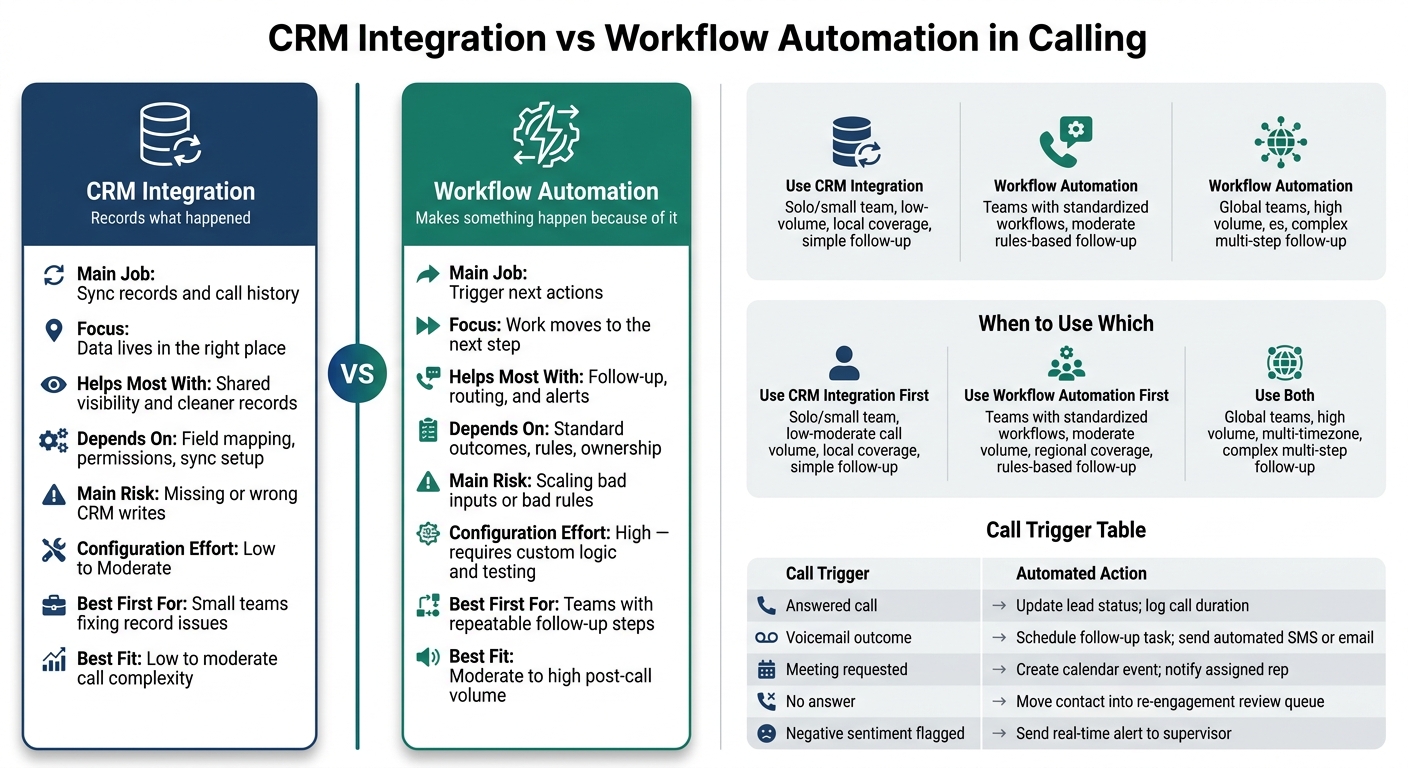
| Main job | Sync records and call history | Trigger next actions |
| Focus | Data lives in the right place | Work moves to the next step |
| Helps most with | Shared visibility and cleaner records | Follow-up, routing, and alerts |
| Depends on | Field mapping, permissions, sync setup | Standard outcomes, rules, ownership |
| Main risk | Missing or wrong CRM writes | Scaling bad inputs or bad rules |
| Best first for | Small teams fixing record issues | Teams with repeatable follow-up steps |
| Best fit | Low to moderate call complexity | Moderate to high post-call volume |
My take: CRM integration records what happened. Workflow automation makes sure something happens because of it. The rest of the article breaks down where each one fits, where each one falls short, and when using both makes more sense.
CRM Integration in Calling: Shared Records and Call History
CRM integration keeps contact fields, ownership, and call history in sync between your calling platform and your CRM. The CRM remains the single source of truth. Before a call, reps can see past outreach and account status. After the call, the activity logs to the right record on its own.
For that sync to work well, four things need to line up: compatible systems, the right user permissions, accurate field mapping, and steady sync behavior. If dispositions map to the wrong CRM fields, or if a rep doesn’t have write access to a record, data can land in the wrong place or fail to write back [5][2].
How CRM Integration Improves Contact Handling and Record Visibility
When contacts, ownership, and account context sync the way they should, every rep sees the same history [1][3]. That cuts down on duplicate outreach and helps teams avoid an awkward moment: one rep calling a contact that another rep already spoke with yesterday.
Ownership matters too. If the integration maps ownership the right way, the correct rep gets credit for the activity. At the same time, account managers can see what’s been happening on their accounts without hunting down coworkers for updates [5].
What Call Tracking Should Log in the CRM
The most useful CRM fields are the ones reps can use right away. If a field doesn’t help someone decide what to do next, it’s probably not pulling its weight.
| Data Point | Why It Matters |
|---|---|
| Call date & local time zone | Critical for international teams tracking calling windows across time zones [3] |
| Duration | Shows level of engagement [5][2] |
| Disposition/outcome | Tells the next rep whether the lead is qualified, busy, or requested a callback [5] |
| Notes | Add context beyond the disposition code [1] |
| Team member/owner | Identifies who handled the call for coaching or accountability [3] |
| Recordings/transcripts | Support follow-up and coaching [1][2] |
CRM integration records what happened. Workflow automation takes that record and pushes the next action forward.
Workflow Automation in Calling: Rules for Follow-Up and Routing
If CRM integration keeps the record up to date, workflow automation is what makes that record do something.
It takes call outcomes and turns them into follow-up, routing, and CRM actions without manual work. It can also flag negative sentiment and escalate urgent calls [6]. And when a status changes, a lead declines, or an issue stays unresolved, it can kick off outreach on its own [1].
Common Call Triggers That Start Automated Actions
Every call ends with an outcome. That outcome should decide what happens next.
But there’s a catch: the trigger only works if the disposition is standardized. If one rep marks a call as "No Answer" and another writes "Didn’t Pick Up", the system can get confused fast.
Here’s how common call outcomes can trigger the next action:
| Call Trigger | Automated Action |
|---|---|
| Answered call | Update lead status; log call duration [2][3] |
| Voicemail outcome | Schedule follow-up task; send automated SMS or email [1][4] |
| Meeting requested | Create calendar event; notify assigned representative [4] |
| No answer | Move contact into a re-engagement review queue [4] |
| Negative sentiment flagged | Send real-time alert to a supervisor for intervention [4] |
These triggers only work when the platform can rely on the call outcome and send it to the right owner.
Why Bad Input Data Breaks Automation
Automation doesn’t clean up messy data. It spreads the mess.
If dispositions are inconsistent or required fields are missing, routing rules can fail or create duplicate tasks [1][4]. Ownership rules matter just as much, because routing needs a clear person or team on the receiving end [1][4].
For international teams, it helps to lock down a few basics before automating cross-border workflows:
- Standardized dispositions
- Clear ownership rules
- Consent flags
- Local calling hours
Automation works best when the inputs are standardized.
CRM Integration vs Workflow Automation: Direct Comparison, Pros, and Limits
This side-by-side view makes it easier to see where each function helps before, during, and after a call. One keeps records up to date. The other pushes the next step forward. They work well together, but they do different jobs.
- CRM integration stores and syncs contact data, call history, and account context in one shared record.
- Workflow automation triggers the next step - follow-up SMS, email, task alert, or lead status update - based on call outcomes.
- Integration cuts manual data entry. Automation removes repetitive post-call work.
- Integration is usually simpler to set up through an API. Automation needs custom rule logic, testing, and clean input data.
| Metric | CRM Integration | Workflow Automation |
|---|---|---|
| Manual Workload | Moderate: Reduces entry but still requires note-taking | Low: Eliminates repetitive post-call tasks |
| Configuration Effort | Low to Moderate: Standard API syncs | High: Requires custom logic and testing |
| Scaling Risk | Low: Main risk is data entry fatigue | High: Can scale bad processes |
Before, During, and After the Call: Where Each One Adds Value
Looking at the call flow makes the difference even clearer.
Before the call, integration pulls up the right contact record and account context so the rep starts with the full picture. Workflow automation can use that same data to route the call to the right agent based on rules [4][6].
During the call, the rep works from the shared record. They log details right in the CRM and keep the conversation aligned with what’s already there. Integration keeps that record current and available across the team.
After the call, integration saves the call history and notes in the CRM. Automation takes a standard outcome and turns it into the next move - like a follow-up SMS, email, task alert, or lead status update [4][6].
From there, the choice gets easier: use integration to keep records clean, automation to move work along, or both when you need each piece to do its job.
When to Use CRM Integration, Workflow Automation, or Both
Use CRM integration when the main issue is bad records. Use workflow automation when the main issue happens after the call.
Here’s the plain-English version: if your team keeps calling the same lead twice, or reps jump into calls without any contact history, CRM integration should come first. It gives everyone one clean, shared record to work from.
If leads keep slipping away after calls because no one takes the next step, then workflow automation is the more urgent fix. That’s the part that turns “we should follow up” into an action that actually happens.
Simple Decision Rules for Small Business and International Teams
For solo operators and small teams, CRM integration usually makes the most sense as the first move. Logged calls create clean triggers for automation later. Once your records are in good shape, workflow automation can take over routine next steps like follow-up emails, lead-stage updates, or call routing based on rules.
| Factor | CRM Integration First | Workflow Automation First | Both |
|---|---|---|---|
| Team Size | Solo operator | Teams with standardized workflows | Global team |
| Call Volume | Low to moderate | Moderate, standardized | High |
| Geographic Coverage | Local / single country | Regional | Global / multi-timezone |
| Follow-up Complexity | Simple / manual | Standardized / rules-based | Complex / multi-step |
Use both when records need to sync across regions and follow-up has to keep moving across time zones. Integration keeps the shared record accurate from one region to another. Automation handles the next step, like updating the lead stage or routing calls based on rules.
For browser-based international calling teams, a platform like dasfone supports this setup with instant setup, mobile access, secure calling, global coverage, and dedicated caller ID.
In day-to-day use, integration gives teams shared visibility and steady data consistency, while automation handles repeatable execution.
FAQs
How do I know which to set up first?
Start with CRM integration if your main goal is to organize contact data and manage leads. It gives you a clean, centralized record of every interaction.
Then add workflow automation for repetitive tasks like follow-up scheduling or status updates. That way, your automations run on accurate information and outreach mistakes are less likely.
Can workflow automation work without CRM integration?
Yes. Workflow automation can still work without CRM integration.
It can still take care of tasks like predictive dialing, automated messaging, and campaign coordination inside the calling platform.
The tradeoff is pretty simple: without CRM integration, call data and contact updates won’t sync on their own. That means your team has to update records by hand to keep lead status accurate.
What data should be standardized before automating calls?
Standardize your contact data before you automate calls. It’s a simple step, but it can make a big difference in both accuracy and efficiency.
First, check that phone numbers use the right format for your dialer. If the format is off, calls can fail or route the wrong way. It also helps to label numbers by region or purpose - something like NYC Sales 212 - so your outreach stays organized and easy to manage.
You should also remove outdated caller IDs from completed campaigns. Old records can clutter your setup and cause mix-ups later. At the same time, confirm that your numbers are registered with carrier analytics services.
Why does that matter? Because features like local caller ID display depend on clean, up-to-date number data to work the way they should. If your records are messy, those automated rules can break down fast.
Related Articles
Ready to Make International Calls?
Try dasfone today and make your first international call in seconds. No app download, no subscription—just instant, affordable calling from your browser.
Start Calling Now