How Browser-Based Calling Handles Long-Distance Calls
How Browser-Based Calling Handles Long-Distance Calls
Browser-based calling simplifies long-distance communication by enabling calls directly through your web browser. Here's why it's a better alternative to traditional phone systems:
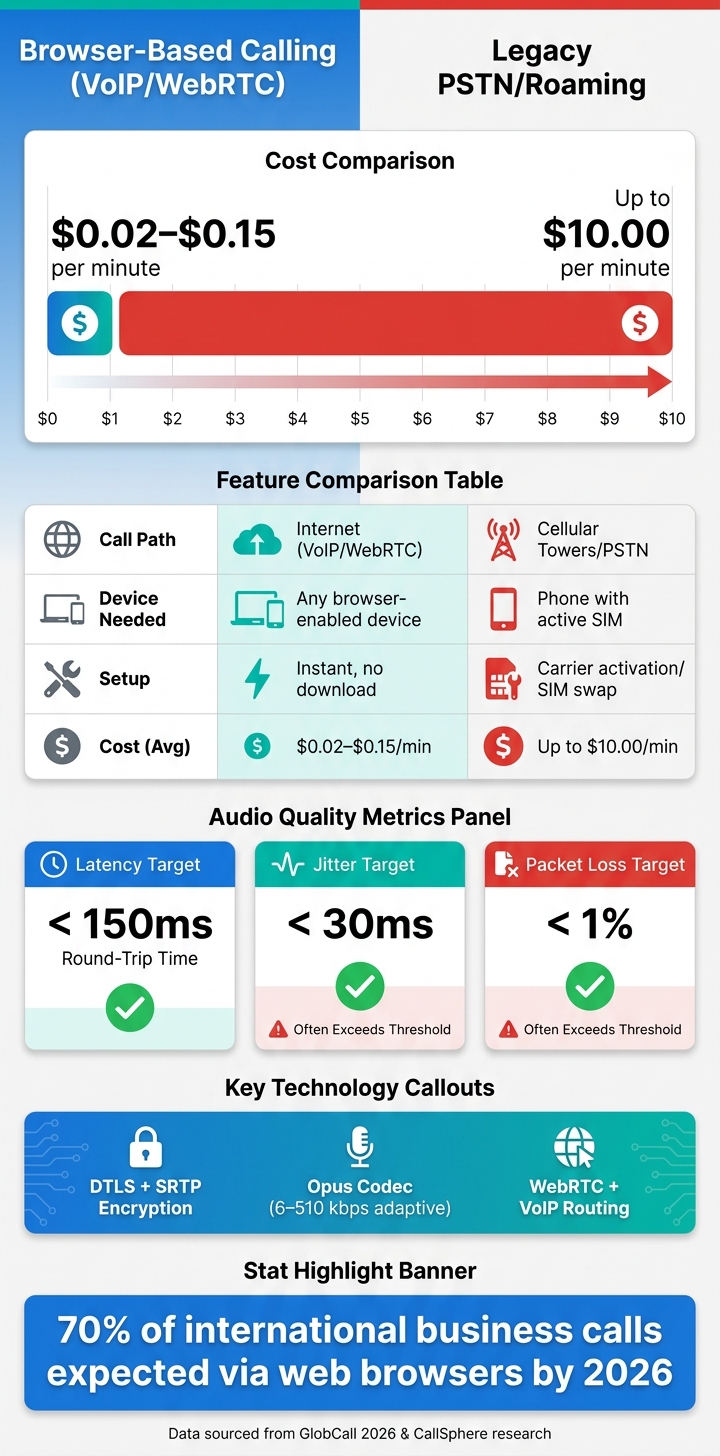
- Cost Savings: Avoid roaming fees or expensive carrier rates. Calls start as low as $0.02 per minute compared to up to $10 per minute with traditional carriers.
- No Downloads or SIM Cards: Just open your browser on any device with a microphone - no apps, plugins, or SIM swaps required.
- Global Reach: Call any mobile or landline worldwide by routing through the internet and local carrier networks.
- Clear and Stable Audio: Advanced codecs like Opus ensure high-quality sound, even with low bandwidth.
- Secure Connections: Encryption protocols protect your calls and data, even on public Wi-Fi.
Platforms like Dasfone make it easy to get started - offering pay-as-you-go pricing with no subscriptions. With over 70% of international business calls expected to use web browsers by 2026, this is the future of global communication.
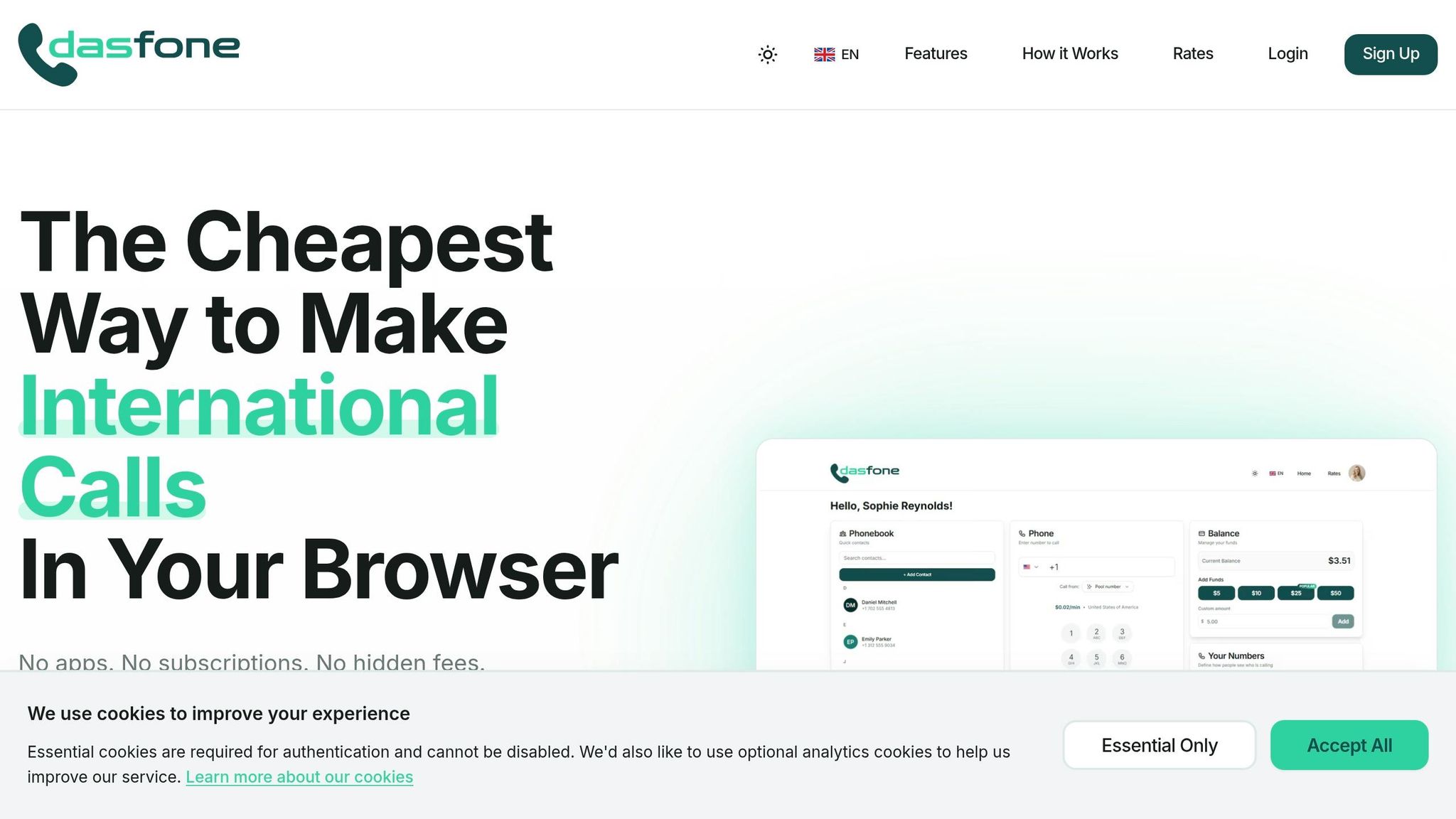
dasfone - The Cheapest Way to Make International Calls In Your Browser
How Browser-Based Calling Handles Long-Distance Calls
Browser-based calling has transformed international communication by offering a reliable and cost-efficient alternative to traditional phone systems. Here's how it works and why it's an appealing choice for long-distance calls.
The Technology Behind Browser-Based Calling
At its core, browser-based calling is powered by two key technologies: VoIP (Voice over Internet Protocol) and WebRTC (Web Real-Time Communication). VoIP converts your voice into digital data packets, allowing it to travel over the internet instead of traditional phone lines. WebRTC takes this a step further by enabling calls directly within your browser - no need for extra apps or plugins. When choosing a provider, you might compare browser-based calling apps to find the best fit for your needs. It captures and compresses audio in real time, reducing delays and ensuring smooth communication. Once digitized, these voice packets are ready to be routed across borders.
How Calls Are Routed Across Borders
After your voice is digitized, the data packets are sent over the internet to the calling provider's servers. From there, the provider routes the call through local carrier networks in the destination country. This process allows the recipient to answer using a standard phone, even without an internet connection. To ensure your call reaches its destination seamlessly, always use the full international dialing format - for example, start with +44 for the UK or +52 for Mexico [1].
"The moment you switch to a browser-based or app-based calling method, you bypass the cellular system entirely. Your SIM card becomes irrelevant." - GlobCall Team [1]
This efficient routing not only ensures reliable connections but also underscores the affordability and flexibility of browser-based calling compared to older systems.
Why Browser-Based Calling Works Better Than Legacy Methods
One of the biggest advantages of browser-based calling is its cost-effectiveness. Traditional systems, which rely on cellular towers and the PSTN (Public Switched Telephone Network), involve high infrastructure costs. These costs are passed on to users, with international roaming charges reaching up to $10.00 per minute. In contrast, browser-based calling eliminates these expenses by leveraging internet routing. For instance, calls to the U.S. and Canada via browser-based platforms can start as low as $0.02 per minute [1].
Here’s a side-by-side comparison of browser-based calling and legacy systems:
| Feature | Browser-Based Calling | Legacy PSTN/Roaming |
|---|---|---|
| Path | Internet (VoIP/WebRTC) | Cellular Towers/PSTN |
| Cost (Avg) | $0.02 – $0.15/min | Up to $10.00/min |
| Device Needed | Any browser-enabled device | Phone with active SIM |
| Setup | Instant (no download required) | Carrier activation/SIM swap |
These differences make browser-based calling a practical and affordable option for anyone looking to make international calls without the hefty fees of traditional methods. Rates are based on GlobCall 2026 data [1].
How Browser-Based Calls Stay Clear and Stable Over Long Distances
How WebRTC and Modern Codecs Maintain Audio Quality
The key to achieving clear audio over long distances lies in one powerful codec: Opus. WebRTC requires Opus as its standard audio codec, and it’s easy to see why. Opus dynamically adjusts its bitrate - from 6 kbps to 510 kbps - based on what the network can handle at any moment [3][4]. At just 24 kbps, Opus delivers better voice quality than the older G.711 codec at 64 kbps, thanks to its much wider frequency range (50 Hz–20 kHz versus 300 Hz–3.4 kHz) [3]. This means voices sound richer and more natural, even on networks with limited bandwidth.
"The Opus codec at 24 kbps delivers better perceived quality than G.711 at 64 kbps due to its wideband frequency range." - CallSphere Team [3]
WebRTC also incorporates Forward Error Correction (FEC), which sends redundant audio data alongside the main stream. If a packet gets lost during transmission, the receiver can instantly reconstruct it, avoiding any noticeable dropouts [4]. This combination of smart audio encoding and error correction ensures calls remain clear and consistent, even when network conditions fluctuate.
Handling Latency, Jitter, and Packet Loss
Network hiccups like delayed or out-of-order packets can make calls frustrating. WebRTC tackles these issues with an adaptive jitter buffer, a small queue that collects incoming packets and plays them back smoothly. The buffer adjusts its size dynamically - typically between 20ms and 200ms - based on the network’s stability at any given moment [4].
To further handle congestion, WebRTC uses Google Congestion Control (GCC). Instead of waiting for packet loss to occur, GCC monitors delays between packets and reduces the bitrate proactively to prevent the network from becoming overwhelmed [4]. For a seamless call experience, certain targets are essential: round-trip time under 150ms, jitter under 30ms, and packet loss below 1% [3]. If these thresholds are exceeded, audio quality suffers - voices may sound robotic, choppy, or cut out entirely.
| Metric | Target for High Quality | What Happens When It's Poor |
|---|---|---|
| Latency (RTT) | < 150ms | Conversations feel unnatural; interruptions occur |
| Jitter | < 30ms | Audio becomes choppy or robotic |
| Packet Loss | < 1% | Voice dropouts and distorted sound |
To address the challenges of physical distance, distributed infrastructure plays a critical role in reducing delays.
How Distributed Infrastructure Cuts Call Delays
Even with advanced codecs and network controls, physical distance introduces unavoidable latency. Browser-based calling platforms combat this by using distributed infrastructure, deploying media servers and points of presence (PoPs) in various regions. This ensures your call is routed through the closest server, avoiding unnecessary long-distance hops [5].
For situations where direct peer-to-peer connections aren’t possible - such as networks protected by firewalls - calls are relayed through TURN servers. Around 14% of WebRTC connections rely on this type of relay, particularly in corporate environments [4]. The ICE framework handles this process automatically, finding the most efficient path without requiring any input from users. This seamless optimization ensures that calls remain stable and delay-free, no matter where the participants are located.
How to Get the Best Quality from Browser-Based Long-Distance Calls
Setting Up Your Device and Internet Connection
For the clearest audio during browser-based calls, start with a stable internet connection. A wired Ethernet connection is the best option since it avoids interference. If Ethernet isn’t possible, connect to a 5 GHz Wi-Fi band (preferably Wi-Fi 6 or 802.11ac) instead of the slower and often overcrowded 2.4 GHz band.
Your device also plays a big role. Aim for at least 8 GB of RAM and an Intel Core i5 processor (or equivalent) to handle WebRTC processing without hiccups. If you’re using a USB headset, plug it directly into your computer’s USB port - not a hub or docking station - to avoid audio issues.
Adjusting your network settings can also make a difference:
- Disable SIP ALG: Many routers have this feature, but it often disrupts VoIP traffic.
- Split tunneling for VPNs: If your workplace uses a VPN, enable split tunneling. This sends call traffic directly to the internet, bypassing the VPN’s central server and reducing latency.
- Exceed Opus requirements: Ensure your connection surpasses Opus codec requirements by at least 20% during peak usage times.
Once your hardware and network are set, fine-tune your browser settings for optimal call quality.
Configuring Audio Settings and Browser Permissions
For browser-based calls, Google Chrome is highly recommended. It can prioritize call media packets, ensuring smoother communication. When you first use the calling platform, the browser will ask for microphone access - select "Always allow" to avoid repeated prompts. If you don’t see this prompt, you can manually adjust permissions by clicking the padlock or microphone icon in the address bar.
Before starting your call, double-check that your microphone isn’t muted at the operating system level. On Windows or macOS, system-wide mute overrides browser settings. Position your microphone 2–3 inches from your mouth for clear audio, and close any unnecessary apps or browser tabs that might hog bandwidth, like video streaming services.
Here’s a quick troubleshooting table for common issues:
| Issue | Likely Cause | Fix |
|---|---|---|
| "Microphone Access Denied" | Browser permission blocked | Click the address bar icon and select "Always allow" |
| Recipient can't hear you | OS-level mute or wrong input selected | Check sound settings and confirm correct microphone |
| Robotic or choppy audio | Network congestion | Switch to Ethernet or move closer to your router |
| Call won't connect | Firewall or VPN blocking UDP | Disable VPN or ensure UDP traffic is allowed |
With these adjustments, you’ll be ready to make calls with minimal disruptions.
Making and Troubleshooting Calls with Dasfone
Dasfone makes international calling straightforward and hassle-free. Since it runs entirely in your browser, there’s no need to download an app, install software, or swap SIM cards. It’s compatible with Chrome, Safari, Firefox, and Edge on both desktop and mobile devices. Plus, new users get $2 in free credit upon sign-up, which can cover up to 100 minutes of calling. For first-time top-ups, you can use the code DF25 to get 25% off a minimum $5 recharge.
When dialing, ensure you’re using the correct international prefix. For instance, use +44 for the UK or +52 for Mexico. If you’re abroad and using a mobile device, switch to Airplane Mode and then re-enable Wi-Fi before making your call. This prevents your phone from connecting to a foreign cellular network, which could result in expensive roaming charges.
"To avoid accidentally connecting to a foreign cellular network (and racking up roaming fees), switch your phone to Airplane Mode and then turn Wi-Fi back on." - Dasfone Team [6]
Browser-based calls are also very data-efficient, using just 0.2–0.5 MB per minute. Even a modest mobile data plan can handle long international calls when Wi-Fi isn’t an option. If your call drops mid-conversation, it’s often due to your device switching from Wi-Fi to cellular data. Reconnect to Wi-Fi and redial to pick up where you left off.
How Browser-Based Long-Distance Calls Stay Reliable and Secure
Keeping Cross-Continent Calls Connected
Browser-based calls rely on redundant routing to maintain connections across continents. This system automatically reroutes traffic through the best available path, minimizing the risk of dropped calls. It works in real-time, continuously monitoring media metrics like packet loss and jitter to detect and address issues before they disrupt your call. Unlike traditional cellular handoffs, which can falter when crossing borders, this approach spreads traffic across multiple routes, ensuring a more stable connection. This reliable framework also supports strong security protocols.
How Browser-Based Calls Are Encrypted
Browser-based calls are safeguarded by multiple layers of encryption. DTLS (Datagram Transport Layer Security) and SRTP (Secure Real-time Transport Protocol) protect the audio stream, while TLS (Transport Layer Security) encrypts signaling data.
| Security Layer | Protocol | What It Protects |
|---|---|---|
| Media Stream | DTLS / SRTP | The audio sent and received |
| Signaling | TLS | Connection setup and metadata |
| Stored Data | AES | Call logs and recordings at rest |
When both participants use a web client, the audio remains encrypted from end to end. For calls to traditional phone numbers, encryption is maintained from your browser to the PSTN gateway, after which the call transitions to standard carrier protocols.
"Dasfone protects your calls and personal information with enterprise-grade encryption, the same level of security used by banks for online transactions." - Dasfone Team
This level of encryption is particularly crucial when using public Wi-Fi in places like airports or hotels. Regular updates from major browsers like Chrome, Safari, Edge, and Firefox ensure these security measures stay up to date. Encryption also extends to managing caller information, keeping sensitive data secure.
Managing Caller ID for International Calls
When making international calls to businesses, banks, or government offices, having a dedicated caller ID can significantly improve answer rates. Dasfone offers the option to use your existing number or purchase a dedicated caller ID through its platform. This feature is especially beneficial for businesses conducting outbound campaigns or for expats needing reliable communication while overseas. The dedicated caller ID integrates seamlessly into the encrypted call environment, allowing you to present a professional identity without compromising personal security.
Conclusion: What Browser-Based Platforms Mean for Long-Distance Calling
Browser-based calling is changing the game for international communication. It slashes costs compared to traditional roaming fees [1], making it an appealing option for frequent callers, expats, and businesses managing outbound campaigns.
The benefits go beyond just saving money. There’s no need to download an app, switch SIM cards, or commit to a subscription. All you need is a modern web browser. According to industry data, by 2026, more than 70% of international business calls are expected to happen through web browsers [2], thanks to the simplicity and reliability these platforms offer. On top of that, these solutions come with built-in security features.
Speaking of security, browser-based calls use enterprise-grade encryption to protect both audio and signaling data, even on public Wi-Fi. Add features like a dedicated caller ID, and you’ve got a setup that works seamlessly for both personal and professional use. This combination of convenience, affordability, and security makes browser-based calling a standout option for international communication.
For businesses, banks, or offices abroad where app-based calling isn’t practical, solutions like Dasfone offer a quick setup, transparent pay-as-you-go pricing with a $5 minimum top-up, and HD audio quality. Plus, new users get a $2 sign-up bonus, which covers up to 100 free minutes.
"Roaming charges are optional in 2026. Fully optional." - GlobCall Team [1]
That quote sums it up perfectly. With the right infrastructure, competitive pricing, and advanced technology in place, browser-based calling has become the smarter, more efficient way to handle long-distance communication.
FAQs
Will browser-based calls work if the person I’m calling doesn’t have internet?
Browser-based calls depend entirely on an internet connection. This means they won't work if the person you're trying to reach isn’t online. For the call to be successful, both you and the other party need to have a stable internet connection.
What internet speed do I need for a clear international browser call?
To ensure smooth international browser calls, aim for an internet speed of at least 0.2–0.5 MB per minute. For optimal call quality, connect to a 5 GHz Wi-Fi network. This helps reduce lag and interruptions, giving you a more seamless experience.
Are browser-based long-distance calls still secure on public Wi‑Fi?
Yes, making long-distance calls through your browser on public Wi-Fi can be safe when using platforms like dasfone, which rely on enterprise-level encryption to safeguard your conversations and personal details. To further enhance your security, consider using a VPN and avoid discussing sensitive information while connected to public networks.
Related Articles
Ready to Make International Calls?
Try dasfone today and make your first international call in seconds. No app download, no subscription—just instant, affordable calling from your browser.
Start Calling Now