Browser-Based VoIP vs Calling Apps
Browser-Based VoIP vs Calling Apps
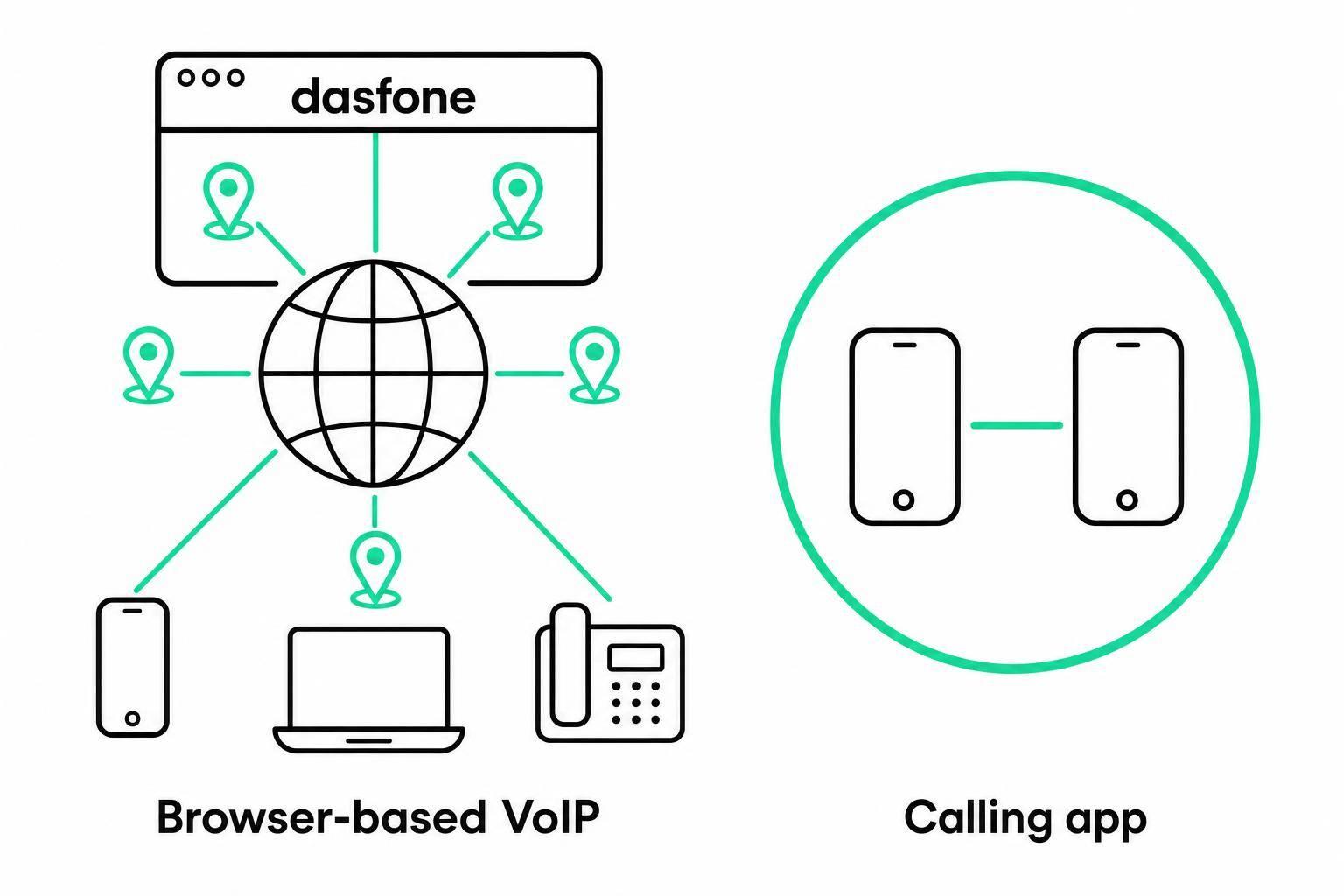
If I need to call regular phone numbers in other countries, I’d usually pick browser-based VoIP. If most of my calls stay inside one platform on my phone, I’d pick a calling app.
That’s the short answer. The choice usually comes down to five things: setup, call quality, mobility, security, and cost. Browser-based VoIP works in a web browser with no install, while calling apps need a download, sign-in, and updates. For teams that switch devices, travel often, or use locked-down work computers, that difference matters right away.
A few points stand out fast:
- No install vs. install: Browser calling starts in a browser. Apps need setup on each device.
- Who you can call: Browser VoIP is often built for calling landlines and mobile numbers worldwide. Many apps focus on app-to-app calls first.
- Mobile use: Apps fit personal smartphones better because of notifications and background calling.
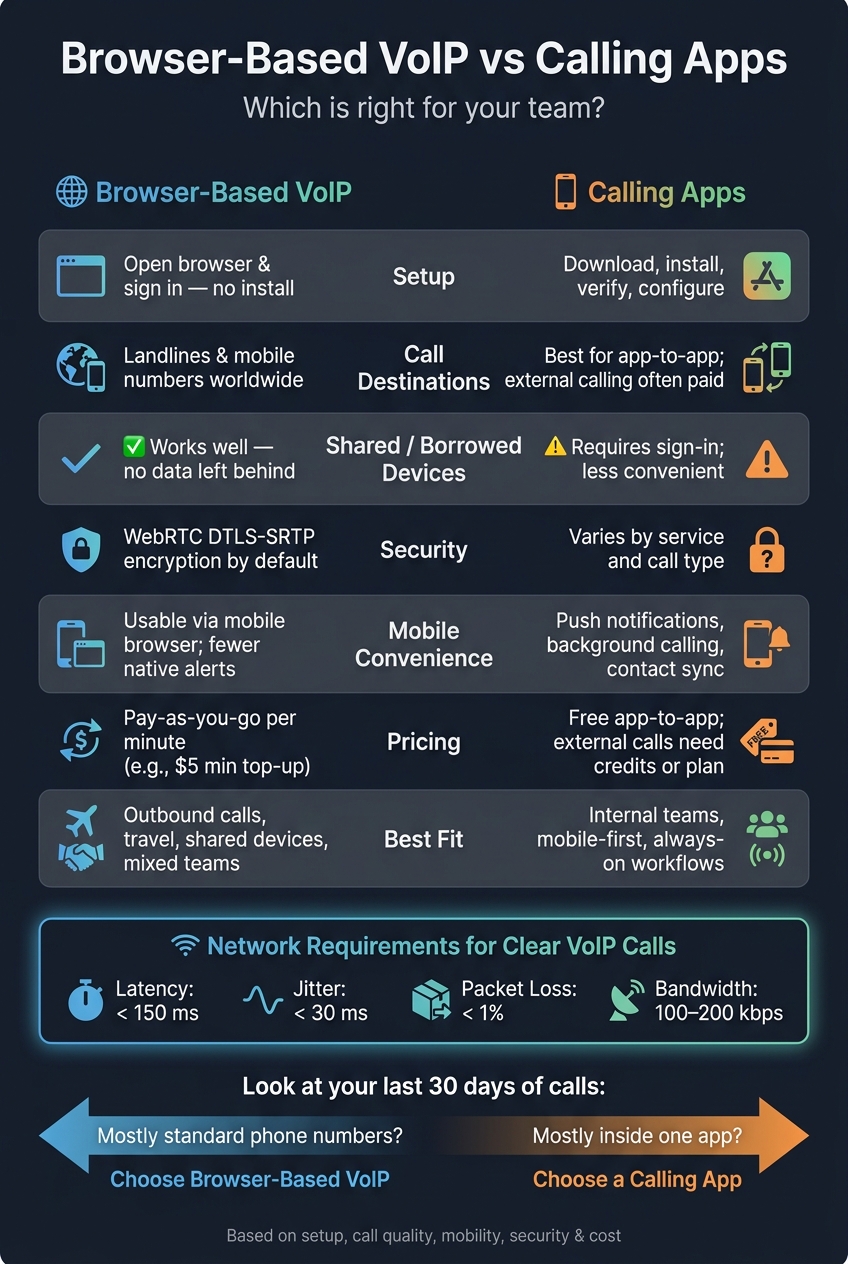
- Connection needs: For clearer VoIP calls, a common target is under 150 ms latency, under 30 ms jitter, under 1% packet loss, and about 100–200 kbps of steady bandwidth.
- Security: WebRTC browser calls use DTLS-SRTP encryption by default.
- Cost: Browser VoIP often uses pay-as-you-go pricing. Calling apps may be free for app-to-app use, but external calling can need credits or a paid plan.
My quick take: browser-based VoIP fits outbound international calling, shared devices, travel, and uneven call volume. Calling apps fit internal team communication, mobile-first work, and always-on access.
Quick Comparison
| Factor | Browser-Based VoIP | Calling Apps |
|---|---|---|
| Setup | Open browser and sign in | Download, install, sign in |
| Device access | Works across many desktops and laptops | Tied more closely to each installed device |
| Shared or borrowed devices | Usually a better fit | Often less convenient |
| Calling regular phone numbers | Usually yes | Often limited or paid |
| Mobile alerts | Less built in | Better with push notifications |
| Security | WebRTC encryption by default | Depends on service and call type |
| Pricing | Often pay-as-you-go | Often free app-to-app; external calling may cost more |
If I were deciding for a U.S. team, I’d look at the last 30 days of calls and ask one question: Did we call more standard phone numbers, or did we mostly stay inside one app? That answer usually makes the choice pretty clear.
Browser-Based VoIP: Setup, Daily Use, and Business Fit
No-Install Access on Desktop and Mobile
The big draw of browser-based VoIP is simple: you don’t need to install anything. Open a supported browser, sign in, and place a call.
That kind of access is handy when you’re working from a shared, borrowed, or constantly changing device. If your laptop quits in the middle of a trip, you can sign in on another device and keep going. Because your account lives in the cloud, your call history, contacts, and billing are still there. For remote and hybrid teams, that means people can start calling right away.
Call Quality, Reliability, and Security in the Browser
Browser-based VoIP quality depends on three things: your network, your device, and the browser itself. In plain terms, a weak setup leads to weak calls. Wired Ethernet or strong private Wi-Fi usually works best. Congested public Wi-Fi often doesn’t.
For clear business calls, the target is usually under 150 ms latency, under 30 ms jitter, under 1% packet loss, and 100–200 kbps of steady bandwidth.[2][3][6][7][8] Those numbers may sound technical, but the idea is simple: if your connection jumps around too much, people will hear it.
Security matters too. Every WebRTC call is encrypted by default with DTLS-SRTP, which protects audio while it’s in transit. Signaling traffic runs over HTTPS. This isn’t an add-on or a paid extra. It’s part of how the WebRTC browser standard works. If your team discusses financial details or private client matters on calls, that built-in encryption carries weight.[1][4][5]
Where dasfone Fits
For teams that want browser-based international calling without installs or subscriptions, dasfone fits that setup. It’s aimed at expats calling foreign banks, small businesses running outbound campaigns, students using campus computers, and digital nomads who switch devices often. In short, it’s for people who need to call regular business phone numbers abroad from a browser.
Getting started is straightforward:
- Create an account
- Add funds
- Start calling
Calls use HD audio with encrypted connections. You can also use or buy a dedicated caller ID, which can help offices, banks, and suppliers recognize the number. Pricing is pay-as-you-go in U.S. dollars, with a $5 minimum top-up and no monthly fees or subscription commitments.
Calling Apps: Installation, Accounts, and App Access
Calling apps work differently: access is tied to each device where the app is installed.
Before someone can make a first call, they usually need to install the app and sign in on that specific device with a phone number, email, or corporate SSO.
That sounds fine on a personal phone. It gets messy on managed or shared hardware.
Corporate-managed devices often run MDM policies that block non-approved apps or limit microphone and camera access.[9][11][12][13] Shared or kiosk workstations add privacy concerns and force people to sign in again and again. On top of that, mixed app versions and older devices can create storage problems and OS compatibility issues.
So yes, calling apps are often easier on personal smartphones. On locked-down work devices, they're often a pain.
When direct phone-number calling is available, there can still be extra setup. It may need a separate credit balance, an international plan, or account-level settings that have to be turned on first.[14][16]
Mobile Performance and Daily Convenience
On mobile, the big upside is convenience.
On personal smartphones, push notifications help keep the app reachable even when it's closed, and Apple's PushKit is designed to wake an app for an incoming call without requiring it to be running in the background.[15] That makes incoming calls easier to catch while using other apps or when the screen is locked. For sales, support, and field teams, that's a clear day-to-day plus.
But there's a catch. Background activity drains battery, and using several calling apps at the same time adds even more strain.
Microsoft notes that allowing apps to run in the background uses more power than restricting them.[10]
Travel adds another layer. During international trips, roaming conditions can slow VoIP traffic, add latency, and make video calls costly enough that many teams switch to audio-only. Mobile convenience helps with internal calling, but it doesn't solve the need to reach external business numbers abroad. And if direct dialing isn't supported, staff may have to swap to another calling method.
Side-by-Side Comparison: Usability, Performance, and Cost
Main Comparison Table for Global Business Calling
These tradeoffs show up most in day-to-day use. The table below gives you the practical differences at a glance.
| Factor | Browser-Based VoIP | Calling Apps (Installed) |
|---|---|---|
| Installation | None - runs in a modern browser | Requires download and installation |
| Account setup time | Very fast - often close to instant | Slower - download, verification, and configuration |
| Desktop access | Works on laptops and desktops across operating systems | Best on personal phones and tablets; less flexible on locked-down desktops |
| Shared devices | Works well without leaving personal data behind | Requires sign-in and persistent app access |
| Call destinations | Can reach regular landlines and mobile numbers worldwide | Often best for app-to-app calls; phone-number calling often requires a paid plan |
| Reliability on weak Wi-Fi | Good on stable connections, but heavy browser use can affect performance | Can benefit from built-in phone background support |
| Encryption | Built on WebRTC with encryption enabled by default | Encryption depends on the service and call type |
| Pricing structure | Pay-as-you-go, per-minute rates | Often free for app-to-app calls, with subscriptions or paid calling for regular numbers |
| Best fit | Outbound calls, travel, cold calling, mixed devices | Internal teams, mobile-first, always-on workflows |
Once you look at speed, reach, and day-to-day workflow, the gap starts to stand out.
When Browser-Based VoIP Is the Better Choice
Browser-based VoIP works best when speed and flexibility matter more than deep device integration. If your team runs outbound calling campaigns, needs to reach suppliers, banks, or government offices abroad, or moves between laptops in different places, browser-based calling cuts out a lot of hassle.
That’s where Dasfone fits. It’s built for people who want pay-as-you-go pricing instead of a monthly plan they may barely touch.
This setup also makes sense for mixed-device teams. Someone can place calls from a work laptop today, a shared desktop tomorrow, and a hotel computer next week without going through a long setup each time.
App-based calling tends to win more often in mobile-first internal workflows.
When Calling Apps Make More Sense
Calling apps make more sense when your team mostly talks inside one app and already uses it all day. If employees are messaging, sharing files, and hopping into quick calls in the same place, adding a browser-based voice tool can feel like one more thing to manage.
They also have an edge on personal phones. Push notifications and background services make calls harder to miss, which helps support teams and other staff who need to stay reachable during the workday.
The downside is reach. App-to-app calling only works when both sides use the same app. That’s a big limit when you need to contact external clients, vendors, or government offices.
Pros and Cons of Browser-Based VoIP and Calling Apps
Pros and Cons Table
Both options have clear upsides and a few catches. For U.S.-based teams making international calls, the main differences show up in the areas below.
| Factor | Browser-Based VoIP | Calling Apps |
|---|---|---|
| External number reach | Calls landlines and mobile numbers worldwide, including banks and government offices | Mostly app-to-app; calling regular numbers usually requires credits or a paid plan |
| Platform dependence | None - runs in the browser with server-side updates | Relies on app stores, OS support, and push notifications |
| Mobile convenience | Usable on mobile browsers, but less integrated with contacts, notifications, and background calling | Better integrated with contacts, notifications, and background calling |
| Cost control | Pay-as-you-go costs are easier to forecast | Free for app-to-app use; external calling costs vary by plan and region |
Tradeoffs for Small Teams and Frequent Travelers
For teams that call across borders, the core issue is pretty simple: do you need direct access to regular phone numbers, or do you mostly stay inside one app? That’s the split between browser-first flexibility and app-first convenience.
Browser-based VoIP is usually the better fit when calls need to reach people outside the app. If your team often contacts foreign suppliers, customs offices, or banks that only take standard phone calls, a browser-based tool with PSTN access is the safer bet.
Calling apps tend to work better when phones are the main work device. A sales rep or traveling employee who depends on push notifications, contact syncing, and fast calling on the move will often prefer a native app over a mobile browser tab.
Frequent travelers also get a clear edge with browser-based VoIP in places like airports, hotel business centers, and coworking spaces. You can sign in from an available machine, make the call, and sign out without installing anything. Calling apps are more tied to a personal phone, and that can become a problem if the phone is lost, dead, or stuck on an OS version the app no longer supports.
Cost stands out most when international calling volume goes up and down. If your team’s usage is uneven, pay-as-you-go browser calling can be a better deal than a fixed monthly plan.
Conclusion: Which Option Works Best for Your Team
Pick the option based on who your team calls most often. If you mostly call standard phone numbers, browser-based VoIP is the simpler path. If most conversations happen inside one platform, a calling app makes more sense.
A simple way to decide: look at your last 30 days of calls. Check how many went to standard numbers and how many stayed inside one app or platform. Then go with the option that handles the bigger share. If standard numbers come out on top, browser-based VoIP is usually the better fit.
Browser-based VoIP is a better match when:
- Your team often calls offices, banks, or other businesses that only take standard phone calls
- IT blocks software installs or company devices are locked down
- You need to place calls from shared, borrowed, or managed devices
- Call volume goes up and down, so pay-as-you-go costs less
Calling apps make more sense when:
- Most communication stays within one team or among contacts already using the same platform
- Smartphones are the main work device and always-on access matters most
- Messaging, group chats, and presence are part of day-to-day work
For teams that call external numbers in different countries, dasfone gives you browser-based calling with no install and no subscription. You also get HD audio, a dedicated caller ID, and clear per-minute pricing.
The best choice comes down to your calling habits, devices, and budget.
FAQs
Can I use browser-based VoIP on a locked-down work computer?
Yes. Because Dasfone runs right in your web browser, there’s no software to install, no admin access needed, and no local storage space taken up.
That makes it a solid fit for locked-down work setups. If you have a modern browser and a stable internet connection, you can open the site, allow microphone access, and start calling.
What internet speed do I need for clear browser calls?
For clear, high-definition browser calls with dasfone, a stable connection of at least 1 Mbps for both upload and download is recommended.
It can still work at 64–100 kbps for basic connectivity, but 5 Mbps or more is best if you want top audio quality, especially during busy hours. Latency below 150 ms also helps cut down on delays.
When is a calling app better than browser-based VoIP?
A calling app makes sense when you mostly talk to people who use the same app. In that setup, messages and calls are often free inside the platform.
Browser-based VoIP is a better fit when you need to reach regular phone numbers like landlines, banks, government offices, or businesses that aren't on a given app. Dasfone does this by letting you call any phone number worldwide from a modern web browser, with no downloads and no monthly subscriptions.
Related Articles
Ready to Make International Calls?
Try dasfone today and make your first international call in seconds. No app download, no subscription—just instant, affordable calling from your browser.
Start Calling Now