What VoIP Means for International Calls
What VoIP Means for International Calls
VoIP lets you call abroad over the internet - but not every service can reach regular phone numbers. Before I dial a bank, office, or business contact, I check destination support, the full international number, and the total cost.
Here’s my checklist:
- Connection: Use a supported browser, allow microphone access, and test the audio on a stable internet connection.
- Number format: Start with
+, then the country code and national number. International numbers allow up to 15 digits, excluding the+. - Price: Check the destination rate, connection fees, taxes, and billing increments. A 10-minute, 1-second call can count as 11 minutes with whole-minute rounding.
- Privacy and caller ID: Check encryption coverage and caller ID rules. A working voice call doesn’t mean a bank will accept a VoIP number for verification.
I also cover dasfone, a browser-based, pay-as-you-go option, and the limits to check before using it. My rule: confirm reach, cost, and call quality before dialing - and keep another contact method ready for urgent calls.
What is VoIP (Voice over Internet Protocol)? How Does VoIP Work?
How International VoIP Calls Connect
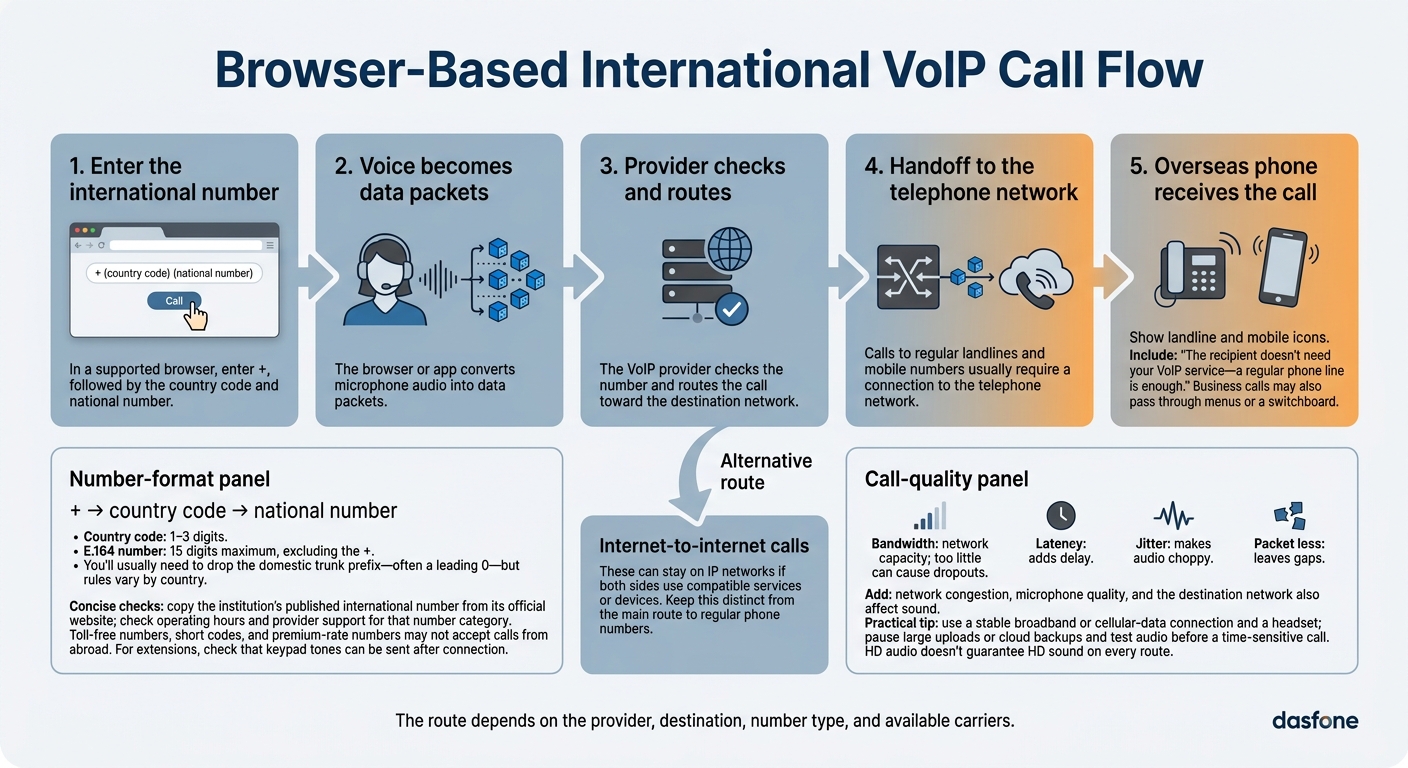
Once you know the terms, here’s how a browser call reaches a regular phone number.
From Your Microphone to an Overseas Phone
You enter the number in your browser. The browser or app turns your voice into data packets and sends them to the provider. The provider checks the number and routes the call to the destination network.[6]
Internet-to-internet calls can stay on IP networks if both sides use compatible services or devices. Calls to landlines and mobile numbers usually need a connection to the telephone network. Business calls may also go through menus or a switchboard. The recipient doesn’t need your VoIP service - a regular phone line is enough. The route depends on the provider, destination, number type, and available carriers.[8][2]
To help the provider send your call to the right place, start with the right number format.
Country Codes and Number Format
Use +, followed by the country code and national number.[4][10] E.164 numbers have a 1- to 3-digit country code and no more than 15 digits total, excluding the +.[4][5][10] You’ll usually need to drop the domestic trunk prefix - often a leading 0 - but the rules vary by country.[7][9] Correct international formatting helps the provider route your call without delay.
Copy the institution’s published international number from its official website rather than using a local-format number. Check its operating hours and whether your provider supports that number category. Special numbers, including toll-free numbers, short codes, and premium-rate numbers, may not accept calls from abroad. Need an extension? Check that you can send keypad tones after the call connects.
The right number gets you connected, but network conditions still affect how clearly you hear each other.
What Affects Call Quality
Long-distance routing can add delay, so your connection matters. Bandwidth is your network’s capacity; too little can cause dropouts. Latency adds delay, jitter makes audio choppy, and packet loss leaves gaps. Network congestion, microphone quality, and the destination network also affect the sound.
Use a stable broadband or cellular-data connection and a headset. Pause large uploads or cloud backups, and test your audio before a time-sensitive call. HD audio doesn’t guarantee HD sound on every route.
How International VoIP Pricing Works
Once a call connects, cost comes down to how your provider bills it: per minute, by package, or through a flat-rate plan. Calls to regular phone numbers often cost more because the provider must pass the call to the destination’s phone network. Your rate depends on your plan, the destination, and the type of number.
Minute packages come with a set allowance and may charge extra if you go over it. Flat-rate plans charge a recurring fee for certain destinations, subject to usage caps. Calls between users on the same platform may have no separate calling charge, though internet or mobile-data costs can still apply.[11][12]
Rates, Fees, and Billing Increments
Check the rate for the exact destination and line type. Offices, banks, and business contacts may use landlines, mobile phones, or special-service numbers. Each can have different rates or restrictions. If you’re buying a package, check which destinations it covers, what extra minutes cost, and whether unused minutes expire.[11][13][14]
Use the rate that applies to your call - not just the advertised price. Factor in per-call connection fees, rounded billing time, and any charges beyond the listed rate. A minimum account top-up may also cost more than a single call. Check when credit expires and whether refunds are available.
| Rate basis | Cost driver |
|---|---|
| Per-minute rates | Destination, number type, and provider route |
| Connection fees | Fixed charge per call, depending on terms |
| Billing increments | Per-second billing, whole-minute rounding, or other blocks |
| Additional charges | Taxes, fees, and surcharges |
| Minimum account top-ups | Required credit purchase or account balance |
Estimate Your Call Cost
To estimate your bill, use this formula:
Estimated cost = billed minutes × rate + connection fees + taxes and surcharges.
Use billed time, not stopwatch time. With whole-minute rounding, a call lasting 10 minutes and 1 second counts as 11 billed minutes.
Hypothetical calculation - not a current rate quote: 10 billed minutes × $0.05 = $0.50. Add a $0.10 connection fee for $0.60 before applicable taxes or other charges.
Before dialing, verify current international rates and service terms, as the Federal Communications Commission (FCC) advises. Check when billing starts, whether unanswered calls incur charges, and whether a minimum billable period applies.[3]
Why Use VoIP for International Calls
Calling Banks, Offices, and Business Contacts
Cost matters, but VoIP’s main draw is simple: you can call real phone numbers abroad. That includes standard numbers for banks, offices, universities, and suppliers.
Account access and verification need extra care. Some banks reject VoIP numbers for verification codes or account recovery, even when voice calls work. Call the bank’s officially published number, and protect your passwords, full PINs, and authentication codes.
For business calls, respect local calling hours, consent rules, recording laws, and do-not-call requests. Use only caller ID you’re authorized to send.[15]
For browser-based international dialing, dasfone is one option.
Using dasfone: Features and Limits
dasfone lets you make international calls through desktop and compatible mobile browsers, with no app or subscription. It uses pay-as-you-go pricing and offers existing or purchased dedicated caller ID options.[16]
| Factor | Limitation or check |
|---|---|
| Phone-number reach | Check support for your destination and number type. Some countries, special numbers, or institutions may be restricted. |
| Rates and credit | Check the current destination rate and your available credit. Pay-as-you-go billing doesn’t guarantee savings. |
| Caller ID | Check authorization and verification requirements. Displaying a caller ID doesn’t guarantee it will be accepted. |
| Connection and security | Use a stable connection and a supported browser. Advertised HD audio depends on the call route. Check encryption coverage before sharing sensitive information. |
Conclusion: Check Before You Call
VoIP lets you call over the internet and reach regular overseas numbers through a handoff to the phone network. Whether that works depends on your provider’s routing and support.[17][1]
Before placing an international VoIP call, check that your provider supports the destination and number type. Use the full international number format, test your connection and microphone, and review the rate, fees, billing increments, and caller ID authorization.
For urgent calls, check business hours and the time zone, and have another way to reach the person ready.
FAQs
Will the person I call pay international fees?
No, the person you call won’t pay international fees. With a browser-based calling service like dasfone, you pay a per-minute rate from your prepaid balance. The recipient gets a standard incoming call at no charge.
You can check the exact rate for your destination before connecting, so you know what you’ll spend.
How much mobile data does a VoIP call use?
VoIP calls typically use 0.2 to 0.5 MB of data per minute. Adaptive codecs adjust to network conditions, helping keep calls reliable even when mobile network speeds change.
You don’t need a high-speed connection. About 100 kbps of bandwidth in each direction is generally enough for clear, high-definition audio.
Why does my VoIP call fail with a valid number?
A VoIP call can fail even when the number is valid. Number formatting, device settings, or connection problems may be the cause. Check the following:
- Dial the full international number, starting with +, followed by the correct country and area codes. Omit leading zeros.
- Allow your browser to access your microphone.
- Check your internet connection. A weak or congested connection can disrupt audio or drop calls.
- Disable any VPN, then check whether your firewall or router blocks VoIP traffic, such as UDP.
Related Articles
Ready to Make International Calls?
Try dasfone today and make your first international call in seconds. No app download, no subscription—just instant, affordable calling from your browser.
Start Calling Now