High Phone Bills Abroad: 5 Simple Solutions
High Phone Bills Abroad: 5 Simple Solutions
Traveling abroad can lead to shockingly high phone bills if you're not careful. The good news? You don’t have to spend a fortune to stay connected. Here’s how to avoid costly roaming fees:
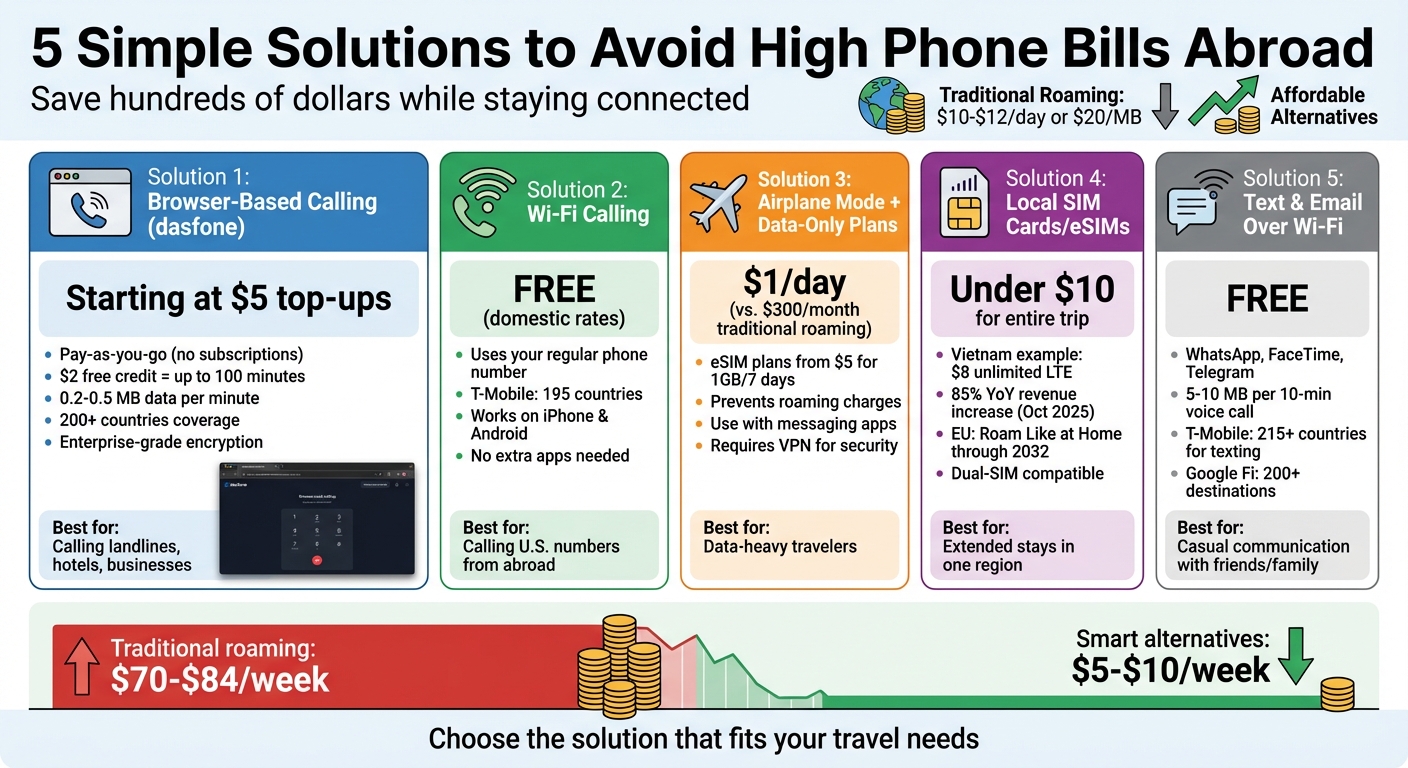
- Browser-Based Calling with dasfone: Make international calls via your browser without hidden fees. Pay only for what you use, starting at $5 for top-ups.
- Wi-Fi Calling: Use your phone’s built-in Wi-Fi calling feature to make calls over the internet for free or at domestic rates.
- Airplane Mode + Data-Only Plans: Disable roaming and use affordable eSIMs for data, starting at just $1 per day.
- Local SIM Cards or eSIMs: Buy a local SIM for cheap data and calls, often under $10 for an entire trip.
- Text and Email Over Wi-Fi: Use messaging apps like WhatsApp and FaceTime to avoid traditional call charges.
These strategies can save you hundreds of dollars while keeping you connected. Whether you’re calling home or navigating a new city, there’s a solution for every need and budget.
1. Use dasfone for Browser-Based International Calling
Cost-Effectiveness
Traveling abroad can quickly rack up hefty roaming charges - sometimes reaching $10–$12 per day or even $20 per megabyte [1][5][6]. That’s where browser-based calling, like dasfone, comes in as a smarter option.
With dasfone's pay-as-you-go system, there are no hidden fees, subscriptions, or daily passes. Signing up earns you $2 in free credit, which translates to up to 100 minutes of free calls [4]. Plus, you can take advantage of a 25% discount on your first top-up with the promo code DF25 [4]. The minimum top-up is just $5, and you’ll only pay for the minutes you actually use.
Simple Setup and Accessibility
Getting started with dasfone is quick and hassle-free. There’s no need to download apps, switch SIM cards, or sign up for special plans. Just open your browser on any device, connect to Wi-Fi or mobile data, and you’re ready to call [4]. Whether you’re at a hotel, a café, or on the go, it’s as easy as logging in.
What’s more, dasfone lets you call both landlines and mobile numbers directly. This makes it perfect for reaching hotels, restaurants, tour operators, or even your bank - no need to rely on messaging apps [4].
Extensive Coverage and Compatibility
With access to 200+ countries [4], dasfone ensures you can stay connected just about anywhere you travel. Since the service runs entirely in your browser, there’s no need to worry about compatibility issues across devices or operating systems.
Browser-based calls are also efficient, using only 0.2–0.5 MB of data per minute [8]. This means you can enjoy clear, uninterrupted calls, even on slower or limited Wi-Fi connections.
Security and Privacy
When traveling, keeping your communication secure is critical. dasfone protects your calls and personal information with enterprise-grade encryption, the same level of security used by banks for online transactions [4][7]. This ensures your conversations stay private, even on public Wi-Fi at airports, hotels, or coffee shops.
Because dasfone operates entirely in your browser, there’s no need to download apps, which reduces potential security risks from unfamiliar app stores. It’s a seamless and secure way to stay connected while abroad.
2. Turn On Wi-Fi Calling
Save Money on Calls Abroad
Wi-Fi calling lets you make calls and send texts over the internet, helping you avoid pricey roaming fees. For most carriers, calls to U.S. numbers are treated as domestic, meaning if your plan includes unlimited domestic calls, they won’t cost you extra. This can save you a ton compared to international roaming rates, which can climb to $10 per day or more[9][2].
To avoid accidentally connecting to a foreign cellular network (and racking up roaming fees), switch your phone to Airplane Mode and then turn Wi-Fi back on. Once you’ve done that, the setup is straightforward, and your calls will feel just like they normally do.
Simple Setup and Seamless Use
Turning on Wi-Fi calling is easy. On an iPhone, go to Settings > Cellular > Wi-Fi Calling. For Android users, open the Phone app and navigate to More > Settings > Calls > Wi-Fi Calling. You may also need to register an emergency (E911) address with your carrier[11][12].
The best part? Wi-Fi calling works with your regular phone number and dialer - no need for extra apps or accounts to stay connected.
Stay Connected Anywhere
Wi-Fi calling offers broad global coverage, so you can stay in touch wherever you go. For example, T-Mobile supports Wi-Fi calling in 195 countries, letting you call the U.S. and Canada at no extra cost if you’re on an eligible plan[9]. Most modern smartphones, like the iPhone 14 and newer Android models, are equipped to handle Wi-Fi calling.
For the best experience, connect to a 5 GHz Wi-Fi network. This type of connection typically provides better call quality, with less lag and fewer disruptions.
Before heading on your trip, check your carrier's policies. While Wi-Fi calls to U.S. numbers are usually free, calls to international numbers might still carry charges depending on your plan.
5 Tips to USE YOUR PHONE Internationally (And Avoid Roaming Charges)
3. Use Airplane Mode with Data-Only Plans
Wi-Fi calling can help lower voice communication costs, but combining airplane mode with a data-only plan takes cost management to the next level, especially when traveling.
Cost-Effectiveness
Switching to airplane mode and using a data-only eSIM can significantly reduce your travel expenses. Traditional roaming charges often pile up quickly, potentially reaching $300 or more for a month-long trip[3]. In comparison, data-only eSIM plans are incredibly affordable, with options starting at just $1 per day[1].
"Now you can just download an app and buy as much data as you need, generally $1 or less per day for usage spread out over a week or a month." – Tim Leffel[1]
For instance, Airalo offers European eSIM plans starting at $5 for 1GB of data over 7 days. Meanwhile, choosing an international plan from your carrier for the same duration could cost $70 or more[3]. By enabling airplane mode, your primary SIM is prevented from connecting to foreign networks, eliminating the risk of surprise roaming charges.
Ease of Setup and Accessibility
Setting this up is simple. Before landing, activate airplane mode on your phone. Once you arrive, turn on Wi-Fi and switch to your pre-purchased data-only eSIM. To avoid accidental roaming, disable Data Roaming in your phone’s settings:
- iPhone: Go to Settings > Cellular > Data Roaming
- Android: Navigate to Settings > Mobile Networks > Data Roaming
With this configuration, you can still use apps like WhatsApp, FaceTime, or Telegram for calls and messages over Wi-Fi or your data-only plan. This method not only keeps costs low but also ensures reliable connectivity while traveling.
Security and Privacy of Communication
While airplane mode prevents roaming fees, relying on public Wi-Fi networks has its downsides. Many free Wi-Fi connections in airports, hotels, or cafes lack encryption, making them vulnerable to cyberattacks. Hackers can intercept your data or steal login credentials[13]. The FBI advises against automatically connecting to public Wi-Fi networks.
To stay safe, always use a VPN when accessing public Wi-Fi. Avoid conducting sensitive activities like online banking or handling confidential documents on these networks. Additionally, confirm the network’s name with staff to avoid falling for fake “twin” hotspots. For secure transactions, a data-only eSIM using cellular networks is a safer option[1].
4. Buy Local SIM Cards or eSIMs
If you're looking to cut down on connectivity costs while traveling, switching to local network options can make a big difference. Buying a local SIM card or eSIM is a simple and cost-effective way to avoid hefty international roaming fees. Instead of spending $10–$12 per day on roaming, you can often get local data plans for under $10 for your entire trip[14][15].
Cost-Effectiveness
The savings add up quickly. U.S. carriers typically charge daily roaming fees, which can cost $70 to $84 for just one week of travel. On the other hand, local options are far more affordable. For instance, in Vietnam, you can get unlimited LTE data for about $8[3].
"In most any country in big cities, you can buy a SIM at a little shop right on the street and you'll be paying so little for data it'll shock you." – Clark Howard, Money Expert[14]
Ease of Setup and Accessibility
Getting a local SIM card is straightforward. They’re widely available at international airports, convenience stores like 7-Eleven, and official network kiosks[14][16]. Just make sure your phone is unlocked, purchase a SIM from a trusted seller, and install it on the spot[17].
For an even easier option, eSIMs are gaining popularity. Many modern smartphones now support eSIM technology, which lets you download a digital SIM profile through a provider's app over Wi-Fi. Ideally, you should set this up before your trip[2][3][15]. Once you arrive, activate the plan, and you're good to go. In fact, travel eSIM revenues have seen an 85% year-over-year increase as of October 2025, showing just how popular this option has become[15].
"I haven't paid more than $10 for either eSIM, and both worked well for me. Compare that to $10/day for international service from some carriers and it's a no-brainer!" – Laura, Team Clark Member[14]
One tip: If you're using an eSIM, install it before you leave. Some countries, like Turkey, block access to international eSIM provider websites, which can make setup tricky once you’re there.
Global Coverage and Compatibility
Local SIM cards provide excellent coverage within the country and offer much lower data costs per gigabyte[15]. If you’re traveling within the European Union, you’ll benefit from the "Roam Like at Home" regulations, which allow a SIM purchased in one EU country to work across all member nations with no extra charges. These regulations are in place through 2032[15][16].
That said, availability varies by destination. In countries like Pakistan or India, getting a SIM can be more complex. Stick to official network shops or carrier kiosks to avoid scams or faulty cards[16].
If your phone supports dual-SIM functionality, you can use a local eSIM for data while keeping your home SIM for calls or texts. Label each SIM (e.g., "Home" and "Travel") and set the local SIM as your default for data. This approach helps you avoid high roaming fees while staying connected[15].
Security and Privacy of Communication
eSIMs offer an added layer of security since they can’t be physically removed if your phone is stolen[18]. However, some eSIM providers may track your activity and sell the data unless you adjust your settings to opt out[18].
When buying a physical SIM card, remember that many countries require you to show your passport or official ID. This is a standard procedure and helps ensure the legitimacy of the transaction[16].
"Many of the data providers track users and sell their data, unless you change your phone settings to opt out." – Allianz Partners[18]
5. Replace Calls with Text and Email
Switching to text and email is a simple way to cut down on communication costs, especially when traveling internationally. Instead of relying on voice calls, consider using Wi-Fi-based messaging apps like WhatsApp, FaceTime, or Telegram. These apps let you send texts, photos, and even make voice calls over Wi-Fi, avoiding traditional carrier networks and their fees. For instance, major carriers like AT&T and Verizon often charge $10 to $12 per day for roaming [1][2], but Wi-Fi messaging is completely free [10].
Cost-Effectiveness
Texting and emailing are much lighter on your wallet compared to voice or video calls, which can quickly consume your data allowance. Many U.S. carriers include unlimited international texting in their plans. For example, T-Mobile offers unlimited texting in over 215 countries, while voice calls cost about $0.25 per minute. Similarly, Google Fi includes texting in over 200 destinations, with voice calls priced at roughly $0.20 per minute [2][19]. If your plan already covers international texting, all you need is a Wi-Fi connection to avoid extra data charges.
Ease of Setup and Accessibility
Getting started with messaging apps is quick and easy. Most smartphones come with these apps pre-installed, or you can download them in seconds [10]. Once you're connected to Wi-Fi at a hotel or café, you can send messages and make calls without spending a dime.
Before heading out of Wi-Fi range, it’s a good idea to download offline resources like maps, hotel details, or guidebooks in PDF format. This way, you can avoid costly data usage later. In many places, especially across Europe, messaging apps like WhatsApp have become the go-to tool for communicating with local services, tour guides, and drivers [10].
Security and Privacy of Communication
While Wi-Fi messaging is a budget-friendly option, public Wi-Fi networks can pose security risks. Avoid handling sensitive tasks, like online banking, over these connections [1].
"Connecting to public Wi-Fi networks may pose a digital security threat, so avoid conducting sensitive transactions like banking over Wi-Fi." – John Breyault, Vice President of Public Policy, National Consumers League [1]
For everyday uses, such as sharing photos or coordinating plans, public Wi-Fi is generally safe. This approach adds a cost-effective, low-data option to your communication toolkit, making it easier to stay connected without breaking the bank.
Conclusion
Traveling abroad doesn't have to mean racking up sky-high phone bills. The five solutions discussed - dasfone for browser-based calls, Wi-Fi calling, Airplane Mode with data-only plans, local SIMs or eSIMs, and messaging apps - offer practical ways to avoid expensive roaming fees. Whether you're booking a hotel, staying in touch with loved ones, or figuring out directions in a new city, there's an option to suit your needs and budget.
Choosing the right method depends on how you plan to communicate. Need to call businesses or landlines? Dasfone's pay-as-you-go browser calling can save you from pricey carrier day passes, which often cost $10 to $12 per day. For casual chats with family or friends, WhatsApp or FaceTime calls over Wi-Fi are free and data-efficient - using just 5 to 10 MB for a 10-minute voice call. And if you need reliable internet on the go, eSIMs deliver fast local data at a fraction of typical roaming charges.
Before you depart, check that your phone is unlocked, supports eSIMs, and has offline maps downloaded. These simple preparations can help you avoid excessive roaming fees and even prevent shocking bills - like the infamous $143,000 case [1].
FAQs
Will dasfone work if my phone is locked?
Yes, Dasfone works even if your phone is locked. You can make calls straight from your browser without needing to unlock your phone or download any apps.
How do I avoid roaming charges while using Wi-Fi calling?
To sidestep roaming charges while traveling, consider enabling Wi-Fi calling on your phone. Before your trip, activate this feature in both your phone's settings and your mobile provider's account settings. Make sure your device is compatible with Wi-Fi calling and connect to a dependable Wi-Fi network when abroad.
When you make calls over Wi-Fi, they are billed as part of your regular plan - no extra fees apply. However, it's crucial to maintain a stable Wi-Fi connection. If the connection drops and your phone switches to cellular data, you could end up with roaming charges.
Should I use a local SIM or an eSIM for my trip?
Choosing between a local SIM and an eSIM often comes down to what works best for your situation. A local SIM is a budget-friendly choice if you're staying in one country, though it involves buying and physically swapping the card in your phone. On the other hand, an eSIM is all about convenience - perfect for multi-country trips. It lets you activate and switch plans remotely without fumbling with physical cards. If you're after flexibility and simplicity, eSIMs are gaining traction. But for longer stays in a single destination, a local SIM might still be the better fit.
Related Articles
Ready to Make International Calls?
Try dasfone today and make your first international call in seconds. No app download, no subscription—just instant, affordable calling from your browser.
Start Calling Now