How Adaptive Codecs Handle Network Fluctuations
How Adaptive Codecs Handle Network Fluctuations
If your network gets worse during a call, the codec has to trade sound quality for speech clarity. That’s the core idea.
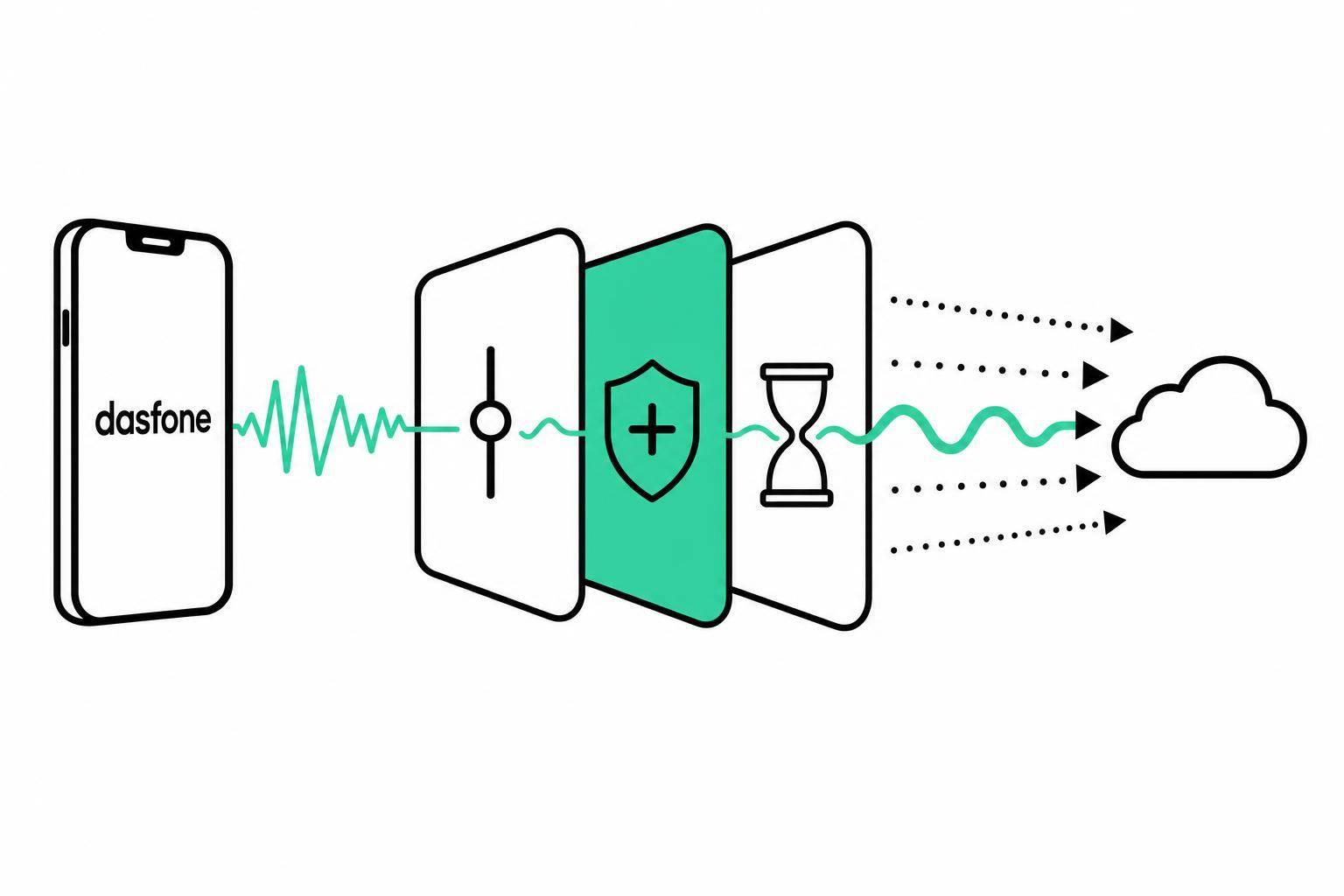
I’d sum it up like this: modern voice codecs watch for bandwidth drops, packet loss, jitter, and delay, then change bitrate, error repair, and buffering to keep people talking. In most browser calls, Opus does this best because it can shift from about 6 to 510 kbps, use FEC and PLC for missing packets, and work with a jitter buffer when packet timing gets uneven.
Here are the main takeaways:
- I see delay under 150 ms one-way as the safe zone for natural conversation
- I’d want packet loss below 1% for clean audio, because quality slips fast past 3% to 5%
- I’d keep jitter near or under 20 to 30 ms before buffering needs to step in
- I’d expect jitter buffers to add about 20 to 100 ms of extra delay
- I’d treat MOS 4.0+ as a good target on stable links, and MOS 3.5+ as a workable floor on mobile or busy networks
- I’d use Opus as the main browser-call reference, since WebRTC requires it
What matters most is simple: when the network turns messy, codecs don’t “fix” the line. They cut bitrate, hide missing audio, and delay playback a bit so the call stays usable.
Quick Comparison
| Topic | What I’d watch for | What the codec does |
|---|---|---|
| Bandwidth drop | Thin, flat audio | Lowers bitrate or shifts mode |
| Packet loss | Missing syllables, clipped words | Uses FEC and PLC |
| Jitter | Choppy or uneven sound | Expands the jitter buffer |
| Delay | Talk-over and awkward pauses | Keeps added buffering in check |
I’d also keep the codec differences straight: G.711 sounds strong on clean links but needs more bandwidth, G.729 uses far less data, iLBC handles loss well, and Opus gives the best all-around fit for browser-based international calling.
So if I had to put the whole article into one plain answer, it would be this: adaptive codecs keep calls understandable by reacting to bad network conditions in real time, even when that means giving up some audio detail. This technology is what powers the cheapest way to make international calls directly from your browser.
How Network Fluctuations Affect Call Quality
When bandwidth drops, packets disappear, or timing gets uneven, call quality starts to slip. And it doesn’t slip in just one way. Different network problems create different kinds of damage.
That puts codecs in a tight spot. They have to adjust bitrate, buffering, or error handling on the fly. The catch is simple: to keep the call stable, they often have to give up some audio detail.
Bandwidth Drops, Congestion, and Audio Compression Limits
When available bandwidth shrinks, a codec cuts bitrate to keep speech usable. That helps the call stay connected, but there’s a tradeoff. The sound can get thinner, flatter, and less natural.
Congestion creates the same kind of pressure. The codec has to strip away detail so people can still understand each other, even if the voice no longer sounds clean or full.
Packet Loss, Jitter, and Delay in Real Conversations
Packet loss stands out fast. Even small amounts can hurt perceived quality: 1% packet loss can lower quality by about 0.3–0.5 MOS points, and 5% loss can cut it by about 1.5 points.[7][6]
In plain terms, listeners may hear:
- skipped syllables
- clipped words
- short silences that break the flow of speech
Jitter causes audio to arrive at uneven times, which can make calls sound choppy or unstable. Delay adds another problem. Once it starts climbing, normal back-and-forth conversation gets awkward fast, and turn-taking begins to break down.
How Studies Measure Perceived Call Quality
Studies on codec performance usually look at both subjective and objective measures.
MOS tracks listener-rated quality on a 1–5 scale. PESQ compares the call audio against clean speech to score how much quality was lost. Put together, these measures show codec tradeoffs more clearly when network stress changes.
These are the exact problems modern codecs are built to fight.
Core Adaptation Mechanisms Inside Modern Codecs
Modern codecs adjust on the fly to changes in bandwidth, packet loss, and jitter so speech stays intelligible. The main controls are bitrate, error recovery, and playout timing.
Bitrate and Codec Mode Switching
When congestion goes up, a codec lowers the bit rate. Some codecs, including Opus, can also switch encoding modes to deal with changing network conditions while keeping speech intelligible.
FEC, Packet Loss Concealment, and Recovery Tools
FEC and PLC help hide missing packets before the listener notices obvious dropouts.
Forward Error Correction (FEC) rebuilds missing packets after loss. Packet Loss Concealment (PLC) fills short gaps during playback.
The mechanisms below map directly to the loss, jitter, and congestion issues described above:
| Mechanism | Network Metric | Expected Effect on Quality | Latency Impact |
|---|---|---|---|
| Forward Error Correction (FEC) | Loss | Reconstructs missing audio data | Negligible |
| Packet Loss Concealment (PLC) | Loss | Smooths over gaps where data is missing | None |
| Opus Bitrate Adaptation | Bandwidth | Maintains speech intelligibility during congestion | Negligible |
| Adaptive Jitter Buffer | Jitter | Reduces choppy and robotic audio | Adds 20–100 ms |
Adaptive Jitter Buffers and Playout Timing
Packets don’t always arrive at even intervals. An adaptive jitter buffer holds them for a short moment before playback so uneven delivery doesn’t turn into choppy audio. The tradeoff is simple: you add 20–100 ms of delay to get cleaner sound.
What Comparative Research Says About Codec Performance
How Different Codecs Behave Under Loss and Jitter
Once codecs start adapting, the next thing to look at is simple: which one keeps a call sounding good when the network gets messy?
That’s where the differences show up fast.
On a clean link, G.711 delivers the best call quality. The tradeoff is bandwidth. It uses much more of it than G.729, which gives up a bit of MOS in exchange for a far lower bitrate.[14][16]
Packet loss makes the gap between older codecs and adaptive codecs much easier to see. G.711 drops off fast if packet loss concealment isn’t there. iLBC, on the other hand, stays near MOS 4.0 even when packets go missing because its frame design handles gaps better.[12][14][17]
Jitter usually does less damage than packet loss, but it can still make weak playout behavior pretty obvious. Research shows that packet loss and MOS tend to track in a more quadratic pattern, while jitter follows a roughly linear one. Put plainly, loss hurts call quality faster than jitter does.[3]
Some codecs lean more on receiver-side buffering to smooth things out. G.711 and Speex fall into that group, so uneven packet timing can trigger artifacts sooner. Opus tends to hold up better because it combines dynamic bitrate control, in-band FEC, PLC, and coordination with the jitter buffer.[4][5][14]
Opus and WebRTC Across Common U.S. Network Conditions
Opus is the required audio codec for WebRTC, so it’s the default reference point for browser-based calling research.[2][5][10] It covers a broad bitrate range of about 6–510 kbps, which gives it room to adjust as network conditions shift.[14][15]
That flexibility matters on the kinds of connections people use every day in the U.S. - home Wi‑Fi, office networks, and mobile data. Opus stays usable across all of them because it can change bitrate on the fly and deal with packet loss better than many older options. Research also shows that smarter jitter buffering can improve MOS in a meaningful way, especially on bursty links.[8][4]
One WebRTC adaptive bitrate study found that Opus-based adaptation improved MOS over default settings across about 3% to 20% packet loss. With FEC turned on, it also kept calls above MOS 3 up to around 15% loss.[1][13]
For browser calls, a practical target is:
- MOS 4.0+ on stable connections
- At least MOS 3.5 on mobile or congested networks
- Packet loss under about 3%, and not sitting above 5% for long[10][13]
Codec Performance Summary Table
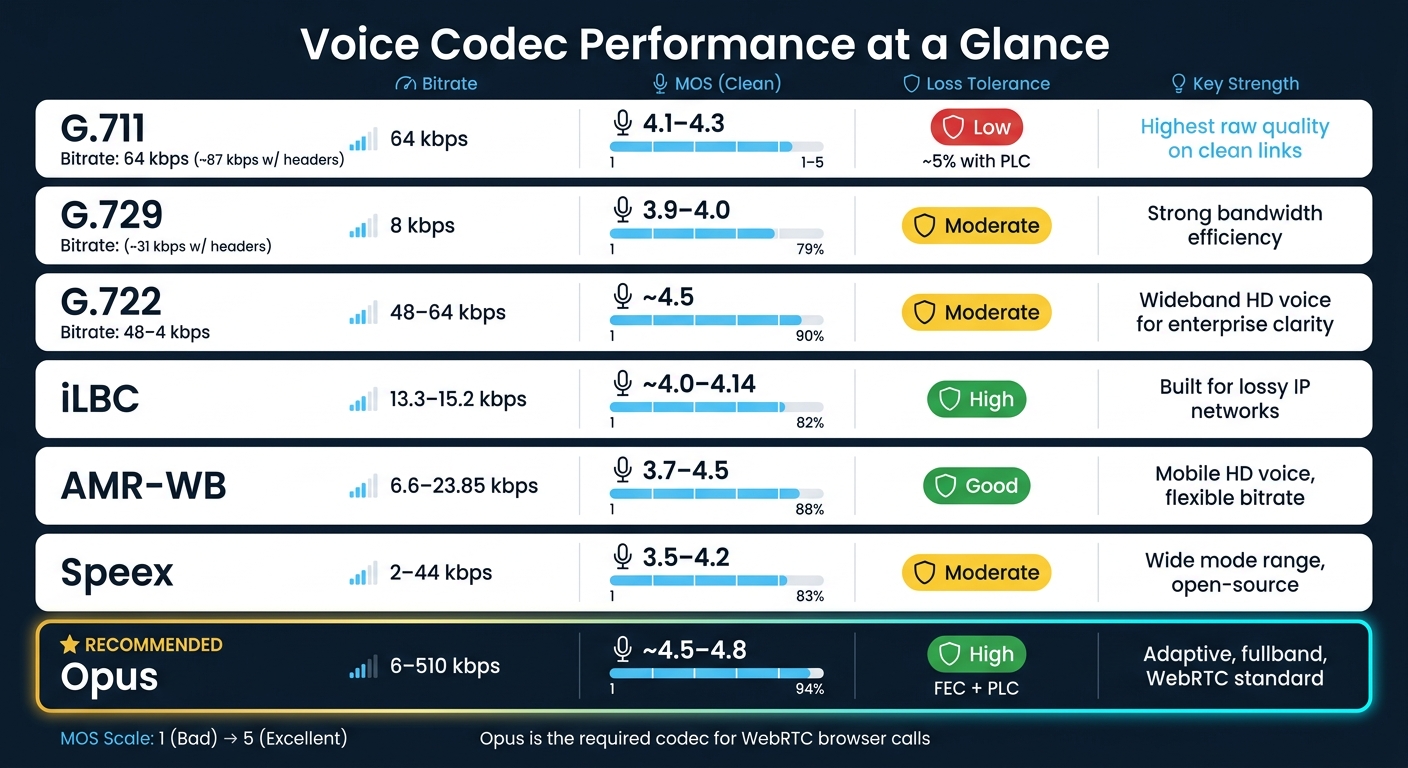
The table below pulls the main comparison points into one place.[9][11][12][13][14][15][16][17]
| Codec | Bitrate | MOS (Clean Link) | Loss Tolerance | Key Strength |
|---|---|---|---|---|
| G.711 | 64 kbps (~87 kbps with headers) | 4.1–4.3 | Low; about 5% with PLC | Highest raw quality on clean links |
| G.729 | 8 kbps (~31 kbps with headers) | 3.9–4.0 | Moderate | Strong bandwidth efficiency |
| G.722 | 48–64 kbps | ~4.5 | Moderate | Wideband HD voice for enterprise clarity |
| iLBC | 13.3–15.2 kbps | ~4.0–4.14 | High | Built for lossy IP networks |
| AMR-WB | 6.6–23.85 kbps | 3.7–4.5 | Good | Mobile HD voice, flexible bitrate |
| Speex | 2–44 kbps | 3.5–4.2 | Moderate | Wide mode range, open-source |
| Opus | 6–510 kbps | ~4.5–4.8 | High (FEC + PLC) | Adaptive, fullband, WebRTC standard |
That makes Opus the practical baseline for browser calls, especially when call conditions can shift in the middle of a conversation.
What This Means for Browser-Based International Calling
Why Adaptive Codecs Work Well for App-Free Web Calling
In browser calling, all of this happens in the background. Browser-based calling works without installed software because WebRTC takes care of the hard parts on its own. The browser handles codec negotiation and media encryption automatically.[18][19][20]
Live stats also give the platform room to react as network conditions shift. It can add more FEC redundancy, grow the jitter buffer, or reduce bitrate when the connection starts to slip.[21][22][23]
Users don't need to change anything. The system adjusts on its own.
How dasfone Benefits from These Research Findings
This matters most for people who need steady international calling without downloading an app. In browser-based international calls, adaptive codecs help turn shaky networks into smaller, more controlled drops in call quality.
Dasfone is built for the people who deal with unstable networks most often - expats, students, digital nomads, and international business teams. And each case stresses a call in a different way.
Dasfone can keep browser calls clear without any user setup. Secure transport through SRTP keeps those conversations encrypted.[19][20]
The table below shows which adaptive tools tend to help most in common network situations:
| Network Scenario | Typical Issues | Most Helpful Adaptive Mechanisms |
|---|---|---|
| Home Wi-Fi (U.S. broadband) | Congestion from streaming or gaming; sporadic jitter | Bitrate scaling; moderate FEC and PLC; dynamic jitter buffering |
| Campus / university networks | High contention, traffic shaping, heavy loss at peak hours | Stronger FEC and PLC; conservative jitter buffers; codec mode tuned for robustness |
| Mobile hotspot (LTE/5G) | Rapidly varying bandwidth; bursty, radio-induced loss | Aggressive bitrate adaptation and VBR; enhanced PLC; fast jitter buffer expansion |
| Overseas links (cross-border routing) | Higher baseline RTT; occasional congestion on long-haul paths | Careful jitter buffer tuning; intelligibility-focused codec mode; modest FEC |
For dasfone, these adjustments help keep browser calls intelligible as network conditions change.
Conclusion: The Core Trade-Offs Behind Stable Call Audio
The main takeaway is simple: adaptive codecs are always reacting. They adjust bitrate, switch modes, recover lost packets, and resize jitter buffers because network conditions keep moving.[1][24]
The best real-time calling systems combine three core levers - bitrate adaptation, loss recovery, and jitter control - then tune them nonstop based on what the network is doing. That's what helps keep conversations clear when the connection isn't.
FAQs
When should a codec lower bitrate?
A codec should lower its bitrate in real time when it detects network changes, such as instability or congestion. That helps keep call quality steady instead of letting the call fall apart when the connection gets rough.
Codecs like Opus, which dasfone uses, can adjust bitrate to fit the connection that’s actually available. When network performance drops, lowering the bitrate helps control latency and packet loss, so conversations stay clear and uninterrupted.
How much delay can a jitter buffer add?
The sources don’t say exactly how much delay a jitter buffer can add. They only make one point clear: total latency should stay under 150 milliseconds if you want conversations to feel natural and high quality.
When network conditions wobble, low-latency performance matters even more. In those cases, dasfone offers a browser-based platform built for high-definition audio and smooth communication.
Why is Opus preferred for browser calls?
Opus is the go-to choice for browser calls because it handles a wide range of audio use cases well. It can deliver 48 kHz high-definition audio, which is a big jump from the 8 kHz sampling rate used in old phone networks.
The main reason it works so well is its codec agility. In plain English, Opus can change its bitrate on the fly, anywhere from 6 kbps to 510 kbps, based on current network conditions. That helps keep calls stable and low-latency even when the connection starts to wobble.
Related Articles
Ready to Make International Calls?
Try dasfone today and make your first international call in seconds. No app download, no subscription—just instant, affordable calling from your browser.
Start Calling Now