Pay-As-You-Go Calls from Browser
Pay-As-You-Go Calls from Browser
I can call international mobile and landline numbers through dasfone in my browser - without installing an app or paying a monthly subscription. Before dialing, I check the destination rate, billing rules, and prepaid balance.
Here’s what I keep in mind:
- Cost: The article lists a $5 minimum top-up, a $2 sign-up bonus, and code
DF25for 25% off the first top-up. I confirm the terms at checkout. - Setup: I need a supported browser, microphone access, reliable internet, and the full international phone number.
- Fit: Prepaid calling can suit occasional personal or business calls, but I check coverage, credit expiration, and caller-ID limits first.
- Limits: I don’t assume the whole call is encrypted, and I never rely on browser calling for emergencies.
My rule: check the rate before calling, then review the charge afterward.
How Browser Calling Works
How Calls Reach Mobile and Landline Numbers
Browser calling uses WebRTC to record audio from your microphone and send it over the internet.[4][5][6][8] The service then connects that audio to the regular phone network.[7][9]
The person you call answers on their regular phone. Whether you can reach a mobile or landline number depends on the destinations and number types the service supports.
Don't assume the entire call is end-to-end encrypted.[2][3]
Routing depends on the destination and number type, so rates can change from one call to the next.
What You Need to Make a Call
Before using dasfone for an important call, check its current browser and device requirements. You'll need a supported browser, a working microphone, an account, and enough credit.
Allow microphone access only on the legitimate HTTPS site. If you've blocked access before, check the browser's site permissions. Work or school devices may block microphone access.[2]
Use headphones to reduce feedback and keep the audio private, then select your headset microphone in the browser.
Before dialing, check the call rate and your prepaid credit.
Understand Rates and Prepaid Billing
Rates depend on the destination and number type. Check the current rate in the web dialpad or Call Rate Calculator before dialing.
Estimate Your Call Cost
For per-minute billing, calculate per-minute rate × billable minutes, then add any minimum charge or connection fee. For per-second billing, use rate × seconds ÷ 60.
Use the worksheet below for an estimate - not a price quote. Enter one row per destination, separating landline and mobile numbers only when their rates differ. Use billing details confirmed by the live rate display or official documentation, and mark missing terms as “Not published.”
| Destination | Number type | Per-minute rate | Minimum charge | Rounding interval | Connection or setup fee |
|---|---|---|---|---|---|
| Country or territory | Landline/mobile | - | - | - | - |
Check whether your balance, including any promo credit, covers the full estimated call cost.
dasfone Top-Ups and Sign-Up Offers
Offer details include a $5 minimum top-up, a $2 sign-up bonus, and code DF25 for 25% off the first top-up. Before paying, confirm current availability, eligibility, and the final checkout amount.
How much call time does bonus credit buy? That depends on the destination rate. A top-up discount lowers the purchase price; it doesn’t change how many minutes the credit covers.
Before payment, check the promotion’s expiration date, destination restrictions, and tax treatment, if shown. Confirm that your available balance covers the planned call, and apply DF25 only if checkout confirms the discount.
Once your balance is set, place the call and review the final charge.
How to Make a Call with dasfone
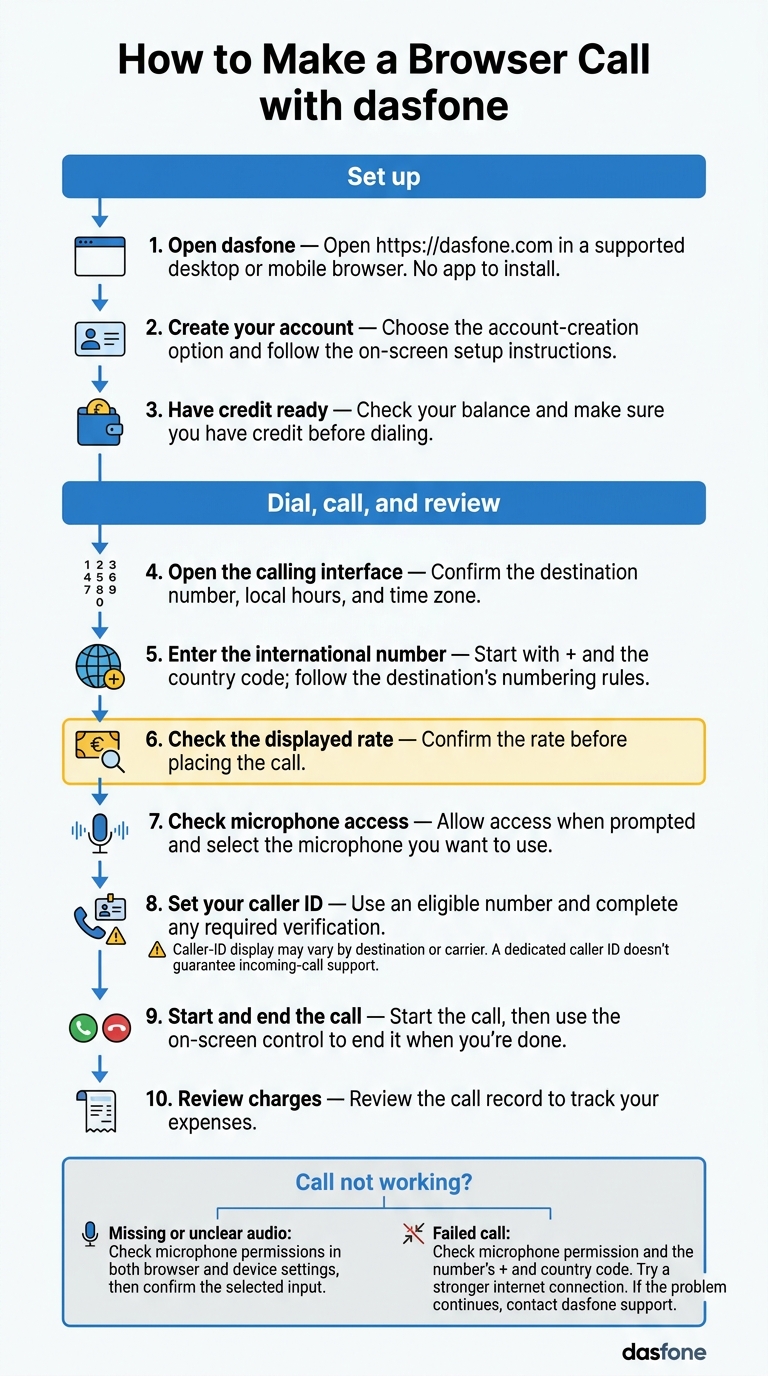
Steps 1–3: Open dasfone, Sign Up, and Add Credit
Open dasfone in a supported desktop or mobile browser. There’s no app to install.[1]
Choose the account-creation option and follow the on-screen setup instructions. Before dialing, check your balance and make sure you have credit ready.
Steps 4–10: Dial, Call, and Review Charges
Open the calling interface. Before dialing, confirm the destination number, local hours, and time zone. Enter the full international number, starting with + and the country code, and follow the destination’s numbering rules.
Check the displayed rate before placing the call. Then check microphone access before connecting. Allow access when prompted, and make sure the browser has selected the microphone you want to use.
Set your caller ID with an eligible number and complete any required verification. A dedicated caller ID may appear differently depending on the destination or carrier. It doesn’t guarantee incoming-call support.
Start the call, then use the on-screen control to end it when you’re done. Review the call record to track your expenses.
Fix Microphone, Audio, and Failed Calls
Missing or unclear audio? Check microphone permissions in both your browser and device settings, then confirm the selected input.
If a call fails, check microphone permission and make sure the number starts with + and the correct country code. Try again with a stronger internet connection. If the problem continues, contact dasfone support.
When Pay-As-You-Go Calling Fits
Once you know the rate, check whether pay-as-you-go calling suits how often you call.
Prepaid browser calling works well for occasional or uneven use, but it isn’t always the cheapest option. With dasfone, think about how often you call mobile and landline numbers abroad. Check billing increments and when your credit expires, too.
Uses for Travelers, Expats, Students, and Businesses
Use this table to see how a prepaid browser setup matches your calling needs.
| Audience | Calling need | Why prepaid billing may fit | Checks before dialing |
|---|---|---|---|
| Travelers | Hotels, airlines, banks, and insurers | Calls cluster around a trip | Reliable internet on travel days; mobile and landline support; backup contact method |
| Expats | Banks, utilities, landlords, and government offices | International usage varies monthly | Destination coverage; incoming-call support; caller-ID options |
| Students and digital nomads | Universities, visa offices, employers, and family abroad | Needs change by semester or location | Destination coverage; network restrictions; credit expiration |
| Importers and exporters | Suppliers, freight, and customs | Call volume changes with shipments | Coverage; business hours; call-record availability |
| Cold-calling businesses | Prospecting and follow-up | Prepaid credit helps control campaign spending | Consent; do-not-call lists; caller-ID requirements; calling hours |
For campaigns, budget for voicemail, retries, and agent time, not just connected calls. Follow calling, consent, caller-ID, and recording rules in every jurisdiction. Set a spending ceiling and track costs against it. Before using call records for reporting, check which fields and export options are available.
Browser calling is not a replacement for emergency calling. VoIP emergency calls may route incorrectly, leave out location or callback details, or fail during internet and power outages.[10][11]
Use the checklist below to check coverage, credit, and permissions before you dial.
Recap and Pre-Call Checklist
Run through this pay-as-you-go checklist before every call to avoid missed permissions, wrong-number charges, and caller-ID issues.
Device check: Make sure your browser is supported and up to date. Allow microphone access, select the right input, and use reliable Wi-Fi or Ethernet. Before an important call, close streaming and backup apps.
Number check: Enter the full international number, including the country code. Omit the local dialing prefix where required.[12][13] Check that both the destination and number type are supported - not just the country.
Payment and caller-ID check: Check the live rate, billing increment, and remaining balance. Keep a small balance buffer for your planned call, and choose an allowed caller ID. What the recipient sees can still vary by their carrier.[14]
After the call, review the duration, destination, charge, and remaining balance. If the charge looks wrong, save the call log and contact support. Check the live rate on dasfone before topping up.
FAQs
Does my unused dasfone credit expire?
No. Your unused dasfone pay-as-you-go calling credits never expire. Add $5 or more, and your balance stays available until you’re ready to use it.
Am I charged if a call reaches voicemail?
With dasfone pay-as-you-go calling, you pay by the second for connected time, with charges deducted from your prepaid balance.
The available information doesn’t explicitly confirm how voicemail is billed. However, if your call stays connected while a voicemail message plays, that time would count as connected time.
You can check your call duration and cost in real time or review your call logs afterward.
What happens if my balance runs out mid-call?
If your balance runs out during a call, the call will end. You can check your balance in real time from your account dashboard.
To help keep calls connected, Dasfone’s auto-recharge feature adds credit automatically when your balance gets low. Prefer to add credit yourself? Set up low-balance email notifications so you can top up before your next call.
Related Articles
Ready to Make International Calls?
Try dasfone today and make your first international call in seconds. No app download, no subscription—just instant, affordable calling from your browser.
Start Calling Now