Mobile Browsers vs. Apps for International Calls
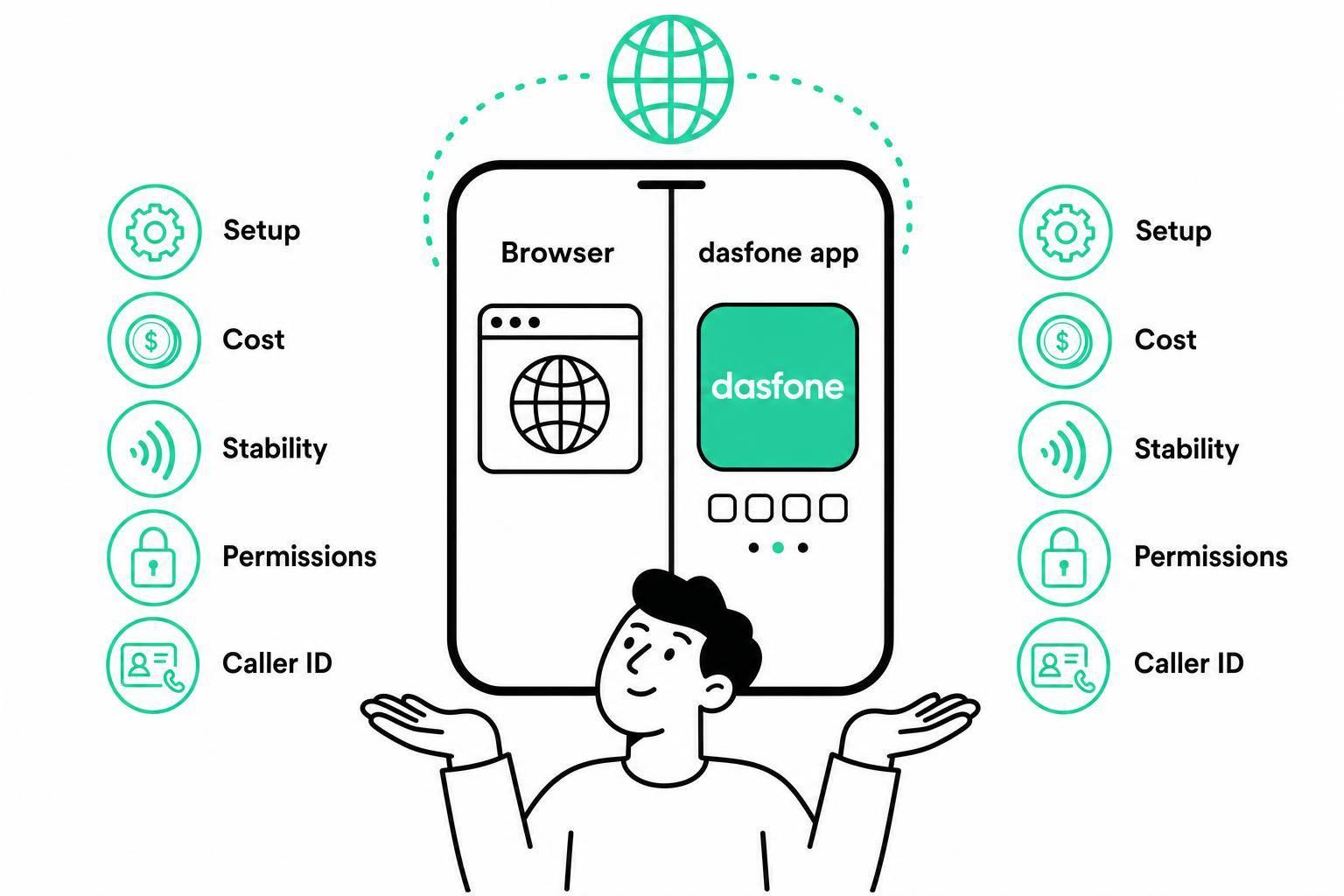
Mobile Browsers vs. Apps for International Calls
If I only make a few international calls each month, I’d usually pick a mobile browser. If I call often or need long calls to stay active while I switch apps, I’d pick an installed app.
Here’s the short version:
- Browser calling is best for fast setup, no download, and pay-as-you-go calling to landlines and mobile numbers.
- Apps are better for longer calls, background use, contact sync, and call logs.
- On iPhone, browser calls are more likely to stop if I lock my screen or move the tab to the background.
- On Android, browser calling can work a bit better than on iPhone, but apps still tend to handle background calling more steadily.
- If I’m calling a bank, supplier, school, or office, caller ID can matter.
- Some services, like dasfone, start at $5 and don’t require a subscription.
A few facts shape this choice:
- Browser calling usually needs only microphone access
- Installed apps often ask for microphone, contacts, and notifications
- Browser tools often suit one-off or occasional calls
- Apps fit people who call every day or multitask during calls
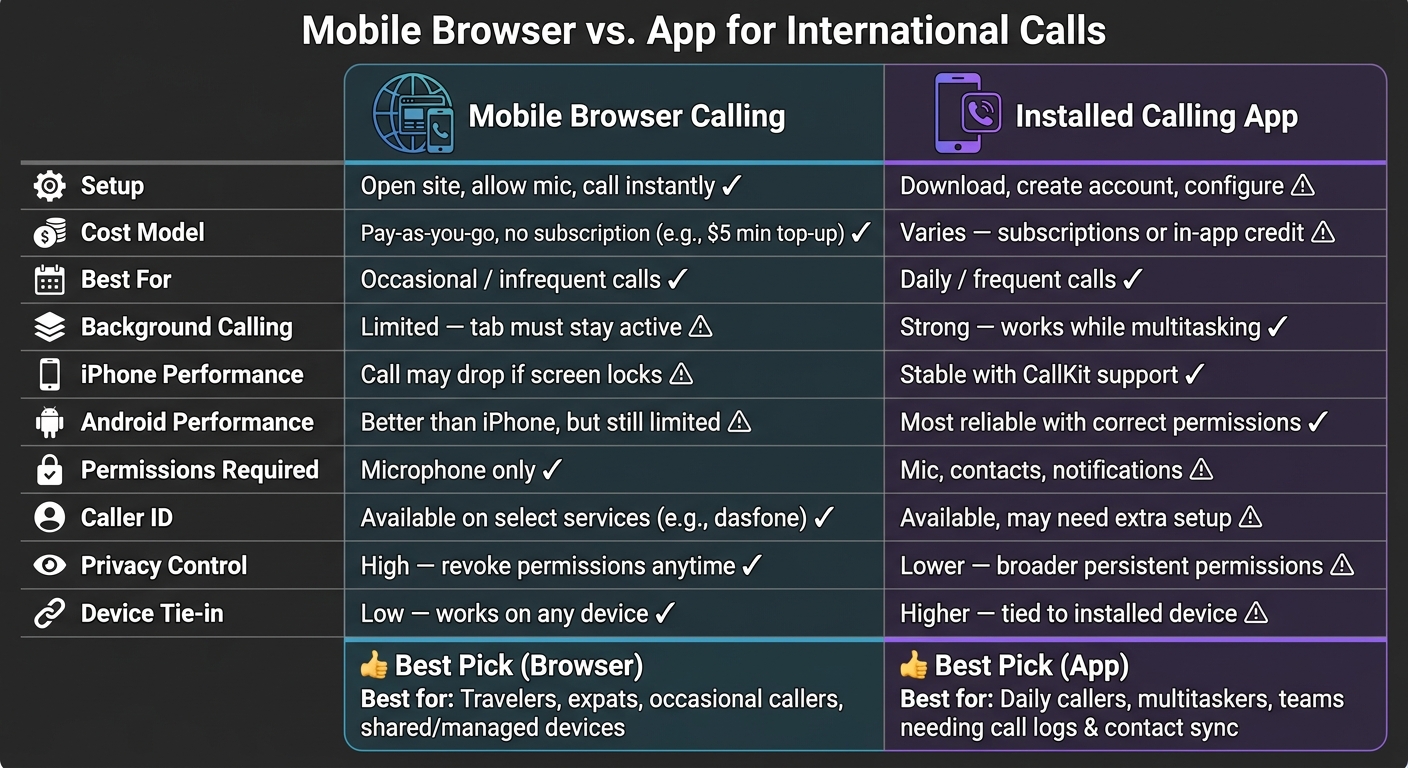
Why it is Better to use Some Platforms on a Web Browser than Using them as Mobile or Desktop Apps
Quick Comparison
| What I’m comparing | Mobile browser | Installed app |
|---|---|---|
| Setup | Open site and call | Download and configure |
| Cost model | Often pay-as-you-go | Varies by app |
| Best for | Occasional calls | Frequent calls |
| Background calling | Limited, especially on iPhone | Better support |
| Permissions | Usually fewer | Usually more |
| Device tie-in | Low | Higher |
| Call stability during multitasking | Lower | Higher |
So if I want the simplest way to call an overseas number, I’d start with a browser. If I need my phone setup to handle calls throughout the day, I’d go with an app.
Mobile Browser Calling: Fast Setup, No Downloads, More Flexibility
Open the site in Chrome or Safari, allow microphone access, add credit, enter the number in international format, and place the call. That’s it. There’s no app to install, no storage taken up, and no subscription tied to the setup.
The big draw is simple: you pay only for the minutes you use. Most browser-based calling services use pay-as-you-go pricing, and per-minute rates are often much lower than carrier international rates. Many also give you credits that never expire, so you’re not stuck racing a deadline to use them[5][7][9].
Where Mobile Browser Calling Works Well
Browser calling makes sense when you need to reach a standard phone number - like an overseas office, bank, or other business - and the person on the other end won’t be using an app. It also works well on company-managed phones where IT rules block app installs, on shared devices, and while traveling when you want to avoid roaming fees or buying a new SIM[5][6][8].
For occasional calls, it’s often the fastest option. The catch is on mobile: background support is less steady than what you usually get from an installed app.
Browser Calling Limits on iPhone and Android
The main downside is simple. Browser calls usually need the tab to stay active. If the tab moves to the background or the screen locks, the call can drop. This happens more often on iPhone, since iOS limits background audio in browsers more aggressively than Android[1][2].
Browser behavior also varies from one setup to another, especially inside in-app webviews[4].
A simple rule helps here:
- Test your setup before any important call
- Use a full browser when possible instead of placing calls through in-app webviews
How dasfone Fits the Browser-Based Option
Dasfone is a browser-based international calling platform built for exactly this kind of use. It works on mobile and desktop, needs no app download, and uses a pay-as-you-go model with no subscription.
It includes HD audio, secure encryption, global coverage, and the option to use a dedicated caller ID. That last part can matter when you’re calling businesses that screen unknown numbers. Pricing starts with a $5 minimum top-up.
If you need better background call stability and deeper phone-level integration, an installed app is usually the better pick.
Installed Calling Apps: Better Device Integration and Background Performance
When browser calls rely on an open tab, installed apps shift the call experience onto the phone itself. That changes a lot. Instead of living inside a browser session, the app works at the device level, which means it can ring while you're in another app, pull up contacts by name, log calls on its own, and bounce back better after short signal drops.
Where Apps Have an Edge
Apps make more sense for frequent calling or calls you can't afford to miss. Since they tie into the phone, contacts, and call logs, they can do more than a browser tab usually can. That includes syncing contacts, call logs, voicemail, forwarding, transfers, ring groups, and CRM notes across devices.
They also handle long calls and multitasking better. If you're switching between apps, checking messages, or looking something up during a call, an installed app is usually more dependable in the background. On Android, apps can stay active in the background more reliably. On iPhone, apps with CallKit support can feel much closer to native phone calls.
What Apps Require From the User
The downside is setup. Installing an app usually means giving it microphone, contacts, and notification permissions. You also need to deal with account login, updates, storage, and mobile data use.
On Android, background performance often depends on extra tweaks, like turning on autostart, disabling battery optimization, or allowing background run permissions. Those settings can change a lot depending on the phone brand and Android version [10][13]. On iPhone, the app needs the right CallKit/PushKit setup to receive calls when it's in the background or fully closed [11][12].
That last part matters more than many people expect. An app may look fine during setup, then miss calls later because one permission or battery setting wasn't configured right. If the app will be used for work or other time-sensitive calls, test it before you rely on it.
Those trade-offs become clearer in the side-by-side comparison below.
Mobile Browsers vs. Apps: Side-by-Side Comparison for International Calls
This choice usually comes down to three things: how fast you want to get started, how steady the call needs to be, and what device you’re using. In day-to-day use, each option has clear strong points.
Comparison Table: Setup, Cost, Reliability, and Privacy
| Factor | Mobile Browser Calling | Installed Calling Apps |
|---|---|---|
| Onboarding | Open a URL, allow microphone access, add credit. | Download the app, create an account, verify, and configure. |
| Billing | Pay as you go, with clear per-minute pricing and no subscription. | Pricing varies: some apps use subscriptions, while others sell in-app credit through app stores, which can add taxes or fees.[16][17] |
| Reliability | HD audio over stable Wi-Fi; browser tabs can be interrupted when you switch apps.[22][7][23][3] | More consistent across long calls and transitions between Wi-Fi and cellular.[21] |
| iPhone and Android support | Works best on modern Chrome, Firefox, and Edge; Safari on iOS is only partially supported.[14][15] | Not browser-dependent, but performance depends on OS support and push notification setup.[21] |
| Ongoing upkeep | No app installs or updates to manage.[20] | Requires periodic updates and ongoing permission and battery configuration.[21] |
| Permissions required | Browser: usually microphone only; browser permissions can be revoked anytime. | App: broader permissions including microphone, contacts, and notifications. |
| Encryption | WebRTC uses encrypted media streams and TLS-secured signaling; dasfone also adds secure encryption.[4] | Reputable apps use similar protections, but they often request broader permissions. |
| Caller ID options | Some browser-based services offer verified or custom caller ID, which can help when calling banks, offices, or suppliers.[7][4][3] | Also available, but may require extra setup or purchasing a separate number.[16][19] |
On iPhone, browser calling is often a better match for short outbound calls than long sessions.
Best Choice by Use Case
The trade-offs make more sense when you look at common calling scenarios.
| Situation | Better Fit | Why |
|---|---|---|
| U.S. student calling a university abroad | Browser | Fast setup, no app to install, and easy pay-as-you-go top-up for an occasional call.[18][20][3] |
| Expat calling a foreign bank | Browser | Direct calls to real phone numbers, caller ID options can help the bank recognize the caller, and no app is needed on a shared or managed device.[7][4][3] |
| U.S. importer contacting overseas suppliers | Browser | Flexible across phone or desktop, with transparent per-minute pricing that suits irregular call volume.[22][23] |
| Companies making outbound international calls | Browser for browser-centric teams, app for mobile-heavy workflows | Browser-based calling suits fast deployment and shared-device access; apps work better when agents need background calling stability and stronger device integration.[20][21] |
Conclusion: Which Option Fits Your Calling Needs
After looking at setup, call stability, and how each option works across devices, the choice mostly comes down to how often you make calls. There isn’t one clear winner for everyone. Browser calling is the faster pick for occasional international calls, while installed apps tend to work better for frequent calling and stronger background use.
If you only call abroad a few times a month, browser calling is usually the simpler route. It’s fast to start and keeps your costs tied to what you use. If you call every day and bounce between apps, an installed app is often the steadier option.
Key Takeaways
Before you decide, run through these four questions:
- How often do you call, and do you want to install software? Occasional callers usually do better with browser tools. Frequent callers usually do better with apps.
- Do you need calls to stay stable while you switch apps or lock your screen? Apps usually handle this better than mobile browsers, especially on iPhone.
- How much privacy control matters to you? Browser-based tools often need fewer persistent permissions than installed apps.
- Do you need a dedicated caller ID? If you’re calling offices, banks, or suppliers abroad, look for a service that lets you use or buy one.
If browser calling sounds like the right fit, dasfone offers instant setup, pay-as-you-go pricing, HD audio, secure encryption, global coverage, and optional dedicated caller ID, with a $5 minimum top-up.
FAQs
Will a browser call drop if I lock my phone?
No. Dasfone can keep the call connected even when your phone is locked. That means you can make international calls from your browser without unlocking your device or installing an app.
Just make sure your internet connection stays stable. If the connection drops, or if your phone switches from Wi‑Fi to cellular data, roaming charges may apply based on your mobile plan.
Do I need caller ID for international business calls?
Yes. Caller ID can help build trust and improve answer rates for international business calls, especially since many people ignore unknown numbers.
With Dasfone, you can verify your current number or buy a dedicated virtual number with a local area code, so your identity stays clear and professional.
How do I know if a browser or app fits me better?
A browser-based app makes sense when you want things to be simple and low-maintenance. It runs right in your web browser, which means no downloads, no installs, and no manual updates.
It’s also a smart pick if you want to free up device storage, skip monthly subscription costs, switch between multiple or shared devices, or call landlines, offices, and businesses around the world.
Related Articles
Ready to Make International Calls?
Try dasfone today and make your first international call in seconds. No app download, no subscription—just instant, affordable calling from your browser.
Start Calling Now