8 Top VoIP Providers For Remote Teams 2026
8 Top VoIP Providers For Remote Teams 2026
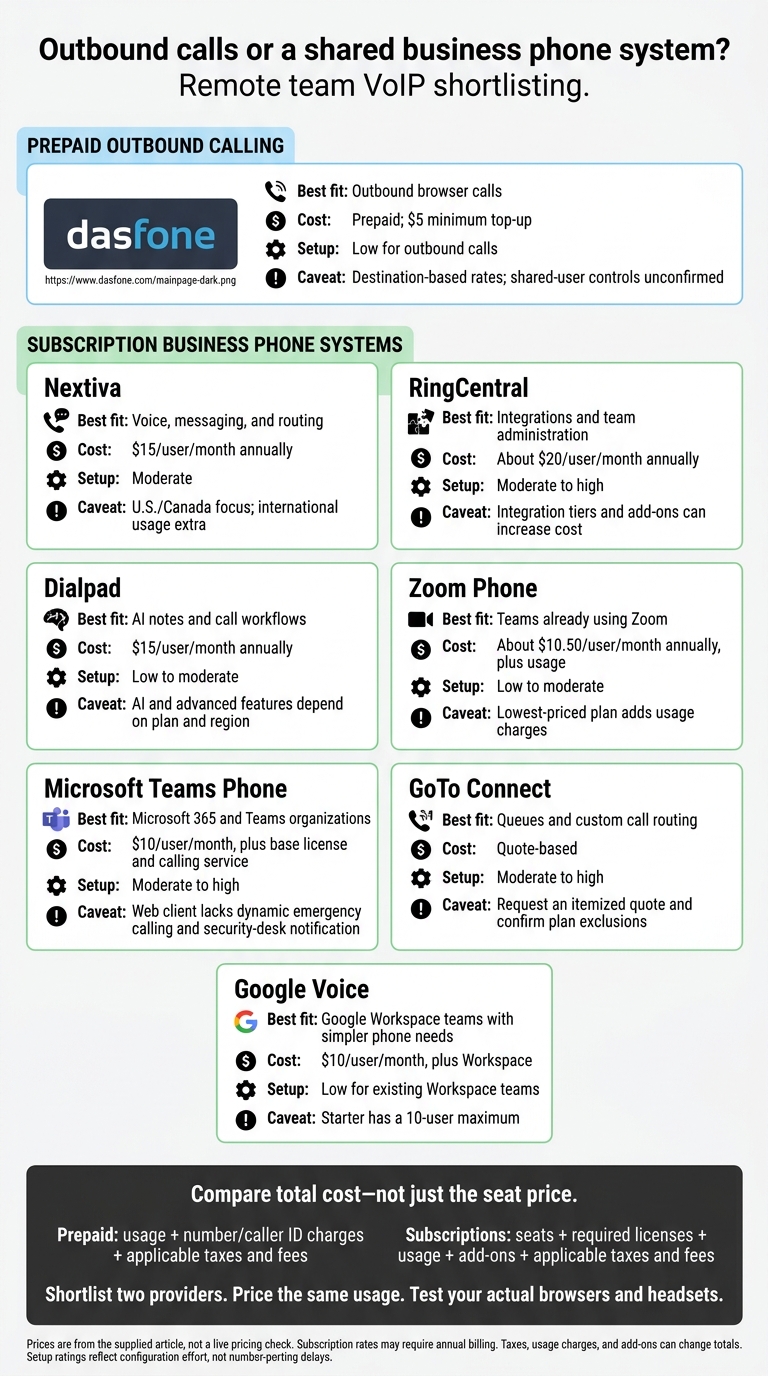
I’d start with one question: Do you need outbound calls or a shared business phone system? dasfone offers prepaid browser calling with a listed $5 minimum top-up. The other seven providers use subscriptions for business numbers, routing, and team tools.
My shortlist depends on how your team works: Nextiva for voice and messaging, RingCentral for integrations, Dialpad for AI call notes, Zoom Phone for Zoom users, Microsoft Teams Phone for Microsoft 365 teams, GoTo Connect for custom call routing, and Google Voice for Google Workspace teams.
I compare browser access, audio quality, total cost, international coverage, caller ID, team tools, and setup. My advice: check your actual calling destinations before choosing. A low seat price can leave out international minutes, required licenses, and add-ons.
Quick Comparison
Prices below come from the supplied article, not a live pricing check. Subscription rates may require annual billing.
| Provider | Best fit and team tools | Starting cost | Browser and audio checks | International calling and caller ID | Setup |
|---|---|---|---|---|---|
| dasfone | Outbound calls; shared-user controls unconfirmed | Prepaid; $5 minimum top-up | Desktop/mobile browsers; HD advertised | Destination-based rates; caller ID checks apply | Low for outbound calls |
| Nextiva | Voice, messaging, and routing | $15/user/month annually | Web/app; test audio on home networks | U.S./Canada focus; international usage extra; custom caller ID | Moderate |
| RingCentral | Integrations and team administration | About $20/user/month annually | Verify browser features and HD voice access | Number coverage and outbound rates differ; caller ID rules apply | Moderate to high |
| Dialpad | AI notes and call workflows | $15/user/month annually | Browser/app; verify AI and audio support | Included destinations depend on office location; selectable caller ID | Low to moderate |
| Zoom Phone | Teams already using Zoom | About $10.50/user/month annually, plus usage | Licensed web access; test call quality | Native calling in 49+ countries; caller ID varies by market | Low to moderate |
| Microsoft Teams Phone | Teams-based calling and administration | $10/user/month, plus base license and calling service | Web limits include emergency-calling gaps | Country and carrier rules apply | Moderate to high |
| GoTo Connect | Queues and custom call routing | Quote-based | Web app; test network and headset | 50+ countries on qualifying plans; exclusions and caller ID rules apply | Moderate to high |
| Google Voice | Workspace teams with simpler phone needs | $10/user/month, plus Workspace | Browser/mobile apps; connection-dependent audio | Numbers in 14 countries/regions; international rates vary | Low for existing Workspace teams |
I’d narrow the list to two providers, price the same monthly usage on both, and test calls with your team’s usual browsers and headsets before committing.
1. dasfone
Browser Calling and Audio Quality
dasfone is a browser-first option for teams that need to make international outbound calls quickly. It works in desktop and mobile browsers. The service advertises HD audio and encryption, but verify both before making sensitive calls.
Pricing and Contract Terms
dasfone uses prepaid, pay-as-you-go billing, with a listed $5 minimum top-up and no monthly subscription. Rates depend on the destination and whether you’re calling a landline or mobile number. Check the exact route and current top-up terms before adding funds.
Country Coverage and Caller ID
Coverage varies by country and number type, so check whether dasfone supports the specific numbers you plan to call.
You can use or purchase a dedicated caller ID. Before doing so, confirm the verification steps, destination restrictions, and how your number will appear to recipients. If you also need inbound calling, verify that capability separately.
Team Features and Setup
For remote teams, the main limitation is team management, not placing calls. Published materials focus on individual outbound calling rather than shared team phone features. That makes dasfone a better fit for solo callers or small distributed groups than larger teams with shared workflows.
Each user needs browser access, microphone permission, and a test call before rollout. It’s best suited to teams that want fast browser-based international outbound calling without administering a full phone system.
2. Nextiva
Browser Calling and Audio Quality
NextivaONE supports browser calling and offers desktop and mobile apps. Before rollout, confirm which browsers it supports and whether the browser version has the same features as the apps. Nextiva advertises 99.999% uptime, but uptime alone won’t ensure clear audio on home Wi-Fi. Test headsets and calls using each employee’s usual connection.[3][8][9]
Browser access also comes with business-plan pricing and limits that vary by tier.
Pricing and Contract Terms
With annual billing, Core starts at $15 per user per month, Engage at $25 per user per month, and Scale at $75 per agent per month, before taxes and add-ons. Confirm current rates, monthly-billing options, user minimums, renewal terms, and implementation charges.[5][8]
Country Coverage and Caller ID
Calling focuses on the U.S. and Canada. For teams calling across regions, international calls are generally billed per minute. New accounts also need support to enable international dialing.[4][7][10][11]
Nextiva supports number porting, toll-free numbers, and custom outbound caller ID, including business-name caller ID through CNAM. Check number availability and whether you can set caller ID by department or queue. Receiving carriers can still affect what customers see.[4][7][10][11]
These calling limits matter when assigning users, call routes, and permissions.
Team Features and Setup
Core includes call routing and voicemail. Scale adds contact-center tools such as skills-based routing, automatic call distribution, and supervisor monitoring. Check which tier includes IVR, voicemail transcription, recording, and live analytics.[5][8][10][12]
For Salesforce, HubSpot, or Zendesk connections, ask whether each integration is native, costs extra, and supports call logging or ticketing. For remote teams, the value goes beyond basic calling: it’s in routing, supervisor controls, and CRM connections.[5][8][10][12]
Most setup work involves routing, numbers, and permissions - not logging in. Configure users, emergency addresses, business hours, and voicemail. Start number porting early, then pilot inbound routing, after-hours handling, caller ID, and CRM connections. Even with fast browser access, porting, routing, and training can extend the rollout.[6]
3. RingCentral
Browser Calling and Audio Quality
RingCentral brings business voice, messaging, and video together, with desktop and mobile apps and HD voice. Check browser support for your RingEX plan, then test internal and external calls on the devices and network your team uses daily. Some plans also include QoS reports to help diagnose call-quality issues.[13]
Pricing and Contract Terms
RingCentral advertises prices of $19.99–$49.99 per user per month with annual billing, or $29.99–$59.99 with monthly billing. Ask for a written quote that covers licenses, minutes, numbers, add-ons, taxes, and renewal terms.[13]
Country Coverage and Caller ID
Coverage deserves as much attention as price. RingCentral says some plans offer business numbers in more than 100 countries. Its international-number service covers more than 75 countries.[13][14] Confirm which type of number you need: business numbers and international numbers have different coverage rules and setup requirements.[14]
Team Features and Setup
RingCentral puts calling, messaging, and video in one system, reducing the need for separate tools. Higher tiers add admin controls and integrations. Before choosing a plan, verify access to Salesforce, SSO, multi-site controls, and recording.
Setup usually involves defining sites, extensions, queues, permissions, and retention rules before porting numbers.[13] This suits teams that want calling and collaboration on one platform.
10 Best VoIP Systems for Remote Teams, Ranked with Real Prices
4. Dialpad
Dialpad is best suited to teams that want browser calling with built-in AI notes.
Browser Calling and Audio Quality
Dialpad supports browser calling and offers native apps for Windows, macOS, iOS, and Android.[18] Its Chrome extension lets you click to call from webpages, CRM records, and email. Check support for Edge, Firefox, and Safari before rollout.
HD voice quality depends on your headset, microphone settings, bandwidth, latency, and network policies. Dialpad AI provides transcription, summaries, highlights, and action items. Before using these tools, check your plan’s eligibility and set rules for recording and privacy.[18][24]
Pricing and Contract Terms
Reported Dialpad Connect rates are $15 per user per month with annual billing or $27 month-to-month for Standard. Pro costs $25 per user per month with annual billing or $35 month-to-month, while Enterprise uses custom pricing.[19][20][21] Reported seat minimums are one for Standard, three for Pro, and 100 for Enterprise.[19][21]
Dialpad also lists a $39 per user per month plan that includes unlimited domestic U.S. and Canada minutes, AI transcripts, AI Recaps, PII redaction, and CRM integrations. Check which product you’re pricing before comparing plans.[22]
Country Coverage and Caller ID
Dialpad offers international numbers across the Americas, Europe, and Asia-Pacific. Availability depends on the country and number type.[16] Included calling covers the user’s office country plus the U.S. and Canada. Calls outside those destinations cost extra.[16][17]
Users can choose a default outbound caller ID, change it for individual calls, or block it. Check that each number can be displayed on outbound calls and meets local rules.[15]
Team Features and Setup
Standard reportedly includes multi-level auto-attendants, visual voicemail, call forwarding, call recording, and up to three ring groups. Pro increases that limit to 25 ring groups and adds more integrations, APIs, and webhooks.[19] Check whether your exact plan includes Salesforce, Zendesk, or HubSpot access.
Setup involves signing in, granting microphone access, assigning numbers, and setting up routing and recording. Small teams may get started fast, but number porting, compliance review, SSO, and complex call flows can take longer.[18][19][21]
5. Zoom Phone
Zoom Phone pairs browser calling with licensed plans and centralized phone management. It suits teams that already use Zoom for meetings and chat and want calling in the same workflow, rather than a separate phone system.
Browser Calling and Audio Quality
Zoom Phone runs in the Zoom web app and desktop and mobile apps. To call from a browser, users need an assigned license, a supported browser, and access to a microphone and speakers or a headset.[26][30][33]
Test calls matter more than bandwidth alone. Latency, jitter, packet loss, and headset quality all affect how calls sound.[30][33]
Pricing and Contract Terms
Zoom offers metered plans, unlimited U.S./Canada plans, and global tiers. Costs depend on the billing term, country, taxes, and add-ons. Organizations can mix metered and unlimited plans to match how their teams call.[27][31][32][34]
Country Coverage and Caller ID
Zoom supports native public-phone-network calling in 49+ countries and metered international calling to 150+ destinations. Availability of local numbers, toll-free numbers, porting, emergency calling, and caller ID varies by market.[25][27][28][32]
Team Features and Setup
Admins can manage extensions, auto attendants, queues, business hours, voicemail, forwarding, and recording. Single-country teams can get started quickly once licenses and numbers are available. Multi-country setups take longer when they require number porting and local telecom checks.[26][29][31]
Larger organizations can also use BYOC (bring your own carrier) to keep their existing carrier arrangements.[26][29][31]
For teams built around Microsoft 365, the next option brings the same phone-system model into Teams.
6. Microsoft Teams Phone
Browser Calling and Audio Quality
Teams Phone supports calling through desktop and mobile apps, Teams-certified devices, and the web client when admins enable PSTN access.[35][36][39] It’s best suited to organizations already using Microsoft 365, though that fit comes with more licensing decisions.
Microsoft lists a 99.999% uptime SLA for Teams Phone Standard.[35] Audio quality still depends on each user’s internet connection, device, and headset.
Pricing and Contract Terms
The total cost has three parts: a Microsoft 365 or Teams license, a Teams Phone license, and PSTN service.[35][37][41]
| Cost component | Listed price or billing model |
|---|---|
| Required Teams or Microsoft 365 license | Separate qualifying license required; check existing entitlements. |
| Teams Phone Standard | $10.00/user/month, paid annually; PSTN service separate[35][41] |
| Teams Phone with U.S. pay-as-you-go calling | $13.00/user/month, paid annually; usage charged separately[35][41] |
| Teams Phone with a U.S. domestic Calling Plan | $17.00/user/month, paid annually[35][41] |
| Teams Phone with domestic and international calling | $34.00/user/month, paid annually[41] |
| Operator Connect or Direct Routing PSTN service | Carrier charges apply; Direct Routing may also require a certified session border controller or managed equivalent. |
Listed plans have annual, auto-renewing terms. Taxes, fees, usage, and eligibility can change the total.[35][37][41]
Beyond price, check country availability and your PSTN options. Calling Plans are Microsoft’s simplest way to call regular phone numbers. Operator Connect uses a participating carrier. Direct Routing gives you more control over carriers and dial plans, but takes more administration.[35][38]
Country Coverage and Caller ID
Availability, number inventory, porting, included minutes, international rates, emergency requirements, and local address rules differ by country. Check each employee’s location, number-porting eligibility, and outbound destinations. Don’t assume U.S. terms apply elsewhere.
Admins manage caller ID in the Teams admin center. External caller ID comes from the PSTN provider, while internal calls can use directory information.[40][42]
Emergency calls must send the user’s telephone number to the public-safety answering point.[40][42] These rules add setup and licensing work beyond browser calling alone.
Team Features and Setup
Before calling goes live, admins must configure licenses, PSTN service, numbers, policies, and emergency locations. Teams includes cloud voicemail, call queues, auto attendants, delegation, and related call-management tools.
Browser-only users need a separate emergency-calling plan. The web client doesn’t support dynamic emergency calling or security-desk notification.[36][39]
7. GoTo Connect
GoTo Connect suits remote teams that need browser calling, shared routing, and call queue controls.
Browser Calling and Audio Quality
GoTo Connect offers browser calling through its web app. Call quality still depends on bandwidth, latency, Wi-Fi, and your headset.[48][49][50] Test calls on your team’s setup rather than relying on the feature list alone.
Pricing and Contract Terms
Pricing is quote-based. Ask for an itemized quote that covers seats, numbers, porting, international usage, toll-free service, taxes, and setup. Also check cancellation terms and any minimum-seat commitment.[44][45][47]
Country Coverage and Caller ID
GoTo advertises coverage in 50+ countries, but qualifying-plan limits, exclusions, and metered overages apply.[43][45][51] Confirm that coverage includes the destinations, number types, and caller ID formats your team needs.
GoTo offers outbound caller ID options, number porting, and local, toll-free, and vanity numbers. Check caller ID verification requirements, how caller ID displays internationally, and fees for extra numbers.[46][48]
Team Features and Setup
GoTo includes auto attendants, call queues, extensions, custom routing, and a drag-and-drop Dial Plan Editor. Recording and analytics are available, but check whether your plan includes them. Before rollout, confirm retention periods, access permissions, export options, and consent controls.[46][47][48][52]
Browser access is just one part of setup. Routing, permissions, and porting account for much of the deployment work. Before launch, plan for number porting, user creation, queue setup, caller ID assignments, emergency-calling tests, and training. Rollout time depends on porting, routing complexity, integrations, compliance requirements, and team size.[46][48][52][53]
For a simpler phone option, the next section covers Google Voice.
8. Google Voice
Google Voice suits teams that already use Google Workspace and want browser calling with admin controls in one place. The consumer service is for personal use, while the Workspace business version adds business-owned numbers.[54][58]
Browser Calling and Audio Quality
Employees can make calls in a browser or through the Android and iOS apps. Audio quality depends on the network, device, headset, and browser permissions. Voicemail transcription may contain errors, and it doesn’t transcribe live calls.
Pricing and Contract Terms
Starter, Standard, and Premier cost $10, $20, and $30 per user per month, respectively. Google Workspace adds $6 per user per month, bringing starting totals to $16, $26, or $36 per user monthly, before usage charges and taxes. Starter supports up to 10 users; Standard and Premier allow unlimited users.[54][56][58]
Country Coverage and Caller ID
Google Voice provides local business numbers in 14 countries or regions on eligible Workspace plans. U.S. calls are included, as are calls to Canada from U.S. or Canadian Google Voice numbers. Calls to other destinations are billed per minute. Company numbers keep employees’ personal mobile numbers private. Check outbound caller ID and number-porting rules before rollout.[54][55][56][57][58]
Team Features and Setup
Workspace administrators can manage users, numbers, call forwarding, and spam controls in one place. Calendar integration can send calls to voicemail when employees are out of office, while call-transfer tools connect callers with teammates.
Check whether your plan includes auto attendants, ring groups, recording, and reporting. Setup involves syncing users, assigning or porting numbers, setting routing policies, and testing calls.[54][56][58]
Next, compare browser support, pricing, coverage, caller ID, team tools, and setup requirements across all eight providers.
Compare Calling Features, Costs, and Setup
These tables put the provider details side by side so remote teams can compare calling options, costs, and setup needs.
Note: This comparison uses the supplied research, not live testing. “Not disclosed” means the research did not provide that detail.
Browser Support and Call Quality
| Provider | Desktop browser | Mobile access | Audio documentation | Uptime/SLA | Headset and network requirements |
|---|---|---|---|---|---|
| dasfone | Claim: browser calling without an app | Claim: mobile compatible; browser support not disclosed | Claim: HD audio | Not disclosed | Not disclosed |
| Nextiva | Claim: browser calling; desktop app recommended for full functionality.[2] | Not disclosed | Not disclosed | Not disclosed | Not disclosed |
| RingCentral | Not disclosed | Not disclosed | Not disclosed | Not disclosed | Not disclosed |
| Dialpad | Official documentation: browser calling, with desktop and mobile apps available.[23] | Not disclosed | Official documentation: WebRTC and Opus.[23] | Not disclosed | Not disclosed |
| Zoom Phone | Not disclosed | Not disclosed | Not disclosed | Not disclosed | Not disclosed |
| Microsoft Teams Phone | Not disclosed | Not disclosed | Not disclosed | Not disclosed | Not disclosed |
| GoTo Connect | Not disclosed | Not disclosed | Not disclosed | Not disclosed | Not disclosed |
| Google Voice | Not disclosed | Not disclosed | Not disclosed | Not disclosed | Not disclosed |
Pricing, Billing, and Contract Terms
| Provider | Price model | Domestic versus international calls | Prepaid credit, numbers, and add-ons | Minimum seats, renewal, and cancellation |
|---|---|---|---|---|
| dasfone | No subscription; pay-as-you-go | Rates vary by destination and call type; exact tariffs not disclosed | $5 minimum top-up; caller ID available for purchase; fees and balance-expiration rules not disclosed | Seat minimum, refunds, and cancellation terms not disclosed |
| Nextiva | Not disclosed | Referenced offer includes the U.S., Canada, and Puerto Rico. International calls start at $0.01 per minute, depending on destination.[2] Exact plan eligibility and extra fees not disclosed | Number fees, credit requirements, and add-ons not disclosed | Not disclosed |
| RingCentral | Not disclosed | Not disclosed | Not disclosed | Not disclosed |
| Dialpad | Calling within the user’s country, the U.S., and Canada is described; other destinations may incur charges.[23] Additional fees not disclosed | Not disclosed | Not disclosed | Not disclosed |
| Zoom Phone | Not disclosed | Not disclosed | Not disclosed | Not disclosed |
| Microsoft Teams Phone | Per user/month, paid yearly: $10 phone system; $13 pay-as-you-go; $17 domestic; $34 domestic/international.[35][41] | The $10 option excludes a calling plan. The listed $34 allowance is 3,000 domestic or 600 international outbound minutes in applicable U.S., U.K., and Canadian plans.[35][41] | Required base licensing and optional services can add cost | Annual auto-renewal is documented.[41] Seat minimum and cancellation details not disclosed |
| GoTo Connect | Not disclosed | Not disclosed | Not disclosed | Not disclosed |
| Google Voice | Not disclosed | Not disclosed | Not disclosed | Not disclosed |
International Coverage and Caller ID
| Provider | Outbound destinations | Countries where service can be purchased | Number types | Caller ID and regional restrictions |
|---|---|---|---|---|
| dasfone | Claim: global coverage; destination list not disclosed | Not disclosed | Claim: existing or purchased caller ID options; inbound service and number types not disclosed | Claim: existing or purchased caller ID options; verification procedure not disclosed |
| Nextiva | International dialing documented; destination list needs confirmation.[2] | Not disclosed | Not disclosed | Claim: custom caller ID.[7] Verification procedure and regional limits not disclosed |
| RingCentral | Not disclosed | Not disclosed | Not disclosed | Not disclosed |
| Dialpad | Domestic and international calling described; destination-specific eligibility not disclosed.[23] | Not disclosed | Not disclosed | Not disclosed |
| Zoom Phone | Not disclosed | Not disclosed | Not disclosed | Not disclosed |
| Microsoft Teams Phone | International allowance documented; eligible destinations need checking.[35][41] | Not disclosed | Not disclosed | Not disclosed |
| GoTo Connect | Not disclosed | Not disclosed | Not disclosed | Not disclosed |
| Google Voice | Not disclosed | Not disclosed | Not disclosed | Not disclosed |
Team Tools and Setup Requirements
| Provider | Shared numbers and routing | Recording and analytics | Administration and integrations | Launch speed |
|---|---|---|---|---|
| dasfone | Not disclosed | Not disclosed | Not disclosed | Claim: instant setup; timing for number provisioning, porting, and team rollout not disclosed |
| Nextiva | Claim: advanced forwarding and virtual voicemail; shared-number controls not disclosed.[7] | Not disclosed | Not disclosed | Not disclosed |
| RingCentral | Not disclosed | Not disclosed | Not disclosed | Not disclosed |
| Dialpad | Not disclosed | Not disclosed | Not disclosed | Not disclosed |
| Zoom Phone | Not disclosed | Not disclosed | Not disclosed | Not disclosed |
| Microsoft Teams Phone | Not disclosed | Not disclosed | Not disclosed | Not disclosed |
| GoTo Connect | Not disclosed | Not disclosed | Not disclosed | Not disclosed |
| Google Voice | Not disclosed | Not disclosed | Not disclosed | Not disclosed |
The pros-and-cons summary below builds on these details to compare each provider’s strengths and limits.
Pros and Cons by Provider
Unverified means not confirmed. Compare each provider’s costs, coverage, limits, and admin work below - and check the details before choosing.
| Provider | Main Advantages | Main Limitations | Conditions to Check |
|---|---|---|---|
| dasfone | Browser-based international calling with no subscription, pay-as-you-go pricing, dedicated caller ID, and encryption. | Rates vary by destination. Recording and AI details remain unverified. | Confirm the $5 minimum top-up, destination rates, caller ID charges, and support terms. |
| Nextiva | A suite for teams that need more than calling.[1] | AI call summaries require higher tiers, and texting limits vary.[1][60] | Confirm the total subscription cost, AI allowances, setup support, and international exclusions. |
| RingCentral | App integrations help connect workflows.[1][60] | CRM access may require higher tiers. SMS caps and AI add-ons can increase costs.[1][60] | Check the total price for the integrations and international calling you need. |
| Dialpad | Built-in AI helps document calls.[60] | CRM access, multi-office controls, SSO, and support depend on the tier.[60] | Confirm which plan qualifies and what AI usage limits apply. |
| Zoom Phone | Offers phone-only licenses and Zoom Workplace bundles.[60] | Global Select Unlimited covers domestic calls in one supported country - not worldwide calling.[59] | Verify whether the $10/month international add-on covers your destinations.[59][60] |
| Microsoft Teams Phone | Offers plans with different calling allowances.[35][41] | Base licensing adds cost, and included minutes vary by plan and region.[1][35] | Check licensing eligibility, destinations, and browser support. |
| GoTo Connect | The supplied research does not disclose browser, pricing, or package details. | Setup effort and package exclusions need confirmation. | Request written browser requirements, pricing, included countries, and setup support terms. |
| Google Voice | Business numbers keep personal numbers private.[54][58] | May require Google Workspace. User caps, shared texting, and call-routing options need checking.[1] | Confirm number availability and international rates.[1] |
Compare total costs at the same usage level - not just the sticker price. For prepaid service, count the credit used and any number or caller ID charges. For subscriptions, count paid seats, required licenses, and the full annual commitment. Include add-ons, taxes, and usage charges in both cases.
Before rollout, test calls on employees’ devices, networks, and headsets. Confirm who handles provisioning, number porting, and failed calls, along with support hours.
For AI features, check the qualifying tier, included minutes, user limits, retention, and overage terms. Any details that haven’t been confirmed remain unverified.
Conclusion: Choose by Calling Needs and Total Cost
Choose based on call volume, geography, and admin workload - not just list price. The prices below are starting points. Taxes, usage charges, and add-ons can change what you pay.
Use this table to narrow your choices before requesting pricing or starting a trial.
| Provider | Best Fit | Starting Cost Model | International Coverage | Caller ID Flexibility | Team-Management Depth | Setup Effort | Main Limitation |
|---|---|---|---|---|---|---|---|
| dasfone | Browser-first international callers who prefer pay-as-you-go pricing | Pay-as-you-go; no subscription | Global outbound calling; destination-based rates | Existing or purchased dedicated caller ID; eligibility restrictions apply | Advanced controls unconfirmed | Low for outbound calling | Heavy usage can make costs less predictable |
| Nextiva | Teams that need voice, SMS, video, and chat | $15/user/month, billed annually [1] | U.S./Canada included; international calls billed by destination [2] | Custom outbound ID; number policies apply | Moderate to advanced routing and collaboration | Moderate | Higher tiers increase total cost |
| RingCentral | Larger teams or those that need many integrations | $20/user/month, billed annually [61] | Business numbers in 100+ countries on some plans; outbound rates vary [13] | Geographic-number eligibility applies | Advanced routing and integrations | Moderate to high | Add-ons increase spending |
| Dialpad | Sales and support teams that want AI-assisted calling | $15/user/month, billed annually [62] | Office country, U.S., and Canada included; other destinations cost extra [16][17] | Default, per-call, or blocked outbound ID [15] | CRM and multi-office controls vary by tier | Low to moderate | AI and advanced features depend on plan and region |
| Zoom Phone | Teams already using Zoom | Metered: about $10.50/user/month, billed annually, plus usage [59] | Native calling in 49+ countries; metered calls to 150+ destinations [25][27][28][32] | Number and caller ID options vary by market | Moderate; centralized administration | Low to moderate | Lowest-priced plan adds usage charges |
| Microsoft Teams Phone | Microsoft 365 and Teams organizations | $10/user/month add-on; qualifying license and calling service cost extra [63] | Availability depends on country and PSTN service; allowances vary by plan [35][41] | Depends on carrier and policy | Advanced enterprise administration | Moderate to high | Licensing and PSTN choices add cost and complexity |
| GoTo Connect | Teams that need customizable call workflows | Quote-based | 50+ countries on qualifying plans; exclusions apply [43][45][51] | Outbound ID options; regional restrictions apply [46][48] | Custom routing and queue controls | Moderate to high | A quote is needed to compare upfront costs |
| Google Voice | Small Google Workspace teams | $10/user/month; Google Workspace costs extra [1] | Numbers in 14 countries/regions; limited included calling, with destination-based international rates [54][55][56][57][58] | Business numbers; regional rules apply | Basic routing | Low for existing Workspace teams | Starter has a 10-user maximum [1] |
Setup ratings reflect configuration effort, not number-porting delays.
Before you buy, confirm destination rates, browser and headset support, caller ID rules, total licensing costs, and number-porting timing.
FAQs
How can I reduce dropped browser calls?
Use wired Ethernet when you can. If you’re on Wi-Fi, switch to the 5 GHz band and move closer to your router to reduce interference. Close apps that use lots of bandwidth, including streaming services and large downloads, to help prevent packet loss.
Keep your browser up to date and use a dedicated USB noise-canceling headset for clear audio. Check your dasfone balance before calling, too - calls disconnect automatically when your prepaid credit runs out.
How do I estimate my team’s monthly calling costs?
Check live, destination-specific per-minute rates with the rate calculator in the Dasfone dashboard before you call. Dasfone uses pay-as-you-go pricing, with no flat monthly subscriptions or hidden fees.
The dashboard’s real-time call logs and usage history let you track individual or team spending. Use that data to forecast monthly costs based on actual usage, not fixed monthly licenses.
How can I keep remote business calls private?
Choose browser-based calling that uses 256-bit AES encryption, SRTP, and DTLS to protect voice data as it travels over the internet.
Connect through a secure, private network rather than open public Wi-Fi, and keep your browser updated. Protect your account with strong passwords that you don’t reuse and multi-factor authentication. If you’re using a shared device, sign out and clear saved login details after your call.
Related Articles
Ready to Make International Calls?
Try dasfone today and make your first international call in seconds. No app download, no subscription—just instant, affordable calling from your browser.
Start Calling Now