WebRTC Security Features for Safe Calls
WebRTC Security Features for Safe Calls
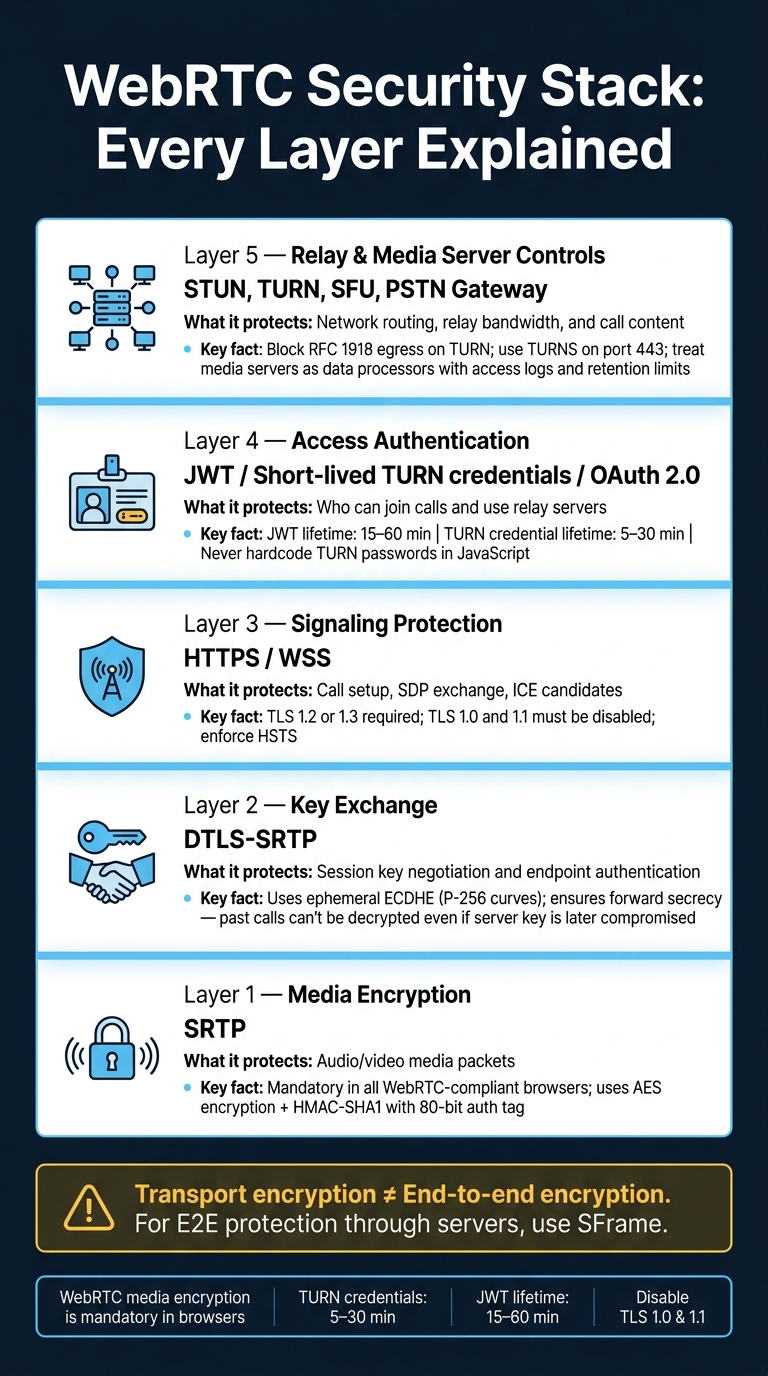
A safe WebRTC call comes down to five things: encrypted audio, protected signaling, short-lived access tokens, locked-down relay servers, and tight control over any media server that touches call data.
If I had to sum up the article in plain English, I’d say this: WebRTC is built to encrypt media by default, but that alone does not make a call safe. I also need to protect the setup path, check who can join, limit relay access, and remember that a server in the middle may still see call content.
Here’s the short version:
- SRTP encrypts live audio and helps stop replay attacks.
- DTLS-SRTP sets up session keys and helps confirm the media path.
- HTTPS/WSS protects signaling, where call setup can be changed if left weak.
- JWTs and short-lived TURN credentials limit who can start calls or use relay bandwidth.
- STUN, TURN, SFUs, and PSTN gateways each expose different data, so each needs its own rules.
- Transport encryption is not the same as end-to-end encryption. If I want end-to-end media protection through servers, I need tools like SFrame.
A few facts stand out:
- WebRTC media encryption is mandatory in browsers.
- TURN credentials are often set to just 5 to 30 minutes.
- JWT lifetimes are often kept around 15 to 60 minutes.
- TLS 1.0 and 1.1 should be off for signaling.
If you want the simplest takeaway, it’s this: safe browser calling is a stack, not a single feature, as seen in our dasfone vs ZenCall comparison. Each layer covers a different weak point, and if one layer is loose, the rest can fall short.
WebRTC Live #76: WebRTC Exposed! Vulnerabilities and Attacks
Core encryption features that protect WebRTC calls
WebRTC protects media with built-in encryption layers that work automatically in compliant browsers and media servers. In plain English, call audio stays private even when it moves across untrusted networks.
SRTP: encrypted audio and replay protection
Secure Real-time Transport Protocol (SRTP) encrypts media packets, checks their integrity, and blocks replay attacks, where someone captures packets and sends them again to disrupt or inject audio. Under RFC 8827, SRTP is required for all WebRTC media channels.[3]
In most cases, SRTP uses AES for encryption and HMAC-SHA1 for integrity checks, with an 80-bit authentication tag attached to each packet. The RTP header remains visible so the network can route traffic, but SRTP can still detect tampering.[7][8]
DTLS and DTLS-SRTP key exchange
DTLS (Datagram Transport Layer Security) is TLS for UDP. It verifies the endpoints and negotiates the keys that SRTP uses to encrypt media. Put together, this becomes DTLS-SRTP: DTLS handles authentication and key exchange, and SRTP uses those keys to protect each voice packet. Once the handshake is done, SRTP carries the media stream.
DTLS also provides forward secrecy. With ephemeral Elliptic Curve Diffie-Hellman (ECDHE), each session gets its own short-lived keys. So if a server's private key were compromised later, recorded calls from earlier sessions still could not be decrypted.[3] RFC 8827 requires support for TLS_ECDHE_ECDSA_WITH_AES_128_GCM_SHA256 with P-256 curves.[3]
DTLS vs. SRTP vs. DTLS-SRTP: a quick comparison
| Protocol | What It Protects | Network Layer | Mandatory in WebRTC? | How It Stops Eavesdropping |
|---|---|---|---|---|
| SRTP | Audio/video media packets | Application layer (wraps RTP) | Yes | Encrypts payload; blocks replayed packets via sequence numbers |
| DTLS | Key exchange and endpoint authentication | Transport layer (UDP-based) | Yes | Authenticates peers; prevents attackers from stealing session keys |
| DTLS-SRTP | The full media session | Combined | Yes | DTLS generates the keys; SRTP applies them to every voice packet |
That distinction matters. Encryption by itself does not decide who gets to join a call.
DTLS and SRTP lock down the media path. The next layer is session authentication. This is a key factor when you compare browser-based calling apps for security and ease of use.
Encryption protects the media path; session setup still has to prove who is allowed into the call.
Authentication and signaling controls that block unauthorized access
Signaling decides who gets into a call. If HTTPS or WSS is weak, an attacker can tamper with SDP, add a participant, or swap the DTLS fingerprint before the browser even starts the connection.
HTTPS, WSS, and certificate fingerprints in session setup
Send all signaling over HTTPS or WSS with TLS 1.2 or 1.3. Disable TLS 1.0 and 1.1, enforce HSTS, and use ECDHE-based AES-GCM suites.[11][4]
The a=fingerprint line in SDP includes a SHA-256 hash of the remote endpoint's DTLS certificate. During the handshake, the browser checks the DTLS certificate against that SDP fingerprint. If they don't match, the connection is rejected.[11][6]
That sounds strong, and it is - but only if the signaling path can be trusted. If a MITM changes the SDP fingerprint before the browser receives it, the check becomes useless.[12][5] So the fingerprint does its job only when the signaling channel itself is locked down.
Token-based authentication for users, devices, and call sessions
Use short-lived JWTs for user and session access. Keep claims narrow and limited to what authorization needs. Then validate those tokens on every signaling request - not just at login, but also during SDP exchange, ICE candidate submission, and mid-call actions like mute or transfer.[1][12][5][14]
It helps to split credentials by purpose. Signaling access and relay access are not the same thing, and they shouldn't share the same credentials.
JWT, TURN credentials, OAuth, and WebRTC identity methods compared
| Method | Primary Use Case | Recommended Token Lifetime | Main Security Benefit | Risk if Misconfigured |
|---|---|---|---|---|
| JWT | Authorizing users and sessions for signaling and room access | 15–60 minutes[1][12][13][14] | Stateless, scoped permissions per call or device | Long-lived tokens allow replay attacks after logout or compromise |
| Short-lived TURN credentials | Authenticating relay server access for NAT traversal | 5–30 minutes[2][9][10] | Prevents relay abuse and unauthorized bandwidth consumption | Static passwords can be scraped from configs and reused indefinitely |
| OAuth 2.0 | Delegating user login to a trusted identity provider (e.g., Google, Microsoft SSO) | 30–120 minutes (access token)[1][12][13][14] | Removes the need to store passwords; integrates with enterprise IdPs | Over-scoped permissions expose more than just calling features |
| WebRTC Identity | Cryptographically binding a user's identity to the media stream via an IdP | Session-based | Peer-to-peer identity assertion independent of signaling server | Complex to implement; limited and inconsistent browser support |
Generate TURN credentials per session with an HMAC-backed backend secret and keep the lifetime to 5–30 minutes. Never hardcode TURN passwords in JavaScript. If they're sitting in client-side code, they can be scraped and reused.[2][9][10]
ICE, STUN, TURN, and media server security
How STUN and TURN support secure call connectivity
Before any audio starts moving, WebRTC uses ICE (Interactive Connectivity Establishment) to find a network path that works between two endpoints. ICE gathers host, reflexive, and relayed candidates, then checks those paths until one succeeds.[20][17]
STUN is the light option. It tells the browser how its public IP and port appear from the outside, which helps make direct peer-to-peer connections work when NAT and firewall rules permit it. STUN does not carry media. It only handles small discovery requests. TURN handles the tougher cases: when a direct connection fails because of a strict corporate firewall or carrier-grade NAT, TURN relays the encrypted SRTP packets between callers through a server. TURN can see ciphertext and metadata, but not the audio itself.[20][17]
That said, TURN also adds risk. If a TURN server is set up poorly, it can turn into an open relay. That gives unauthorized users a way to route traffic through your infrastructure, burn your bandwidth, or mask the source of attacks.[1][15]
Once ICE picks a path, the main concern moves away from path discovery and toward relay controls and server access.
Hardening TURN and reducing IP exposure
Start by limiting what TURN is allowed to relay. Block egress to private RFC 1918 ranges - 10.x, 172.16–31.x, and 192.168.x - so attackers can't use your relay to reach internal networks. Add per-user and per-IP rate limits for allocations and bandwidth. Use TURN over TLS (TURNS) on TCP port 443 so relay traffic stays encrypted and can pass through firewalls that only allow HTTPS traffic.[15][19]
You should also watch for strange patterns. Sudden jumps in allocations, odd destination IPs, or long-lived idle relays are all signs that deserve alerts.
For privacy-sensitive calls, use ICE relay-only mode so remote parties see only the TURN server IP. The downside is pretty simple: a bit more latency and higher relay costs. For regulated industries or high-risk calling setups, that's often a trade worth making.[1][16][18]
STUN vs. TURN vs. SFU and media servers compared
Each part of the call path sees a different part of the traffic. And that changes what you need to lock down.
| Component | Role in the Call | What It Can See | Main Security Risk | Recommended Hardening |
|---|---|---|---|---|
| STUN | Discovers public IP for direct P2P | Client IP/port and NAT behavior | IP leakage; NAT mapping exposure | Limit exposed ICE candidates; use trusted STUN servers |
| TURN | Relays encrypted media when direct paths fail | Encrypted packets, metadata, and destination IPs | Open relay abuse; bandwidth theft | Short-lived HMAC credentials; rate limits; block RFC 1918 egress; TURNS on port 443 |
| SFU (Selective Forwarding Unit) | Routes streams between participants | Encrypted streams; may terminate encryption for mixing or routing | Trust model shift if decryption occurs | Strict access control; isolate in a dedicated network segment |
| Media server / PSTN gateway | Decrypts, mixes, transcodes, or records audio | Full call content (plaintext) | Data exposure; compliance risk | Treat as a data processor; enforce encryption at rest, access logs, and retention limits |
STUN and TURN help with connectivity. SFUs and media servers go a step further because they may also handle content, which means they need data-access controls too.
A simple way to think about it: apply network hardening to STUN and TURN, then use access control, logging, and retention rules for SFUs and media servers.
In browser-based international calling, STUN discovers paths, TURN relays when direct paths fail, and media servers or PSTN gateways connect the call to the phone network. Every hop needs its own set of controls.
The next section applies these controls in a production SaaS workflow.
Applying WebRTC security to international browser calling
What a secure call setup looks like in a production SaaS workflow
A secure WebRTC call usually follows a straightforward path: authenticated signaling, verified key exchange, and controlled media routing. That’s the setup behind a live call in a production SaaS workflow.
The backend issues a short-lived JWT. The browser then sends that token over WSS, so the server can authorize the call before negotiation begins. That stops unauthorized setup before any media path is even created.
Next, DTLS-SRTP encrypts audio while it’s in transit, and certificate fingerprints tie that media session to the authenticated call. If the fingerprint doesn’t match, the connection gets rejected. That blocks fingerprint spoofing during the handshake.
After that, ICE picks the best route for the call. If it can, it uses a direct path through STUN. If NAT or firewall rules get in the way, it falls back to TURN relay. In locked-down deployments, TURN credentials are time-limited and tied to one session, which helps cut relay abuse.
That same flow is what browser-based international calling uses in production. For international callers, a browser-based platform like dasfone uses these controls so calls stay encrypted across the call path, whether the user is on public Wi-Fi, a hotel network, or a campus connection.
Conclusion: The security controls that matter most
Once the call is live, security depends on keeping every layer in place, not on one feature doing all the work. WebRTC security only holds up when signaling, key exchange, authentication, and relay controls all remain tight.
- SRTP keeps media private and blocks replay attacks.
- DTLS manages trusted key exchange.
- HTTPS/WSS protects signaling and call control.
- Token-based authentication limits who can place calls.
- Hardened TURN helps reduce relay abuse.
Each layer covers weaknesses the others don’t. Together, they make browser-based international calling secure and practical.
FAQs
Is WebRTC encrypted by default?
Yes. WebRTC is encrypted by default for voice, video, and data. It’s not optional.
It uses DTLS-SRTP. DTLS handles the key exchange, and SRTP encrypts the media stream. That setup helps keep communication private and protected from tampering or eavesdropping, without extra plugins or software.
Does WebRTC encryption mean calls are end-to-end encrypted?
Yes. WebRTC uses built-in encryption to protect calls with DTLS-SRTP and 256-bit AES.
Here’s how that works in plain English: DTLS handles the handshake and key exchange, while SRTP encrypts the voice data. That helps block eavesdropping and tampering across browsers and devices.
Why do TURN credentials and JWTs need short lifetimes?
The current material doesn’t say why TURN credentials and JWTs should expire after a short time.
So this FAQ can’t be answered from the source as-is. If you want to answer it well, you’ll need a source that covers that security point directly.
Related Articles
Ready to Make International Calls?
Try dasfone today and make your first international call in seconds. No app download, no subscription—just instant, affordable calling from your browser.
Start Calling Now