How Browser-Based Calling Works
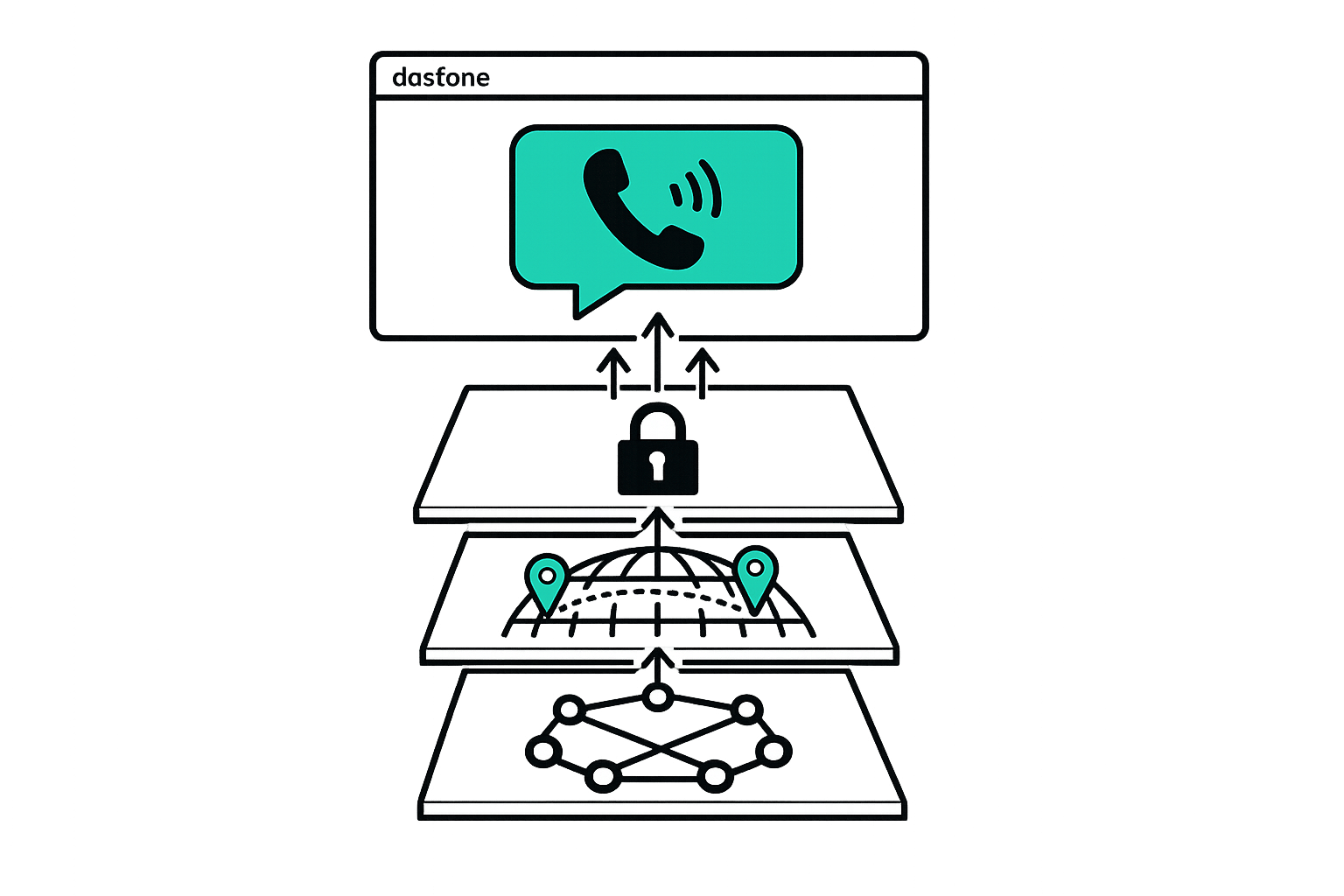
How Browser-Based Calling Works
Browser-based calling allows you to make international calls in your browser without needing apps, downloads, or SIM cards. Powered by WebRTC (Web Real-Time Communication), this technology connects your browser to global phone networks, offering high-quality audio, affordable rates, and secure encryption. Here's what you need to know:
- No Apps Needed: Works on any device with an updated browser like Chrome, Firefox, Safari, or Edge.
- Affordable Rates: Costs as low as $0.005–$0.02 per minute, saving up to 93% compared to traditional carriers.
- HD Audio: Delivers crystal-clear 48kHz sound quality using the Opus codec.
- Global Reach: Call landlines and mobile phones in over 195 countries.
- Secure Encryption: Uses DTLS-SRTP for secure, private calls.
- Quick Setup: Start calling in under 60 seconds.
This service is ideal for expats, professionals, and travelers who need easy, cost-effective international communication. Simply open your browser, add funds, and dial any number worldwide with no extra software or hardware required.
WebRTC Calls Made Super Simple!
How Browser-Based Calling Works
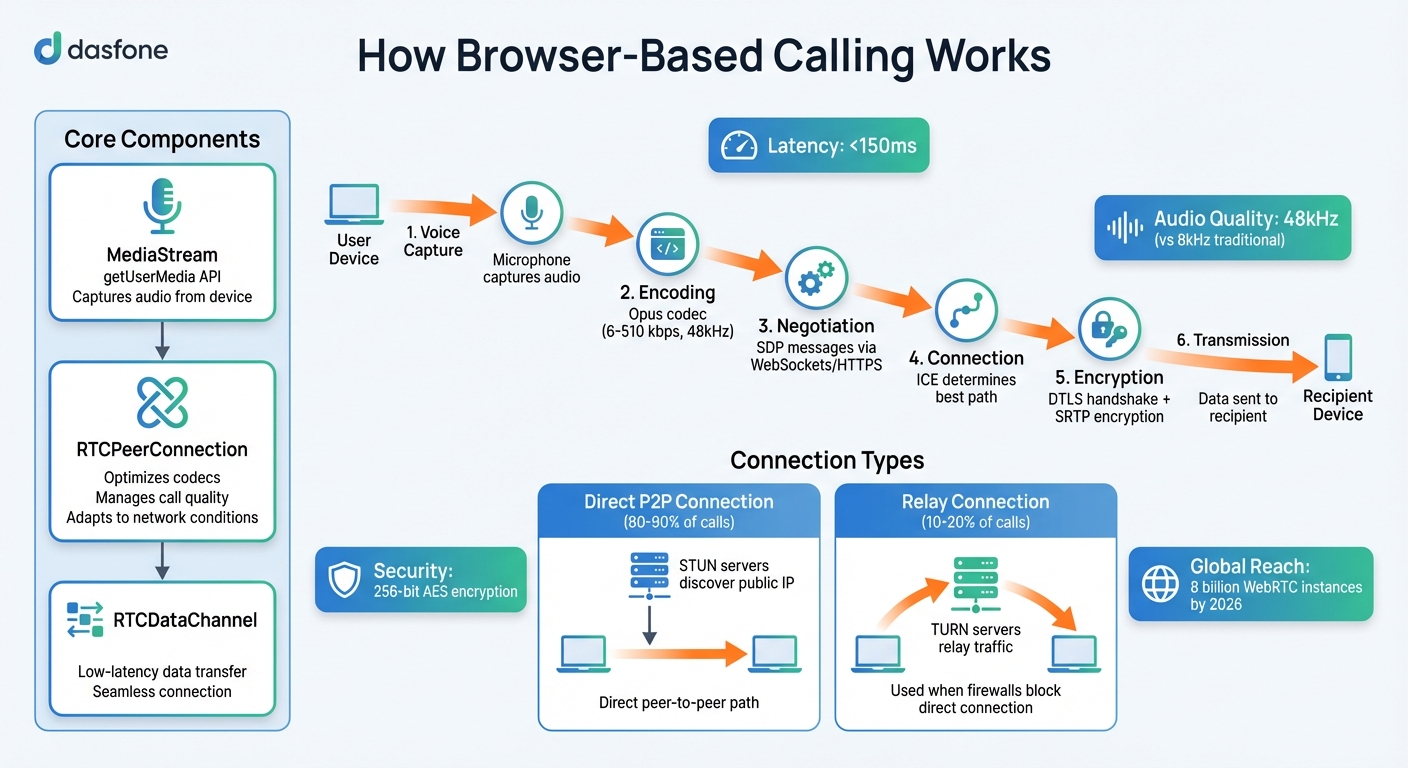
When you make a call directly through your browser, you're tapping into WebRTC (Web Real-Time Communication) technology. This system captures your voice, encrypts it, and sends it over the Internet - all without needing additional plugins or software. Let's break down the key components that make this work so smoothly.
The Core Components
WebRTC relies on three main elements to function effectively:
- MediaStream: This is accessed through the
getUserMediaAPI. Once you grant permission, it captures audio directly from your device, such as your microphone. - RTCPeerConnection: This handles the call connection. It works behind the scenes to optimize codecs, manage call quality, and adapt to network conditions, ensuring your conversation remains clear.
- RTCDataChannel: This component ensures low-latency data transfer, keeping the connection seamless and responsive.
WebRTC Technology Explained
One of WebRTC's standout features is its ability to maintain low latency - typically under 150 milliseconds. This is crucial for conversations to feel natural and uninterrupted. It achieves this using the adaptive Opus codec, which supports a wide range of bitrates (6–510 kbps) and delivers high-definition audio at 48 kHz sampling. This is a huge step up compared to the 8 kHz sampling rate used in traditional phone networks [1][2].
By 2026, it's estimated that there will be over 8 billion WebRTC-enabled browser instances globally [2]. WebRTC also uses SDP (Session Description Protocol) messages, sent via intermediary servers like WebSockets or HTTPS, to negotiate media formats and network settings with the recipient. This ensures that secure and efficient connections are established without user intervention.
How Secure Connections Are Established
Security is baked into WebRTC. Every call begins with DTLS (Datagram Transport Layer Security), which handles the initial handshake and key exchange. Once that's done, SRTP (Secure Real-time Transport Protocol) takes over to encrypt the actual voice data [2].
The connection process is powered by ICE (Interactive Connectivity Establishment), which determines the best path between you and the person you're calling. For about 80–90% of WebRTC calls, the connection is direct and peer-to-peer, thanks to STUN servers that help discover public IP addresses. In cases where firewalls block direct connections, TURN relay servers step in, accounting for 10–20% of calls [2]. Remarkably, your browser handles all of this automatically, ensuring both security and ease of use [2].
Setting Up Browser-Based Calling: Step-by-Step
Ready to start making secure calls directly from your browser? The setup is quick and hassle-free - no downloads, no app stores, and no complicated steps. Follow this guide to get started and make your first call in just a few minutes.
Step 1: Access the Platform
First, open your preferred browser and head to dasfone.com. For the best experience, Chrome is recommended, but Firefox, Safari, and Edge work well too. Setting up your account is simple - just provide your email address and create a password. Once that's done, you're ready to go. The platform works seamlessly on both desktop and mobile devices, with no need to install any additional software.
Step 2: Add Funds
To start calling, add a minimum of $5.00 to your account. Use promo code DF25 for a $2.00 sign-up bonus and a 25% discount on your initial credit purchase. Go to the "Add Funds" or "Buy Credits" section of your dashboard, select the amount, apply the promo code, and complete the payment using a credit card or another secure method [3][4]. Your balance updates instantly, reflecting both your purchase and the bonus amount.
Step 3: Grant Browser Permissions
Before making your first call, your browser will request access to your microphone. Click "Allow" when prompted. If you accidentally block it, you can easily fix this by clicking the padlock icon in your browser's address bar to re-enable microphone access. This step ensures your calls are securely encrypted, as discussed earlier. The best part? You only need to do this once - your browser will remember the permission for future use.
Step 4: Dial and Connect
Now you're ready to make your call. Start by entering the international number, including the correct country code (e.g., +49 for Germany or +1 for the United States). Choose your caller ID - either use your existing number or purchase a dedicated one through the platform. Then, hit the call button. WebRTC technology instantly establishes an encrypted connection, delivering crystal-clear 48kHz HD audio. Plus, with calls using just 0.2–0.5 MB of data per minute, it's efficient even on mobile networks [1].
That's it! You're all set to enjoy secure, high-quality calls directly from your browser.
Benefits of Browser-Based Calling
Browser-based calling brings a range of advantages, making it an appealing option for users around the globe. Here's a closer look at what sets it apart.
Quick Setup and Easy Access
One of the standout features of browser-based calling is how quickly you can get started. There’s no need to download apps, install software, or worry about taking up precious storage space on your device. Unlike mobile apps that can consume anywhere from 100 to 500 MB of storage [5], browser calling uses zero storage. Most users can get up and running in just 30 to 60 seconds [1]. This makes it especially handy in workplaces where IT restrictions block app downloads but allow access to web browsers.
HD Audio Quality and Transparent Pricing
Audio quality often suffers on traditional phone networks, which compress sound to 8kHz, leading to muffled conversations. Browser-based calling solves this with how WebRTC technology works and the Opus codec, delivering audio quality at up to 48kHz [1]. The result? Crystal-clear conversations where every word comes through, even on long-distance calls.
On top of that, the pricing is straightforward. With pay-as-you-go rates starting as low as $0.02 per minute for certain destinations [1], you only pay for what you use. There are no monthly fees, no hidden activation costs, and no expiration dates on your credits. For comparison, traditional carriers can charge as much as $1.50 per minute for international calls [6]. That means browser-based calling could save you up to 93% on those costs [6].
Worldwide Coverage and Secure Connections
Platforms like dasfone extend their reach to over 195 countries [5], allowing you to connect with mobile phones and landlines across the globe - all from a single browser tab. Whether you're dialing a bank in Germany, a supplier in China, or family in Brazil, the process is simple: enter the number with the country code and make your call.
Security is another key strength. Every call is encrypted using the DTLS-SRTP protocol with 256-bit AES encryption, the same level of protection trusted by banks and government agencies [5]. This ensures that your conversations remain private, whether you're using the service for personal or professional purposes.
Browser-based calling combines ease of use, high-quality audio, affordable rates, global reach, and top-tier security, making it a reliable tool for modern communication.
Device Compatibility and Technical Requirements
Browser-based calling, powered by WebRTC, works seamlessly on any WebRTC-enabled device - whether it's a desktop computer or a smartphone. This technology ensures HD audio quality and global reach. The only essential requirement is a modern browser, such as Google Chrome, Mozilla Firefox, Apple Safari, Microsoft Edge, Opera, Brave, or Arc. For the best experience, make sure your browser is updated to at least Chrome v80+, Edge v85+, Firefox v75+, or Safari v12+ [8]. Supported operating systems include Windows, macOS, Linux, and ChromeOS, making it versatile across platforms. Mobile users are covered too - Safari on iOS and Chrome on Android allow direct browser-based calling with no need to download additional apps.
Dasfone’s platform is designed to meet these standards, ensuring a smooth and reliable experience on all devices. Let’s take a closer look at the technical requirements that make this possible.
Compatible Browsers and Operating Systems
The technical requirements are straightforward. You’ll need a working microphone, either built-in or connected via a headset, and a steady internet connection. While a minimum bandwidth of 100 kbps for upload and download is sufficient [7], 1 to 5 Mbps is recommended for HD audio quality [1][9]. On iOS devices, double-check your privacy settings to ensure microphone permissions are enabled for the browser [11]. If you encounter connection issues, check your browser’s address bar or site settings to confirm that microphone access hasn’t been accidentally blocked.
These simple requirements ensure that both desktop and mobile users can enjoy an uninterrupted calling experience.
Using Browser-Based Calling on Mobile and Desktop
For desktop users, any supported browser on Windows, macOS, or Linux will do the job. Mobile users can simply open Safari on iPhone or Chrome on Android, navigate to the platform, and start making calls. Your call history and account credits sync automatically across devices, eliminating the need for additional logins or setups.
For the best audio clarity, consider using a dedicated headset or Bluetooth earbuds (like AirPods), which provide superior echo cancellation compared to built-in laptop microphones [1]. If you’re on a corporate network and run into connection issues, ensure that your firewall allows WebRTC traffic through TURN servers. Additionally, keeping your browser updated to the latest version ensures access to the newest security features and improvements. For optimal interface display, set your system scale and browser zoom to 100% [10].
Conclusion
Browser-based calling makes international communication simple and affordable. Forget about app downloads, subscriptions, or roaming fees - just open your browser, add credit, and call any number worldwide. With rates starting as low as $0.02 per minute and HD audio quality that outshines traditional phone networks, it’s a hassle-free way to stay connected [1].
This approach is especially handy for expats handling tasks like contacting banks or government offices, digital nomads working from various locations, or businesses running global campaigns. Dasfone works instantly on any device - whether it’s a laptop, tablet, or smartphone - and supports popular browsers like Chrome, Safari, Firefox, and Edge.
Powered by WebRTC, a technology integrated into browsers since 2011, it guarantees secure encryption and reliable performance [1]. Unlike services that require both parties to install software, browser-based calling connects directly to the global phone network, allowing you to reach anyone, anywhere, without asking them to download anything.
The setup is quick and easy - no hardware, no monthly subscriptions, and no risk of credit expiring. Whether confirming a dinner reservation overseas or managing large-scale international campaigns, this pay-as-you-go model keeps costs transparent and under control.
FAQs
Will my calls work on hotel Wi‑Fi or restricted networks?
Browser-based calling platforms, such as dasfone, can operate over hotel Wi-Fi or networks with restrictions. However, their performance often hinges on how the network is configured. Sometimes, you might need to navigate around these restrictions using tools like VPNs or proxies. Before making a call, ensure the network permits access to essential login or setup pages to avoid any hiccups.
How can I improve call quality if audio sounds choppy or delayed?
To get better call quality, start with a stable internet connection - wired is usually the best choice. Make sure your microphone and speakers are connected correctly and have the latest updates. It also helps to clear your browser cache, update your browser, and double-check that microphone access is enabled in your settings. If you're still having trouble, try disabling any VPNs or security software temporarily. And if audio issues continue, switching to wired headphones instead of Bluetooth can often make a big difference.
Can I choose what caller ID people see when I call?
Yes, browser-based calling platforms like Dasfone often let you choose the caller ID that appears to recipients. This can include options like a virtual number or a dedicated line. With Dasfone, you can even purchase a specific caller ID, giving you more control and a polished, professional appearance.
Related Articles
Ready to Make International Calls?
Try dasfone today and make your first international call in seconds. No app download, no subscription—just instant, affordable calling from your browser.
Start Calling Now