How to Make International Calls Without an App
How to Make International Calls Without an App
Making international calls has become simple and app-free with browser-based calling. Here's how it works:
No App Needed: Use any modern web browser like Chrome, Safari, Firefox, or Edge to make calls directly.
Powered by VoIP and WebRTC: Your voice is converted into data and transmitted securely over the internet.
Low Rates: Call over 195 countries starting at $0.02 per minute.
No Downloads: Save device storage - everything runs online.
Secure and Clear: Enjoy HD audio with encryption for privacy.
All you need is an internet connection, a headset for better sound, and prepaid credit on a platform like dasfone. Simply log in, enter the number, and call. It’s quick, affordable, and easy to use.
What Is Browser-Based International Calling?
Browser-based international calling allows you to make voice calls to any landline or mobile phone worldwide directly from your web browser. No need for apps, SIM cards, or traditional phone plans. All it takes is logging into the service’s website, entering the number you wish to call, and pressing the call button. Let’s dive into the key technologies that make this seamless process possible.
At the heart of this service is Web Real-Time Communication (WebRTC), a technology integrated into modern browsers like Chrome, Firefox, Safari, and Edge. WebRTC works alongside VoIP (Voice over Internet Protocol) to convert your voice into secure digital signals and transmit them in real time.
How Browser-Based Calling Works
WebRTC ensures smooth, real-time communication with latency as low as 50–100ms - much faster than the 150–300ms delay often experienced with traditional phone lines.
To keep your calls secure, this system uses DTLS-SRTP protocol with 256-bit AES encryption, offering military-grade protection - even on public Wi-Fi networks. For the best experience, use the latest version of Chrome, Edge, or Safari on your desktop or mobile device. A stable internet connection with at least 1 Mbps upload and download speed is recommended for clear, HD-quality voice calls. This combination of low latency, high security, and HD clarity ensures reliable communication across different networks.
Benefits of Calling Through Your Browser
Browser-based calling isn’t just technically sound - it’s also incredibly practical. One standout feature is its zero local storage requirement. Unlike mobile apps that can take up 100–500 MB of storage, browser-based calling uses no space on your device. There’s nothing to download, install, or manually update since everything runs on the service’s servers.
Setup is lightning-fast, taking about 30 seconds, compared to the 2–5 minutes typically needed to download and configure an app. Plus, it works on any device with a modern web browser, making it perfect for shared or work devices where software installation isn’t an option.
With the ability to connect to landlines and mobiles in over 195 countries, browser-based calling is a convenient global solution. And with rates starting as low as $0.02 per minute for certain destinations, it’s an affordable way to stay in touch worldwide.
What You Need to Get Started
Getting started with browser-based international calling is straightforward - no downloads or extra storage space needed. Everything operates directly within your web browser. Here’s a breakdown of the tools you'll need and how to set up your account.
Tools and Setup
You can make calls from any device with a modern web browser. Supported browsers include Google Chrome, Mozilla Firefox, Microsoft Edge, and Safari, all of which work smoothly on Windows, macOS, and Chrome OS.
For audio, you can use your device’s built-in microphone, but a dedicated headset is recommended. It offers better sound quality and minimizes background noise. A stable broadband connection - whether DSL, cable, or high-speed Wi-Fi - is essential for clear audio. Keep in mind that browser-based calls use about 0.2 MB of data per minute.
When you first use the service, your browser will ask for permission to access your microphone and speakers. Simply click "Allow" to enable these features [4]. To make sure you never miss notifications for incoming calls, you can right-click the browser tab and select "Pin" to keep it open during use.
Creating Your Account
To get started, sign up for a dasfone account and link your phone number - this can be a mobile or landline number. You’ll receive a six-digit code via text or voice call, which you’ll need to enter to verify your number.
For international calls, you’ll need prepaid credit. Add a payment method, ensuring the billing address matches the one registered with your card. You can then add funds in increments of $5, $10, $25, or $50. The maximum balance allowed is $500.00.
How to Make an International Call
Step-by-Step Instructions
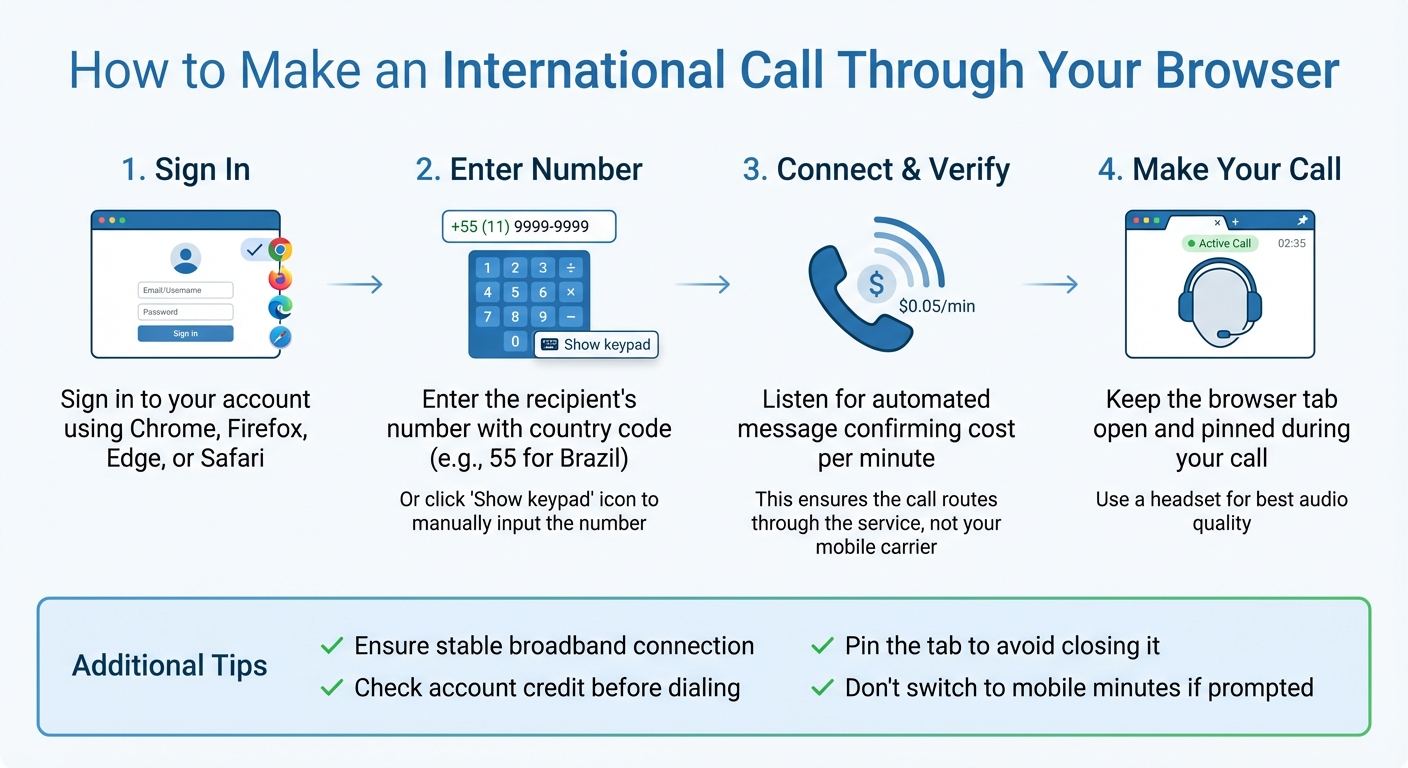
Once your account is loaded with credit, making an international call is pretty simple. Start by signing in to your account using a supported web browser like Google Chrome, Mozilla Firefox, Microsoft Edge, or Safari.
To make the call, enter the recipient's phone number, including the correct country code. For instance, if you're calling Brazil, start with +55 followed by the local number. Alternatively, you can click the "Show keypad" icon in the bottom-right corner to manually input the full international number. Make sure your browser is set up to handle "tel" links - this way, clicking a phone number will automatically initiate a call. Follow the dialing steps to connect your call.
Once connected, you’ll typically hear an automated message confirming the cost per minute or verifying that the call is being routed through the service. If you don’t hear this confirmation, the call might be going through your mobile carrier, which could lead to roaming charges. To avoid this, double-check that you’re connected to a stable broadband network.
Tips for Better Call Quality
For the best audio experience, use a headset instead of relying on your device's built-in microphone and speakers. If you run into audio problems or the connection drops, try restarting your browser to clear any temporary glitches.
Keep your dasfone tab open during the call. To avoid accidentally closing it, you can right-click the tab and select "Pin." This also ensures you don’t miss any incoming call notifications. If your internet connection becomes unstable, avoid switching to mobile minutes when prompted. Lastly, make sure your account has enough credit before dialing to prevent interruptions mid-call.
Understanding Costs and Rates
Once your account is set up, it's important to get a handle on how the rates work and discover ways to keep your expenses in check.
How Pricing Works
Dasfone uses a simple pay-as-you-go system, meaning you’re only charged for the minutes you actually use. There are no monthly fees, long-term contracts, or hidden costs. Rates start at just $0.02 per minute for countries like India, the United States, and Mexico. If you're calling Venezuela, the rate is approximately $0.11 per minute.
The pricing is straightforward - it's based on the number of minutes you talk, with no minimum call length required. Whether you’re calling a mobile phone or a landline, the rate is typically the same for most destinations. To plan ahead, use the rate calculator built into the platform. This tool lets you check the per-minute rate for your destination so you can estimate costs and avoid surprises.
You can start small, with as little as $2 in credit, to test the service and confirm the rates. Plus, your account dashboard provides real-time updates on your balance and call logs, so you’re always in control of your spending.
Ways to Lower Your Calling Costs
To save money, connect through a reliable Wi-Fi network to avoid using mobile data. Keep an eye on how long your calls last - since charges are per minute, even trimming a few seconds here and there can make a difference over time.
You can also set up email notifications to alert you when your balance is running low, rather than enabling auto-recharge. This gives you more control over how much you add to your account. Start with a small amount to test the service and adjust your spending as needed. With Dasfone’s clear pricing and no hidden fees, managing your budget is simple and stress-free.
Security and Privacy Protection
Making international calls through your browser comes with the peace of mind that your conversations are safeguarded by multiple layers of security. Knowing how these protections work can help you feel more in control of your privacy.
How Your Calls Are Protected
Dasfone uses HTTPS encryption to secure the connection between your browser and their calling servers. This encryption scrambles your call data, account credentials, and metadata while they travel across the internet. For the best security, stick to the latest versions of modern browsers like Google Chrome, Microsoft Edge, Mozilla Firefox, or Safari. This setup ensures your personal account details remain secure, reflecting Dasfone's dedication to safe, app-free international calling.
Keeping Your Account Safe
To protect your account, never share verification codes sent via text or phone. These codes are essential for verifying account ownership and blocking unauthorized access. Also, check your browser's "Protocol handlers" settings to ensure only trusted sites are allowed to initiate calls.
Regularly review your call logs for any unusual activity, and report unauthorized charges to dasfone right away.
Conclusion
Dasfone's browser-based calling makes global communication effortless - no app downloads required. With just Chrome, Firefox, Safari, or Edge on any device, you can connect to any landline or mobile number worldwide.
The pricing? Simple and transparent. Dasfone operates on a pay-as-you-go model, charging as little as $0.02 per minute. There are no subscriptions, hidden fees, or surprises - just clear, per-minute billing. This approach can lead to considerable savings compared to traditional carriers.
And when it comes to security, your calls are safeguarded with advanced HTTPS encryption and robust account protection measures, ensuring your conversations stay private and secure.
FAQs
Is browser-based international calling secure?
Browser-based international calling provides a hassle-free way to connect worldwide without the need for extra apps. Most platforms use encryption to safeguard call data, making them a solid choice for everyday conversations. That said, since these calls depend on internet connections, they can be at risk if you're on an unsecured network.
To keep your calls secure, stick to private and trusted Wi-Fi networks, ensure your browser and device software are up to date, and avoid discussing sensitive information unless you're sure the platform is reliable. While this method is generally safe, a little caution goes a long way in protecting your communication.
What internet speed do I need for high-quality international calls?
For smooth and reliable international calls, you'll generally need a stable internet connection with at least 1 Mbps for both upload and download speeds. That should cover basic needs. But if you're aiming for top-notch audio and video quality - especially during peak usage times - speeds of 5 Mbps or more per user are a safer bet.
Other factors can also play a role in call quality, like how crowded your network is, how well your device performs, and the quality of your router. A strong, steady connection is key to ensuring your calls are crystal clear.
How can I make international calls without using my mobile plan's minutes?
If you want to skip using your mobile plan's minutes for international calls, consider turning to web-based calling platforms that operate through your internet connection. These platforms let you make calls straight from your browser, so you’re only using data instead of racking up charges on your carrier minutes.
They’re simple to use, budget-friendly, and work seamlessly with most devices - offering a convenient option for secure, app-free global communication.
Related Articles
Ready to Make International Calls?
Try dasfone today and make your first international call in seconds. No app download, no subscription—just instant, affordable calling from your browser.
Start Calling Now