Ultimate Guide to Browser Calling
Ultimate Guide to Browser Calling
Browser calling lets you make phone calls directly from your web browser - no apps, SIM cards, or contracts required. By using WebRTC technology, it connects your internet-based call to regular phone networks (PSTN), allowing you to reach any landline or mobile number worldwide. It’s secure, cost-effective (as low as $0.02/min), and works on any device with a browser.
Key Highlights:
- How It Works: Uses WebRTC to transmit voice data securely via SRTP encryption.
- Who Benefits: Ideal for travelers, remote workers, expats, and businesses needing international communication.
- Setup: Compatible with most devices and browsers. Requires microphone access and a stable internet connection.
- Cost Savings: Up to 150x cheaper than traditional carrier roaming charges for international calls.
- Platforms: Services like Dasfone offer pay-as-you-go plans with no contracts or subscriptions.
Browser calling is simple to set up, affordable, and versatile for both personal and business use.
Getting Started with Browser Calling
System Requirements and Setup
Browser calling is compatible with Windows, macOS, Linux, ChromeOS, Android, and iOS - no extra hardware needed. For mobile users, Android supports Chrome and Firefox, while iPhone and iPad users must use Safari 14.3 or later, as all iOS browsers rely on Safari's engine.
A stable internet connection is key. While the minimum requirement is 100 kbps for both upload and download speeds, a connection of 1 Mbps or higher with latency below 100 ms provides HD-quality audio. If you're on Wi-Fi, switching to the 5 GHz band can reduce interference compared to the crowded 2.4 GHz band. For even better reliability, a wired Ethernet connection is ideal for important calls. Using a USB noise-canceling headset ensures clear audio. Always test your connection speed before your first call, and keep your browser updated to access the latest WebRTC security updates and audio improvements.
| Requirement | Minimum | Recommended for HD |
|---|---|---|
| Download Speed | 100 kbps | 1 Mbps+ |
| Upload Speed | 100 kbps | 1 Mbps+ |
| Latency | < 300 ms | 50–100 ms |
| Jitter | < 30 ms | < 20 ms |
| Hardware | Built-in mic/speakers | USB noise-canceling headset |
Once your system is ready, you're all set to create your account.
Creating an Account and Adding Credit
Head over to dasfone to sign up and start with a $2 bonus credit, which gives you about 100 free minutes. Dasfone operates on a pay-as-you-go basis - no monthly fees or contracts. Simply add credit when needed, with a $5 minimum top-up, making it a budget-friendly option. First-time users can also apply the discount code DF25 for 25% off their first top-up.
Before adding credit, use the Call Rate Calculator on the "Buy Credits" page to check the per-minute cost for your destination. This tool ensures you know exactly how much credit to add, avoiding any surprises.
Browser Permissions and Caller ID Setup
Once your account is ready, adjust your browser settings for smooth calling. On your first call, your browser will prompt you to grant microphone access - be sure to allow it. If access is accidentally blocked, click the lock icon in your browser's address bar to update permissions.
From your account dashboard, you can configure your outbound caller ID. Use an existing number or purchase a virtual number starting at approximately $2 per month. Having a recognizable caller ID boosts the chances of your calls being answered, ensuring professional and reliable communication. To streamline your experience, pin the calling tab to prevent accidental closure and enable "tel" link support in your browser's protocol handler settings. This lets you click phone numbers on web pages and open them directly in your web dialer.
Practical Use Cases for Browser Calling
How Individuals Use Browser Calling
Browser calling offers a simple yet powerful way to make calls without the need for both parties to install the same app. Unlike platforms like WhatsApp, it allows you to dial any landline or mobile number directly, making it especially handy for situations where messaging apps fall short.
Take, for example, someone needing to contact offices abroad - whether it’s a bank, a government agency, or a university that only lists local landline numbers. With a browser dialer, you can make those calls effortlessly, skipping the hassle of app installations or complicated setups.
For travelers and digital nomads, browser calling is a game-changer. It helps avoid the steep costs of international roaming. A 30-minute call from Thailand to the U.S., for instance, costs just $0.60–$0.90 using browser calling, compared to the hefty $12–$35 charged by roaming services [1].
It’s also an excellent option for staying in touch with elderly relatives who still rely on landlines and may not be comfortable downloading or using modern apps.
These personal benefits highlight why browser calling is such a practical choice for everyday use. But it doesn’t stop there - it’s equally effective for businesses.
How Businesses Use Browser Calling
For U.S. businesses, browser calling simplifies international communication, particularly for outreach and cold-calling. There’s no need for complex setups or long-term contracts with international carriers. Teams can easily connect with contacts in over 200 countries without the overhead of traditional phone systems.
One standout benefit is the ability to use a local presence strategy. By purchasing a virtual number with a local area code, businesses can make their calls appear more familiar to recipients. This often leads to higher answer rates. For example, Dasfone offers dedicated virtual numbers that help boost familiarity and trust during outbound calls.
Browser calling is also a great fit for companies with remote or distributed teams. It eliminates the need to issue company phones or install specialized software. Employees can make calls directly from their web browsers using a shared account. This shift aligns with a broader industry trend toward shared-balance, pay-as-you-go models instead of traditional per-seat monthly subscriptions [2].
"For businesses, shared-balance VoIP eliminates per-seat fees entirely, meaning a 30-person team pays only for the minutes they actually use." (GlobCall Team, [2])
Additionally, importers and exporters find browser calling particularly useful. It allows them to maintain frequent, cost-effective communication with overseas suppliers. Paying by the minute becomes especially efficient when call volumes vary from month to month.
Browser calling isn’t just a tool - it’s a practical solution for both individuals and businesses, offering flexibility, cost savings, and ease of use.
WebRTC for Beginners: The Complete Protocol Breakdown
Advanced Features and Call Optimization
Improving Call Quality and Reliability
The quality of a call largely depends on having a stable wired or strong Wi‑Fi connection and using a dedicated headset to minimize echo and background noise.
Behind the scenes, modern browser calling platforms utilize tools like jitter buffering and packet loss concealment to ensure smooth audio, even if your connection isn't perfect. Jitter buffering helps by managing inconsistent packet delivery, while packet loss concealment uses predictive algorithms to fill in the blanks when audio data is lost [3].
Looking to the future, platforms are starting to incorporate features like AI-powered noise cancellation, automatic transcription, and real-time translation directly into the browser experience [1]. With the expansion of 5G networks, call quality is expected to improve significantly, especially in areas where connectivity has been unreliable [1].
Next, let’s dive into how browser calling ensures secure communications.
Security and Privacy in Browser Calling
Browser calling provides a higher level of security compared to traditional cellular calls. Cellular calls are often unencrypted and transmitted over radio waves, making them susceptible to interception. In contrast, browser-based calls use mandatory SRTP encryption (AES-256) to secure voice data and TLS/HTTPS to protect signaling information, such as call setup and metadata [3].
Because the dialer operates entirely within your browser, it runs in a sandboxed environment. This means it has no access to your operating system, files, or contacts - it only requires microphone permissions. Platforms like Dasfone also comply with GDPR and CCPA standards, ensuring no ad tracking or data selling [3]. Here's a quick comparison of browser calling versus cellular calling:
| Security Feature | Browser Calling (WebRTC) | Traditional Cellular |
|---|---|---|
| Voice Encryption | Mandatory (SRTP/AES-256) | Often unencrypted |
| Signaling Security | Encrypted (TLS/HTTPS) | Varies by carrier |
| Device Access | Sandbox isolated | Full app access |
| Permissions Required | Microphone only | Contacts, location, photos, etc. |
| Software Risk | None (runs in browser) | Requires installs/updates |
Browser Calling vs. Phone Lines vs. App-Based Calling
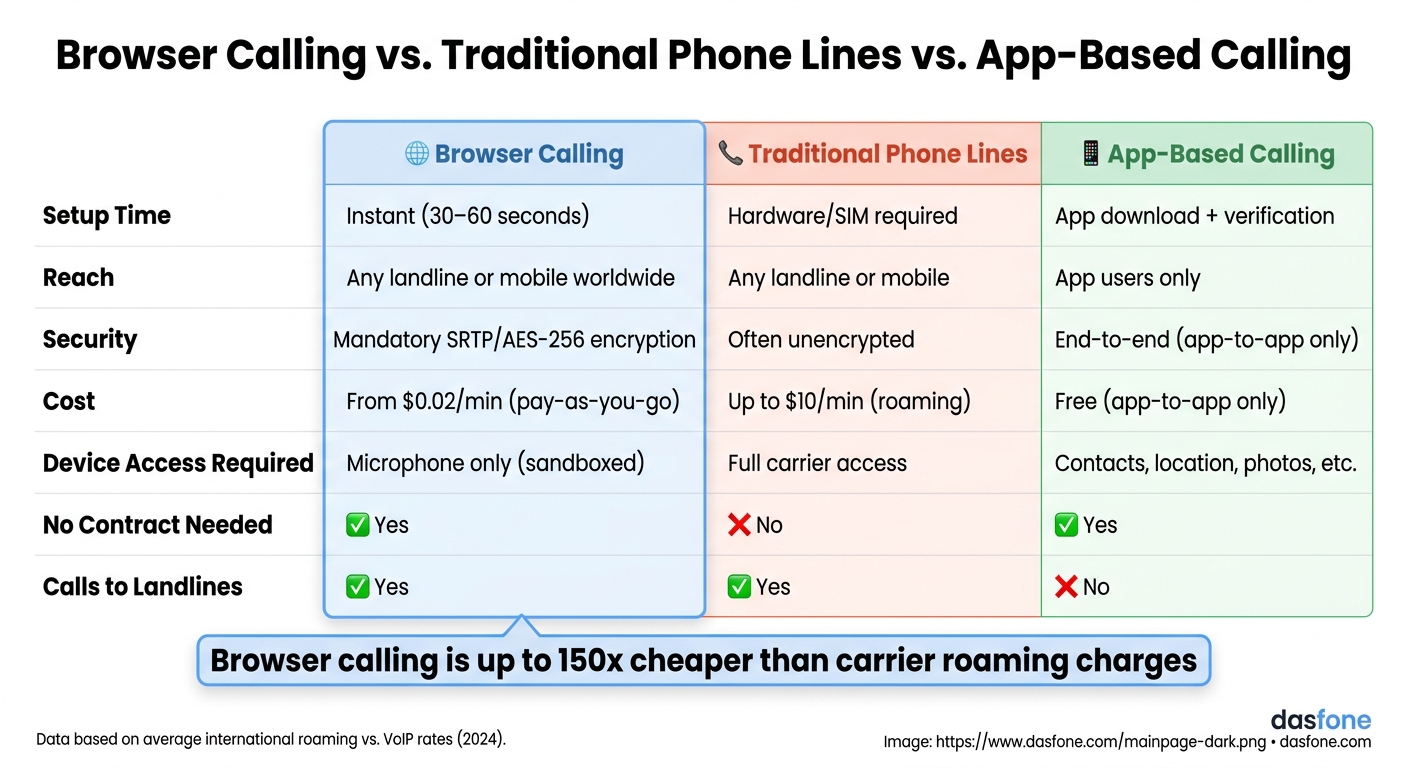
With improved call quality and strong security, browser calling stands out as an accessible, cost-effective alternative to traditional methods. For example, international roaming on traditional phone lines can cost up to $10 per minute [4]. While app-based calling is free, it only works if both parties use the same app, making it impractical for contacting offices, banks, or landlines. Browser calling bridges this gap, allowing you to reach any number worldwide for as little as $0.02 per minute [4], with setup taking just 30–60 seconds and no downloads required.
| Feature | Browser Calling | Traditional Phone Lines | App-Based Calling |
|---|---|---|---|
| Setup | Instant (30–60 seconds) | Hardware/SIM required | App download + verification |
| Reach | Any landline or mobile | Any landline or mobile | App users only |
| Security | Mandatory SRTP encryption | Often unencrypted | End-to-end (app-to-app only) |
| Cost | Low (pay-as-you-go) | High (roaming/contracts) | Free (app-to-app only) |
For businesses handling high call volumes, advanced browser calling platforms also include features like shared account balances, real-time call logs, and call recording. These tools make browser calling an efficient option for professional use without the complexities of traditional phone systems [1][2].
Conclusion and Key Takeaways
Browser calling offers a straightforward and affordable way to make international calls - no need for downloads, contracts, or worrying about surprise roaming charges. Setting it up is quick, taking just 30–60 seconds, and it allows you to reach any landline or mobile number worldwide. With voice data protected by SRTP/DTLS encryption and rates starting as low as $0.02 per minute, it’s an efficient solution. For businesses, the shared balance system ensures you only pay for the minutes used, completely eliminating per-seat licensing fees [5][2]. These features create a smooth and hassle-free experience on Dasfone.
Dasfone caters to anyone needing to call real phone numbers internationally - whether it’s an expat contacting a bank, a business running outbound campaigns, or a student handling paperwork abroad. New users can take advantage of a $2 bonus credit (equivalent to up to 100 free minutes) and get 25% off their first top-up with the code DF25 (minimum $5 required).
FAQs
Will my calls work behind hotel or office Wi‑Fi firewalls?
Yes, your calls will work. Dasfone relies on STUN and TURN servers combined with ICE protocols to handle firewalls and complex networks. This setup ensures stable connections even when dealing with network address translators (NATs) or strict security settings - no special IT adjustments needed.
How do I fix echo, choppy audio, or one-way sound in the browser?
If you're dealing with problems like echo, choppy sound, or one-way audio, here are a few tips to get things back on track:
- Check your internet connection: A stable broadband connection, such as high-speed Wi-Fi or cable, is essential for clear audio.
- Use a dedicated USB headset: Opt for a headset with noise-canceling features to improve sound quality and reduce background noise.
- Restart your browser: Sometimes, a quick browser restart can fix temporary glitches that might be causing audio issues.
- Keep your browser updated: An up-to-date browser ensures better performance and security, which can help prevent audio problems.
These simple steps can make a big difference in resolving audio troubles.
Can I use my own number as caller ID, and how is it verified?
Absolutely! With Dasfone, you can set your mobile or landline number as your caller ID. Here's how it works:
- Link your number to your Dasfone account.
- Verify it by entering a six-digit code sent to you via text or voice call.
Prefer not to use your own number? No problem. You can also purchase a dedicated virtual number through Dasfone.
Using a verified number ensures your calls appear professional and familiar to the people you’re contacting.
Related Articles
Ready to Make International Calls?
Try dasfone today and make your first international call in seconds. No app download, no subscription—just instant, affordable calling from your browser.
Start Calling Now